lab10
Lab 10-1
Does this program make any direct changes to the registry? (Use procmon to check.)
Although the Process Monitor (Procmon) output primarily displayed RegQuery and RegOpen operations, which may initially suggest passive behavior, the Regshot comparison proves that Lab10-01.exe successfully modified the system configuration. This discrepancy is a common indicator that the malware is utilizing high-level Windows APIs (such as CreateService) or interacting with the Service Control Manager (SCM). In such cases, the malware process itself only “queries” or “opens” keys to verify state, while the actual “write” operations are executed by a legitimate system process (like services.exe) on its behalf, effectively masking its direct footprint in Procmon.
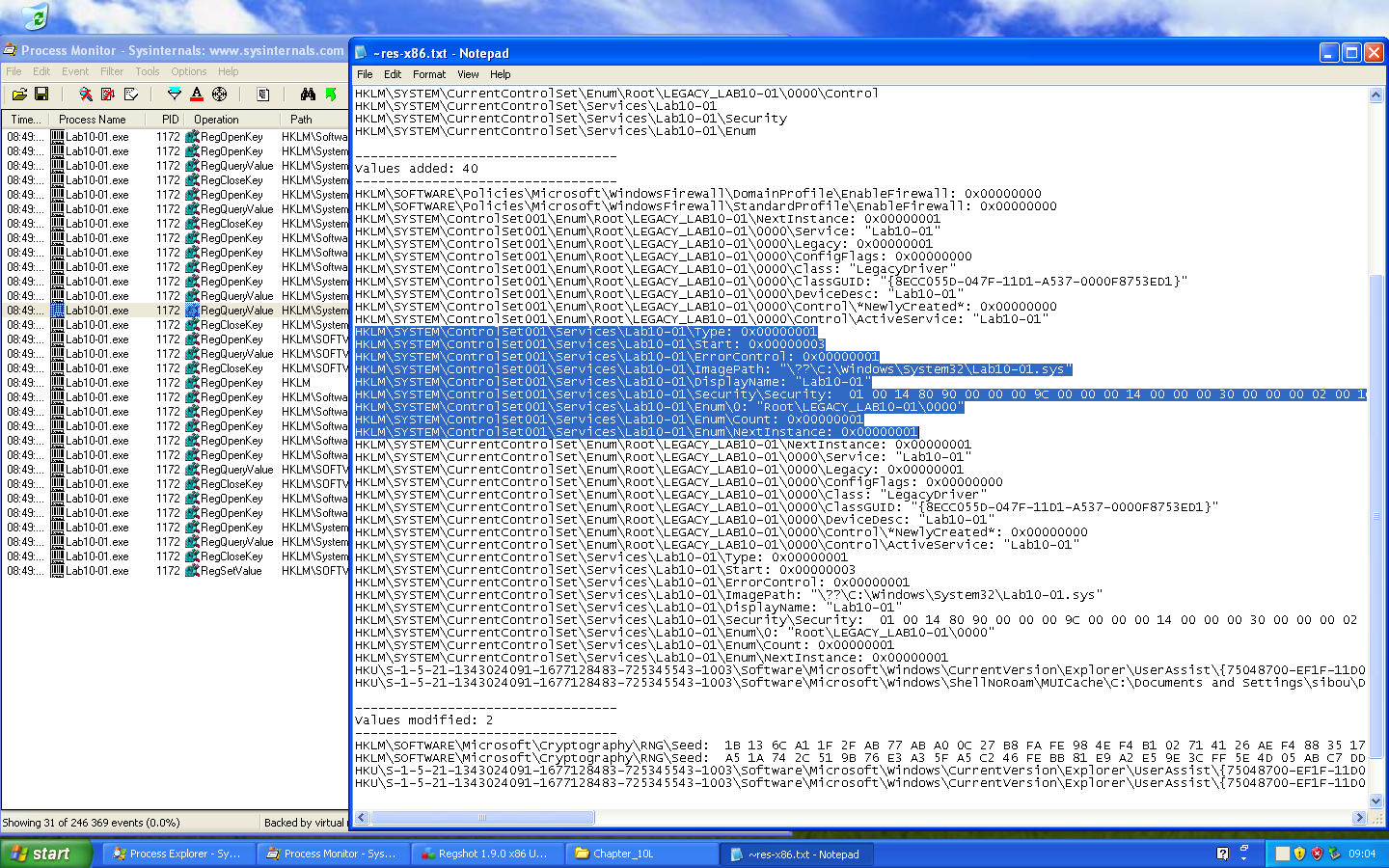
The most immediate malicious action identified is the disabling of system security features. Regshot detected the addition of keys under HKLM\SOFTWARE\Policies\Microsoft\WindowsFirewall, specifically setting EnableFirewall to 0x00000000 for both the Domain and Standard profiles. By modifying these specific policy keys rather than just the standard service settings, the malware ensures that the Windows Firewall is suppressed at a policy level. This “Defense Evasion” technique (MITRE ATT&CK T1562.004) prevents the system from blocking unauthorized inbound or outbound connections, clearing the way for further malicious network activity or Command & Control (C2) communication.
The analysis further revealed a critical persistence mechanism through the installation of a new kernel-mode service named Lab10-01. The registry entries under HKLM\SYSTEM\CurrentControlSet\Services\Lab10-01 show a Type value of 0x00000001, which identifies this as a Kernel Device Driver rather than a standard user-mode application. The ImagePath points to a driver file located at C:\Windows\System32\Lab10-01.sys. By establishing itself as a service with a Start value of 0x00000003 (Load on Demand), the malware gains the ability to execute code with the highest possible system privileges (Ring 0), allowing it to intercept system calls, hide files, or bypass security software at the kernel level.
The user-space program calls the ControlService function. Can you set a breakpoint with WinDbg to see what is executed in the kernel as a result of the call to ControlService?
Analysis in IDA Pro reveals that the user-mode executable Lab10-01.exe calls ControlService at the end of its execution. According to the Windows API documentation, this function sends a control code to a service. In this specific case, the Control parameter is set to 1, which corresponds to the constant SERVICE_CONTROL_STOP.
This command tells the Service Control Manager (SCM) to stop the driver and unload it from kernel memory.
The challenge here is timing. Because the driver unloads immediately after the ControlService call, simply running the program and trying to find the module later with lm m Lab* will fail, the module will already be gone.
To capture the kernel-mode execution, we use a two-steps approach:
- User-Mode Debugger (OllyDbg): We run the executable inside the VM and pause it exactly at the instruction before the ControlService call. This gives us “breathing room” while the driver is still active in memory.
- Kernel-Mode Debugger (WinDbg): While the VM is frozen by the user-mode debugger, we use WinDbg from our host to inspect the driver’s memory. We locate the Unload Routine using !drvobj Lab10-01 2, set a breakpoint at the DriverUnload address, and then resume execution.

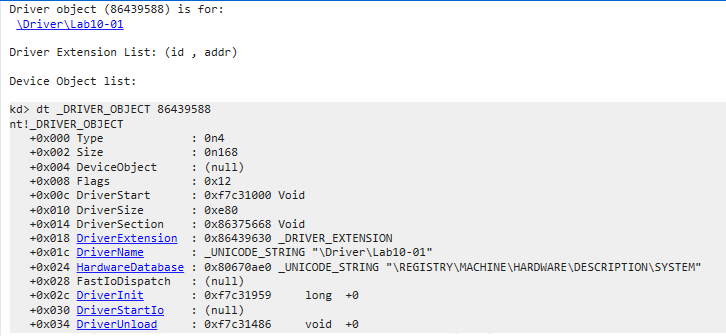
Once the breakpoint is hit, we find ourselves inside the driver’s cleanup code. We unassemble the first block of instructions to see how it prepares for its task:
kd> u . L40
Lab10_01+0x486:
f7c31486 8bff            mov     edi,edi
f7c31488 55              push    ebp
f7c31489 8bec            mov     ebp,esp
f7c3148b 51              push    ecx
f7c3148c 53              push    ebx
f7c3148d 56              push    esi
f7c3148e 8b358017c3f7    mov     esi,dword ptr [Lab10_01+0x780 (f7c31780)]
f7c31494 57              push    edi
f7c31495 33ff            xor     edi,edi
f7c31497 68bc16c3f7      push    offset Lab10_01+0x6bc (f7c316bc)
f7c3149c 57              push    edi
f7c3149d 897dfc          mov     dword ptr [ebp-4],edi
f7c314a0 ffd6            call    esi
To identify the function pointer loaded into esi, we use dps to resolve the symbol. We also use du to decode the Unicode strings being pushed as parameters.
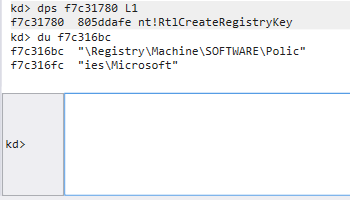
The call at f7c314a0 is to nt!RtlCreateRegistryKey. The malware is ensuring that the following registry path exists: \Registry\Machine\SOFTWARE\Policies\Microsoft
f7c314a2 684016c3f7      push    offset Lab10_01+0x640 (f7c31640)
f7c314a7 57              push    edi
f7c314a8 ffd6            call    esi
f7c314aa 68a815c3f7      push    offset Lab10_01+0x5a8 (f7c315a8)
f7c314af 57              push    edi
f7c314b0 ffd6            call    esi
f7c314b2 bb0c15c3f7      mov     ebx,offset Lab10_01+0x50c (f7c3150c)
f7c314b7 53              push    ebx
f7c314b8 57              push    edi
f7c314b9 ffd6            call    esi
By inspecting the memory addresses pushed before each call, we see the full path being constructed:
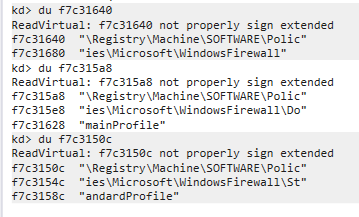
The multiple calls to RtlCreateRegistryKey is because, in older versions of Windows (like XP), the Write function would fail if the subkeys didn’t already exist. The malware is being “thorough” by building the path itself.
f7c314bb 8b358817c3f7    mov     esi,dword ptr [Lab10_01+0x788 (f7c31788)]
f7c314c1 6a04            push    4
f7c314c3 8d45fc          lea     eax,[ebp-4]
f7c314c6 50              push    eax
f7c314c7 6a04            push    4
f7c314c9 bfee14c3f7      mov     edi,offset Lab10_01+0x4ee (f7c314ee)
f7c314ce 57              push    edi
f7c314cf 68a815c3f7      push    offset Lab10_01+0x5a8 (f7c315a8)
f7c314d4 6a00            push    0
f7c314d6 ffd6            call    esi
f7c314d8 6a04            push    4
f7c314da 8d45fc          lea     eax,[ebp-4]
f7c314dd 50              push    eax
f7c314de 6a04            push    4
f7c314e0 57              push    edi
f7c314e1 53              push    ebx
f7c314e2 6a00            push    0
f7c314e4 ffd6            call    esi
After the keys are created, the malware changes its objective. It loads a new function pointer into esi at f7c314bb. By resolving the pointer at f7c31788, we confirm the function is nt!RtlWriteRegistryValue.
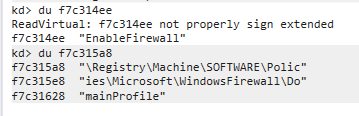
The malware prepares a DWORD value of 0 (seen in the local variable initialization) and writes it to the EnableFirewall value name within both the DomainProfile and StandardProfile keys.
What does this program do?
This driver acts as a “silent closer.” While the user-mode program might appear to just be starting and stopping a service, the kernel-mode driver uses its high-privilege access to:
- Bypass Permissions: Modifying Policies registry keys often requires SYSTEM privileges, which the driver possesses. It specifically targets the Policies subkeys, which often override local user settings in the Windows UI.
- Stealth: By performing these actions during the Unload routine, the malware ensures that by the time an administrator notices the firewall is down, the malicious driver has already removed itself from the loaded modules list.
The malware is a security-disabler. Its sole purpose is to “blind” the infected host by turning off the native firewall, likely as a first-stage maneuver to allow a second-stage payload (like a RAT or Backdoor) to communicate with a Command & Control (C2) server without being blocked or logged.
The most significant finding is that the malicious logic is placed inside the DriverUnload routine rather than the DriverEntry.
- Detection Evasion: Most EDR (Endpoint Detection and Response) and AV tools monitor drivers when they are loaded. By staying dormant during the “Start” phase and only triggering the registry changes during the “Stop” phase, the malware minimizes its active footprint.
- Anti-Forensics: By the time the Windows Firewall service reacts to the registry change and shuts down, the malicious driver has already been unmapped from memory. An administrator looking at the lm (list modules) output in a debugger or checking Task Manager will see no trace of the malicious driver.
Lab 10-2
Does this program create any files? If so, what are they? Does this program have a kernel component?
Initial observation via Process Monitor confirms that the malware drops a new file into the System32 directory.
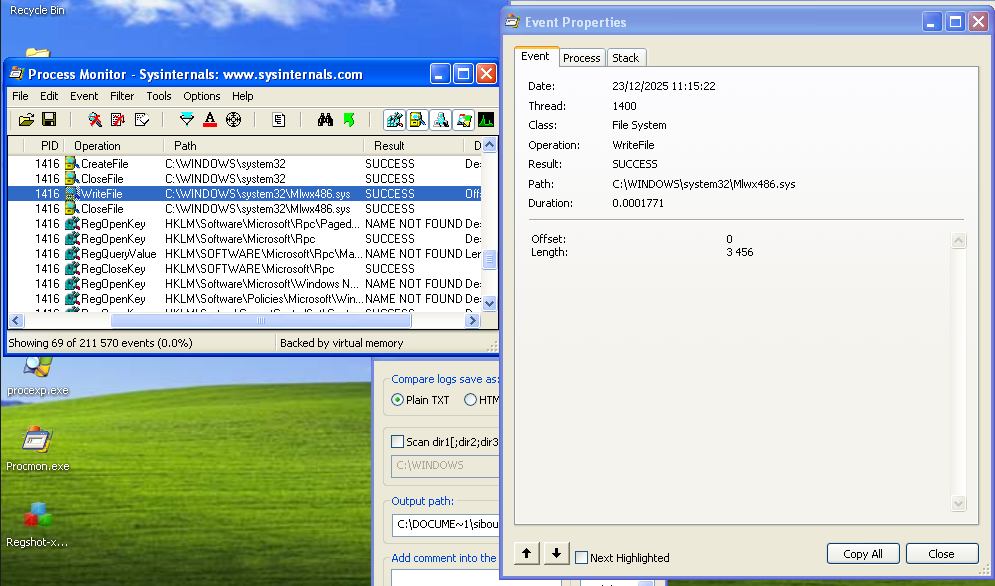
Mlwx486.sys is the kernel-mode component of this threat. Its presence indicates a classic “Loader-Driver” architecture: the user-mode executable acts as an installer that extracts the driver, loads it into the kernel, and then terminates. Analysis of Regshot provides the “Paper Trail” for the driver’s installation:
HKLM\SYSTEM\ControlSet001\Enum\Root\LEGACY_486_WS_DRIVER\NextInstance: 0x00000001
HKLM\SYSTEM\ControlSet001\Enum\Root\LEGACY_486_WS_DRIVER\0000\Service: "486 WS Driver"
The service “486 WS Driver” is registered as a legacy driver. Interestingly, the malware does not perform direct registry writes; instead, it utilizes legitimate Windows APIs like CreateServiceA and StartServiceA to delegate the “dirty work” to the OS itself.
A significant anomaly was observed during file system verification:
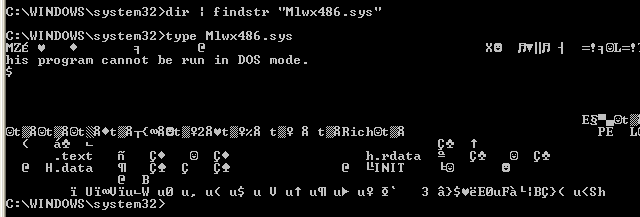
Standard directory enumeration (dir or Windows Explorer) fails to show the file. However, attempting to access the file directly via the type command succeeds. This behaviour points at a Rootkit, although further analysis should confirm this.
We should mention that you can extract the sys file using binwalk on the exe file since it is hidden inside its resources section:
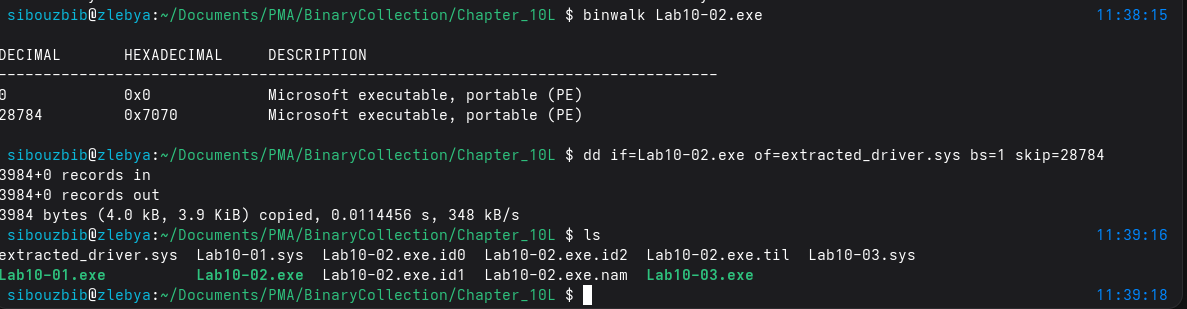
What does this program do?
To uncover the mechanism of this stealth, we transition to Kernel Debugging (WinDbg). Upon loading the modules we find our first roadblock:

The lm command fails to show Mlwx486.sys, even though we know the service “486 WS Driver” is running.
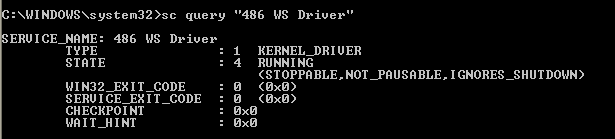
The lm command failed to list the driver because the malware is employing a rootkit technique known as Direct Kernel Object Manipulation (DKOM) to hide its presence. While the Service Control Manager (sc) tracks the driver via the registry, WinDbg’s lm command works by traversing the PsLoadedModuleList, which is a doubly-linked list of LDR_DATA_TABLE_ENTRY structures that the kernel uses to keep track of loaded modules. By modifying the Flink (Forward Link) and Blink (Backward Link) pointers of the neighboring entries in this list, the malware “unlinks” itself. This leaves the driver’s code active and fully functional in memory, but renders it invisible to any standard enumeration tool that relies on walking that specific list.
Even if it’s unlinked from the module list, the Driver Object usually still exists in the Object Manager’s namespace.
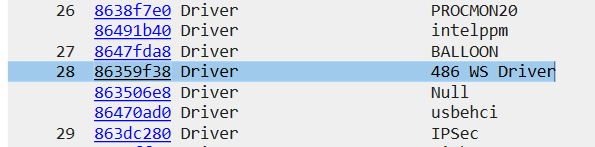
Listing its driver object first, We found its entry point at f7c037ab. Searching the System Service Descriptor Table (SSDT) reveals a hijacked entry.
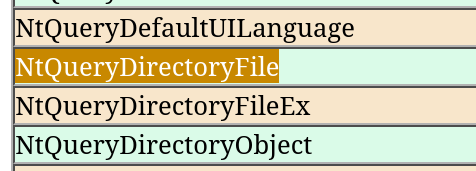
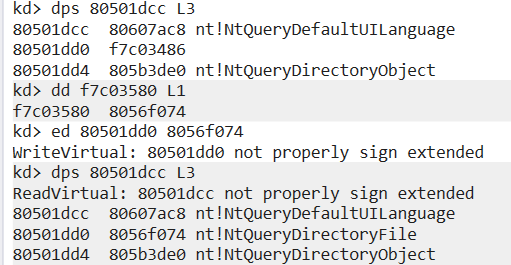
A quick way to check what function got “hooked”, is checking whats its index in the SSDT, and instead of making a full calculation, I chose a lazier approach. Since SSDT entries are fixed, I checked what entry was before and after the hooked entry using dps 80501dcc L3, and it was sandwiched between NtSystemDebugControl and NtQueryDefaultUILanguage. Using an online reference (like “https://j00ru.vexillium.org/syscalls/nt/32/”), we find out the entry replaced was NtQueryDirectoryFile which makes total sense.

As a next step, lets take a look at this new function and disassemble it. First the function takes the stack parameters and makes a function call for f7c03514 address.which is a wrapper that executes the original kernel function.
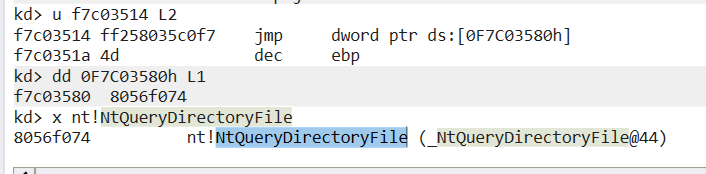
f7c034b6 837d2403        cmp     dword ptr [ebp+24h],3
f7c034ba 894530          mov     dword ptr [ebp+30h],eax
f7c034bd 7546            jne     f7c03505
f7c034bf 85c0            test    eax,eax
f7c034c1 7c42            jl      f7c03505
The rootkit specifically targets FileInformationClass index 3 (FileDirectoryInformation), which is the structure used by Explorer and the dir command.
Next, the rootkit enters a loop, walking through the returned file list. It uses a string comparison (identified as _strnicmp at 80541ea0) to check filenames
f7c034ca 6a08            push    8
f7c034cc 681a35c0f7      push    0F7C0351Ah
f7c034d1 8d465e          lea     eax,[esi+5Eh]
f7c034d4 50              push    eax
f7c034d5 32db            xor     bl,bl
f7c034d7 ff159035c0f7    call    dword ptr ds:[0F7C03590h]
The values compared are the numbers of bytes of the filename to be compared (8), and a certain value stored at 0F7C03590h, which contains the string: “Mlwx”. If a match is found, the rootkit modifies the NextEntryOffset of the previous file in the list to point to the file after the malware. It “jumps” over itself.
Fixing the system requires restoring the integrity of the SSDT. We retrieved the original address of NtQueryDirectoryFile (8056f074) which the rootkit had “saved” in its own memory at f7c03580 to use for its trampoline.
Since we know the original function’s offset, and the patched entry, a single command is enough: ed 80501dd0 8056f074
And effectively querying the system32 directory and looking for the file works just fine even tho the driver is still running:
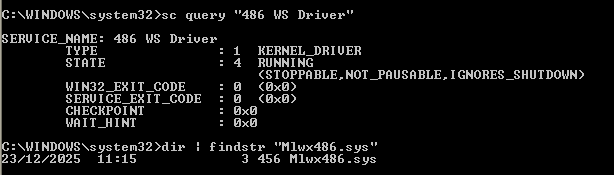
This malware is a kernel-mode rootkit that employs both DKOM to hide its presence from the module list and SSDT Hooking to hide its file from the user. By restoring the SSDT, we successfully bypassed its stealth mechanism without needing to stop the driver.
Lab 10-3
What does this program do? Once this program is running, how do you stop it?
Running the EXE after placing the SYS file inside the system32 directory results in an immediate browser popup requesting an advertisement HTML page.
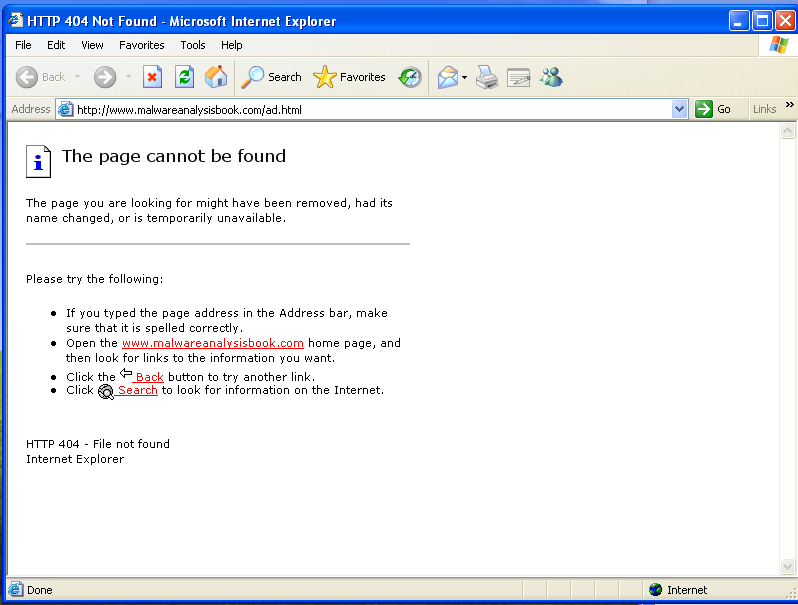
Checking the Regshot comparison, the most critical change is the registration of a new kernel driver with the Service Name “Process Helper.” While analyzing the rest of the artifacts, the ad popped up again. This prompted me to check Process Explorer for the Lab10-03.exe process or any signs of process hollowing, but I found nothing. The malware was successfully hidden using the rootkit component, which we will analyze shortly.
As a notable observation, the IEXPLORE.EXE process remained running even after the ad was closed. I found that killing IEXPLORE.EXE manually caused the ads to stop appearing. This likely indicates a specific behavior or bug in the malware that made getting rid of it this easy.
To start the deep dive, I reversed the EXE in IDA. After the standard driver installation code, the EXE communicates with the driver using the typical CreateFile/DeviceIoControl pattern:
loc_40108C:
lea     ecx, [esp+2Ch+BytesReturned]
push    0               ; lpOverlapped
push    ecx             ; lpBytesReturned
push    0               ; nOutBufferSize
push    0               ; lpOutBuffer
push    0               ; nInBufferSize
push    0               ; lpInBuffer
push    0ABCDEF01h      ; dwIoControlCode
push    eax             ; hDevice
call    ds:DeviceIoControl
In this call, the input and output buffer sizes are both set to 0. This indicates the EXE is simply triggering the control code 0xABCDEF01 (which looks like a garbage value) as a signal to the driver, without passing or expecting data buffers.
The rest of the code shows the malware using COM (Component Object Model) to hijack Internet Explorer. It initializes the interface by calling CoCreateInstance with the Class ID for IWebBrowser2. It then prepares the advertisement URL and enters an infinite loop. Every 30 seconds, it calls the object to pop up the ad. Even though the program is in a persistent infinite loop, it remains invisible in Task Manager and Process Explorer. All signs point to the driver installed at the start, so we analyze that next.
Why did killing iexplorer.exe suffice? Well the COM server was probably destroyed while the “Boss” process (Lab10-03.exe) was potentially waiting for a response or held an open handle to that specific process. When the loop restarts 30 seconds later and tries to call Maps on a browser object that was already nuked, the malware hits an Access Violation and dies.
What does the kernel component do?
Using WinDbg attached to the victim’s kernel, I queried the driver object for “Process Helper” after locating its address:
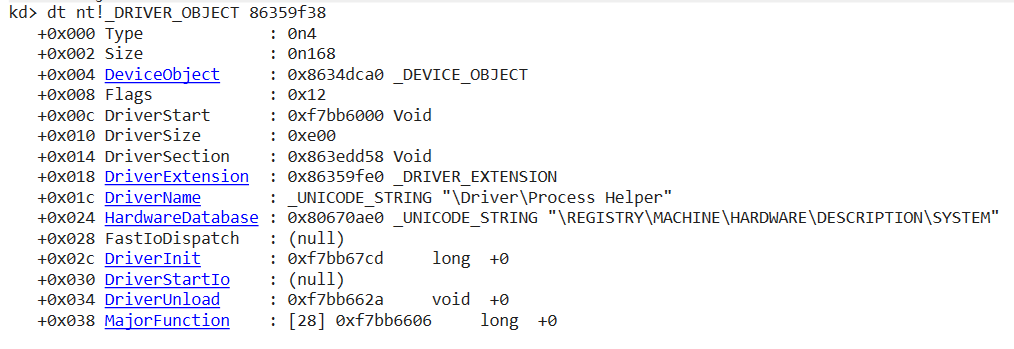
We are specifically interested in the MajorFunction table. Checking the offsets, we see that the driver only supports IRP_MJ_CREATE (Index 0), IRP_MJ_CLOSE (Index 1), and IRP_MJ_DEVICE_CONTROL (Index 14). All other indexes point to _IopInvalidDeviceRequest
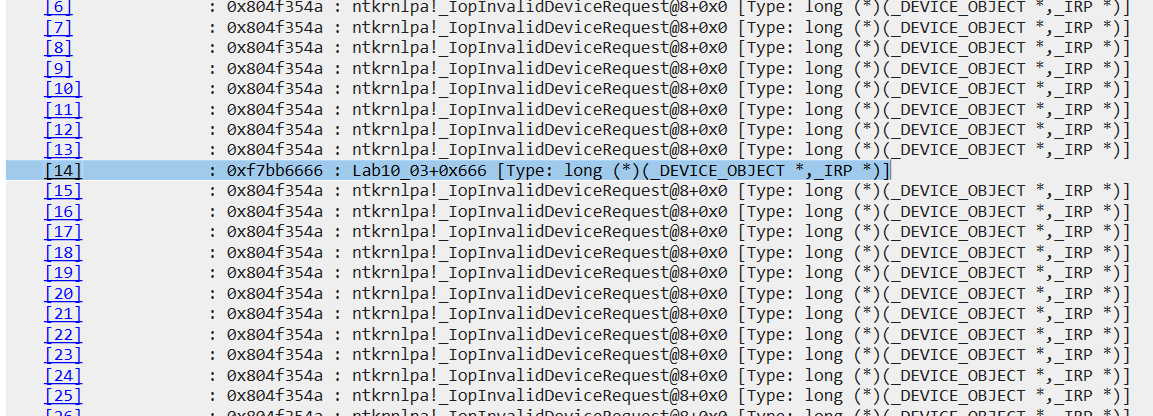
Both the Create and Close routines point to the same simple Dispatch Routine. Because the driver is primarily a tool to hide the malware, it doesn’t need complex logic for opening or closing handles; it just needs to respond successfully so the EXE can move forward.
The core logic is inside the DeviceIoControl handler at 0xf7bb6666. It first makes a call to a small helper function at 804ee608:
804ee608 64a124010000    mov     eax,dword ptr fs:[00000124h]
804ee60e 8b4044          mov     eax,dword ptr [eax+44h]
804ee611 c3              ret
The driver basically performs a “background check” on whoever is calling it by reaching into the processor’s own internal bookkeeping. The first instruction looks at a special hardware location called the FS segment register, which always points to the data area for the current processor. At the specific offset of 124h, the kernel keeps a pointer to the KTHREAD, the data structure representing the specific “worker” thread currently running on the CPU.
Since this thread belongs to the malware EXE that just asked to be hidden, the second instruction, simply follows a shortcut inside that thread’s own records. At offset 44h, there is a direct pointer to the EPROCESS structure, which is the kernel’s master “identity card” for the entire process. By the end of these two steps, the driver has successfully identified the caller and moved the address of the malware’s process record into the eax register, giving it the exact target it needs for the task of making the process invisible.
f7bb6671 8b888c000000    mov     ecx,dword ptr [eax+8Ch]
f7bb6677 0588000000      add     eax,88h
f7bb667c 8b10            mov     edx,dword ptr [eax]
f7bb667e 8911            mov     dword ptr [ecx],edx
f7bb6680 8b08            mov     ecx,dword ptr [eax]
f7bb6682 8b4004          mov     eax,dword ptr [eax+4]
f7bb6685 894104          mov     dword ptr [ecx+4],eax
f7bb6688 8b4d0c          mov     ecx,dword ptr [ebp+0Ch]
In the Windows XP kernel, every process is part of a giant chain called ActiveProcessLinks located at offset 0x88 inside the EPROCESS structure. This chain uses two-way pointers: a Flink (Forward) at +0x88 and a Blink (Backward) at +0x8C. By reading the value at 8Ch, the driver is grabbing the address of the process that comes right before the malware and saving it in ecx. Inside edx, its storing the value at 88h which is indeed the process that comes right after it. The rest of the operations simply access both those processes and make them point to each other, basically unlinking the caller process from the chain.
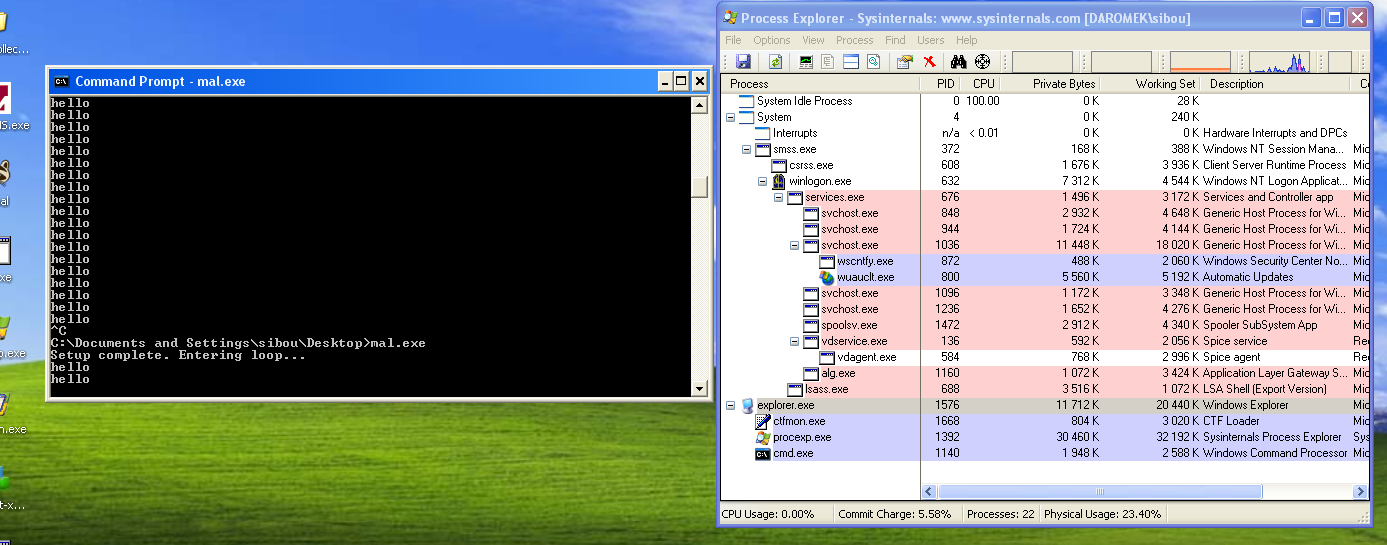
This explains now why the process was not visible in proc explorer or task manager. Since the exe made a call for the driver’s DeviceIoControl, the driver checked which processes preceded and came after it and made them skip the caller so any basic process explorer that relied on the EPROCESS structure would skip and not detect it.
This driver is essentially a “generic” rootkit component. Any process that calls this IOCTL will be unlinked and hidden. To verify this, I wrote a simple C program to connect to the driver using the same parameters and enter an infinite loop printing “hello.”
mov     dword ptr [esp+18h], 0 ; hTemplateFile
mov     dword ptr [esp+14h], 80h ; dwFlagsAndAttributes
mov     dword ptr [esp+10h], 3 ; dwCreationDisposition
mov     dword ptr [esp+0Ch], 0 ; lpSecurityAttributes
mov     dword ptr [esp+8], 0 ; dwShareMode
mov     dword ptr [esp+4], 0C0000000h ; dwDesiredAccess
mov     dword ptr [esp], offset FileName ; "\\\\.\\ProcHelper"
call    _CreateFileA@28 ; CreateFileA(x,x,x,x,x,x,x)
sub     esp, 1Ch
mov     [ebp+hDevice], eax
cmp     [ebp+hDevice], 0FFFFFFFFh
mov     [ebp+BytesReturned], 0
mov     dword ptr [esp+1Ch], 0 ; lpOverlapped
lea     eax, [ebp+BytesReturned]
mov     [esp+18h], eax  ; lpBytesReturned
mov     dword ptr [esp+14h], 0 ; nOutBufferSize
mov     dword ptr [esp+10h], 0 ; lpOutBuffer
mov     dword ptr [esp+0Ch], 0 ; nInBufferSize
mov     dword ptr [esp+8], 0 ; lpInBuffer
mov     dword ptr [esp+4], 0ABCDEF01h ; dwIoControlCode
mov     eax, [ebp+hDevice]
mov     [esp], eax      ; hDevice
call    _DeviceIoControl@32 ; DeviceIoControl(x,x,x,x,x,x,x,x)
sub     esp, 20h
mov     [ebp+var_10], eax
mov     dword ptr [esp], 0 ; pvReserved
call    _OleInitialize@4 ; OleInitialize(x)
sub     esp, 4
mov     [ebp+var_14], eax
cmp     [ebp+var_14], 0
jns     short loc_401565
After “hiding” itself it’ll enter a n infinite loop, sustaining its process in theory, yet, process explorer isn’t discovering it.