lab3
Lab 3-1
What are this malware’s imports and strings?
Running manalyze on the sample shows only a single imported function:
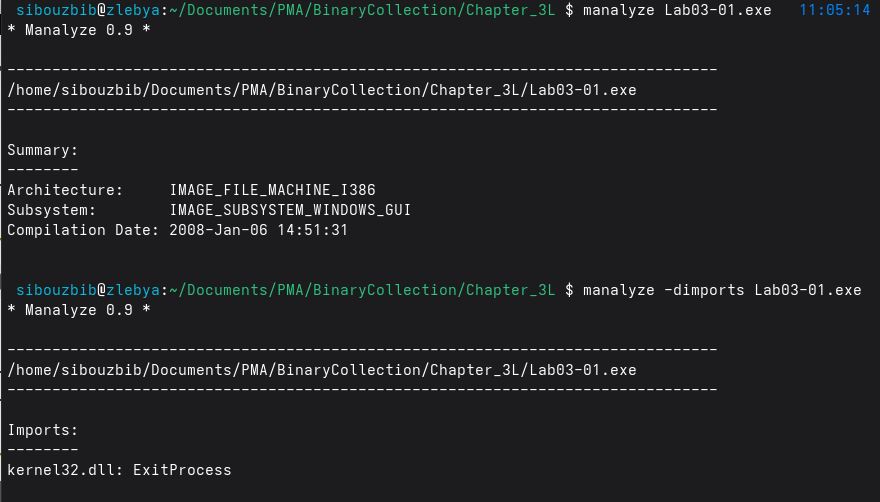
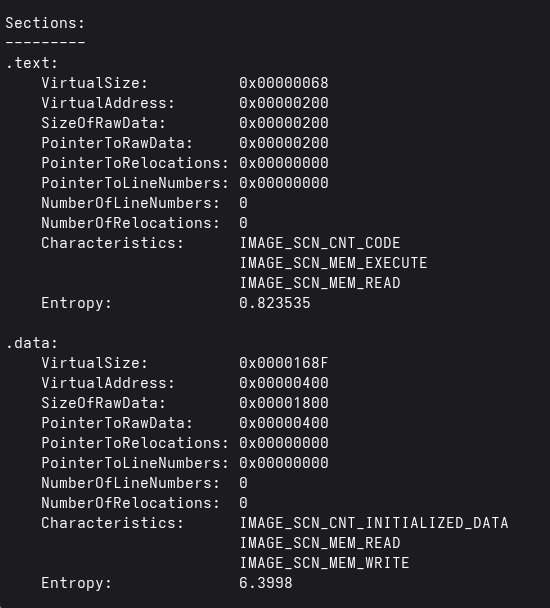
At first glance, seeing a PE file with almost no imports might suggest that the malware is packed or heavily obfuscated. However, that assumption quickly falls apart when examining the file’s contents. The .text and .data sections still exist and have reasonable sizes, and nothing in the strings output points toward UPX or any other common packer. Instead, the absence of imports is intentional: this malware is using runtime API resolution rather than static linking.
The strings output strongly supports this. We see the names of DLLs such as ws2_32, advapi32, ntdll, and user32, none of which appear in the import table. This is a hallmark of runtime linking, where malware calls LoadLibraryA and GetProcAddress (or even manually walks the PEB) to dynamically resolve functions at runtime. This avoids detection by static analysis tools and prevents analysts from easily knowing which APIs are used.
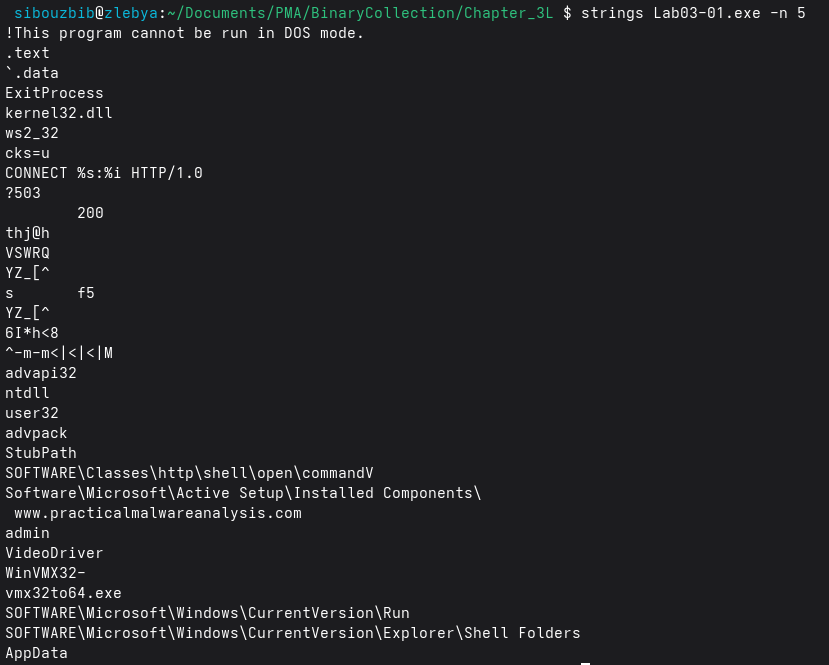
The strings also reveal clear evidence of network functionality, including:
- CONNECT %s:%i HTTP/1.0
- http://www.practicalmalwareanalysis.com
This strongly implies that the malware initiates outbound HTTP connections, likely contacting a command-and-control (C2) server. Even though ws2_32 is not listed in the imports, its presence in the strings means the malware probably loads networking functions dynamically.
Additional strings point toward persistence and system modification:
- SOFTWARE\Microsoft\Windows\CurrentVersion\Run
- Software\Microsoft\Active Setup\Installed Components
- SOFTWARE\Classes\http\shell\open\command
Several filesystem-related strings also appear:
- VideoDriver
- WinVMX32
- vmx32to64.exe
- AppData
These suggest the malware may drop or rename executables, possibly staging additional payloads under disguise (for example, masquerading as a video driver or virtualization component).
What are the malware’s host‑based indicators?
For this analysis, I executed the sample on my Windows XP VM and observed its behavior using ProcMon, Process Explorer, and Regshot. Despite the static import table showing only kernel32.dll, Process Explorer’s lower pane reveals a long list of dynamically loaded DLLs.
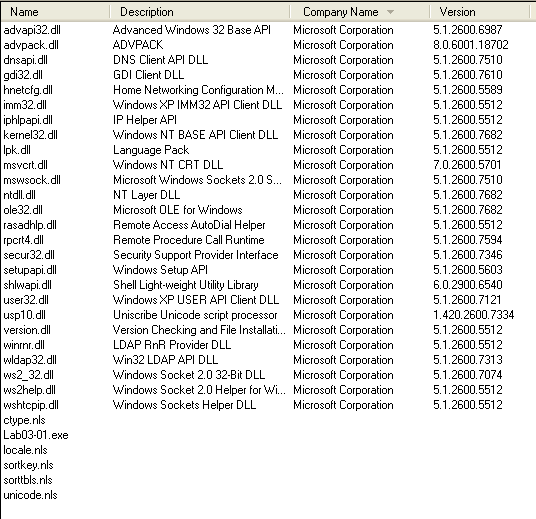
The most notable ones relate to networking, system configuration, and persistence. advapi32.dll is especially important because it provides access to registry and service‑management functions, common mechanisms for establishing persistence or escalating privileges. A cluster of network‑related DLLs, dnsapi.dll, iphlpapi.dll, mswsock.dll, wldap32.dll, and hnetcfg.dll, indicate that the malware performs DNS resolution, enumerates network interfaces, uses Winsock extensions, and may interact with LDAP or local firewall settings. These strongly suggest C2 communication, host reconnaissance, or potential lateral‑movement capabilities. setupapi.dll and rasadhlp.dll are also noteworthy, as they can be used for system‑level installation tasks or network configuration assistance.
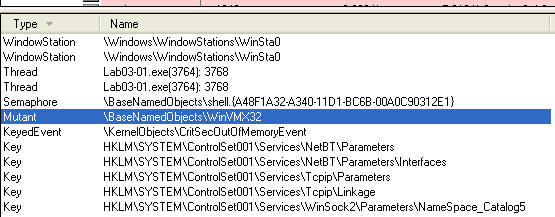 Process Explorer also shows a new mutant name under the handles view: \BaseNamedObjects\WinVMX32, which the malware likely uses for mutex‑based instance control or stealth.
 Regshot provides a clearer host‑based indicator: a new registry value under
HKLM\SOFTWARE\Microsoft\Windows\CurrentVersion\Run.
The added entry, VideoDriver, contains the hex‑encoded (UTF‑16LE) path: C:\WINDOWS\system32\vmx32to64.exe
This reveals two things: the malware copies itself into system32 under a name that looks benign, and it disguises its persistence mechanism under a harmless‑looking key (“VideoDriver”).
ProcMon confirms this behavior. Filtering events to only those generated by Lab03‑01.exe shows a file write of 7178 bytes into the system32 directory, the same size as the original binary, indicating that the malware drops a copy of itself. The subsequent registry write to the VideoDriver key completes its persistence mechanism.
Are there any useful network‑based signatures for this malware? If so, what are they?
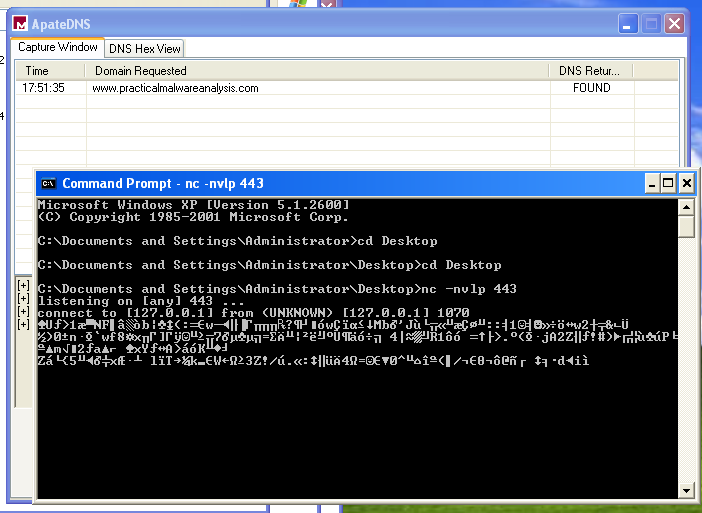
To analyze the malware’s network behavior, I used ApateDNS to redirect all DNS queries to my local analysis machine and listened on port 443 with nc. The sample attempts to resolve and contact: www.practicalmalwareanalysis.com
Once redirected, the malware establishes an outbound connection to port 443 and immediately begins sending fixed‑size 256‑byte packets at regular intervals. When captured, these packets appear as high‑entropy, structureless binary data, with no readable strings, headers, or protocol framing. This strongly suggests that the traffic is encrypted or obfuscated C2 beacon data, rather than real HTTPS.
Lab03-02
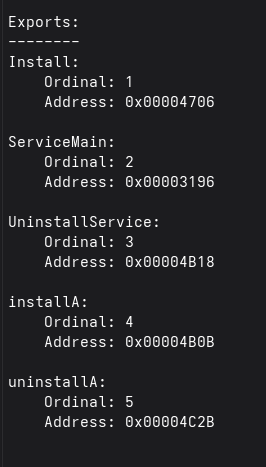 First Let’s statically analyse the malware. Checking its exports, we see that the dll installs itself as a service, as evident by the functions InstallA and ServiceMain.
From the import list too, we can make several observations: The ADVAPI32 functions, especially OpenSCManagerA, CreateServiceA, OpenServiceA, and DeleteService, show that the malware can install, modify, or remove a Windows service, meaning it likely persists by creating its own service entry. The WS2_32 and WININET imports (such as connect, WSASocketA, send, recv, InternetOpenA, and HttpOpenRequestA) reveal that it supports both raw socket communications and HTTP-based communication, strongly suggesting command‑and‑control or data exfiltration capabilities. Combined with functions like CreateProcessA, CreateThread, and pipe‑related imports, this sample is almost certainly designed for remote command execution and background service‑level persistence, making it a fully interactive backdoor rather than a simple dropper.
 Strings output also hint at a network communication through HTTP, and it also contains base64 obfuscated commands.
Before installing we boot up regshot to see where it is installing and the service name.
\WINDOWS\system32\rundll32.exe Lab03-02.dll,installA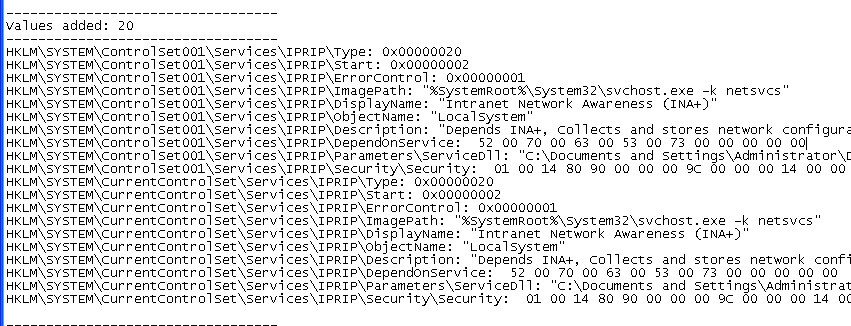
The regshot comparaison displays multiple added keys and values. HKLM\SYSTEM\ControlSet001\Services\IPRIP and HKLM\SYSTEM\CurrentControlSet\Services\IPRIP are added to the registry with both paramaters and security under them.
It creates a new service named IPRIP, which is normally a legitimate system component, but replaces it with a malicious configuration. The service is given a deceptive display name, “Intranet Network Awareness (INA+)”, and a legitimate‑sounding description to avoid raising suspicion.
Instead of pointing to a normal Windows DLL, the service’s ServiceDll value is set to the attacker‑controlled file: Lab03‑02.dll.
HKLM\SYSTEM\ControlSet001\Services\IPRIP\Parameters\ServiceDll: "C:\Documents and Settings\Administrator\Desktop\BinaryCollection\Chapter_3L\Lab03-02.dll"This DLL will then be loaded by svchost.exe -k netsvcs, a common technique malware uses to blend into normal system activity. The service runs under LocalSystem, meaning the malicious DLL executes with the highest possible privileges.
The service startup type is set to Automatic, ensuring the malware loads on every reboot. The presence of matching entries under ControlSet001 and CurrentControlSet confirms the change is persistent across system restore contexts.
Before starting the service, we boot up our usual monitoring tools, and set nc to listen on port 80 since we saw the HTTP string.
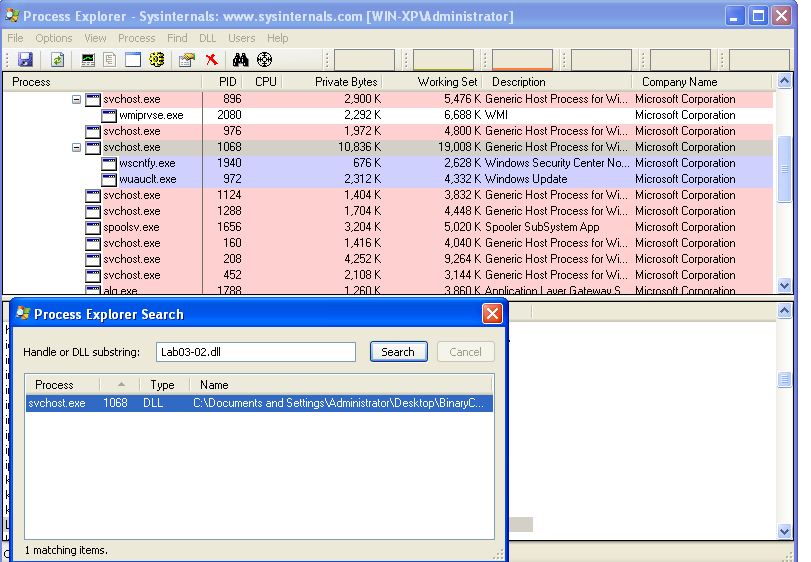 To identify the process loading the malicious DLL, we searched for Lab03‑02.dll in Process Explorer. As expected, it was loaded by an svchost.exe instance. This is useful because it gives us the PID we would need for filtering in Procmon, although in this case, Procmon did not reveal any additional meaningful activity.
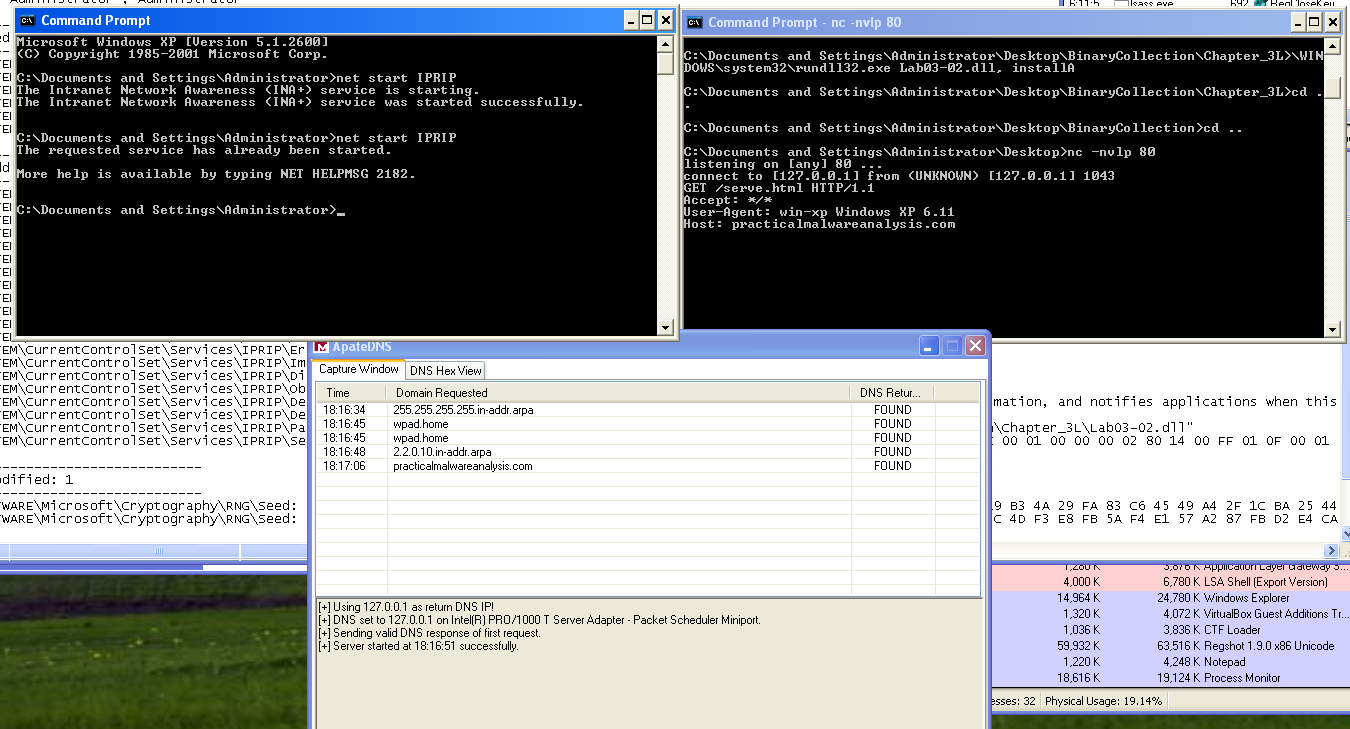 One noteworthy observation is that the malware issued an HTTP request to practicalmalwareanalysis.com to retrieve a file named serve.html. This would be useful for creating a network signature since the same request is sent every time the service is started.
Lab03-03
What do you notice when monitoring this malware with Process Explorer?
When the sample is executed, Lab03-03.exe never appears in Process Explorer, even for a moment. This strongly suggests that the program immediately transfers execution elsewhere, most likely through process replacement (a.k.a. process hollowing). The absence of any visible new process reinforces the idea that the malware injects itself into an existing process rather than running as its own.
Can you identify any live memory modifications?
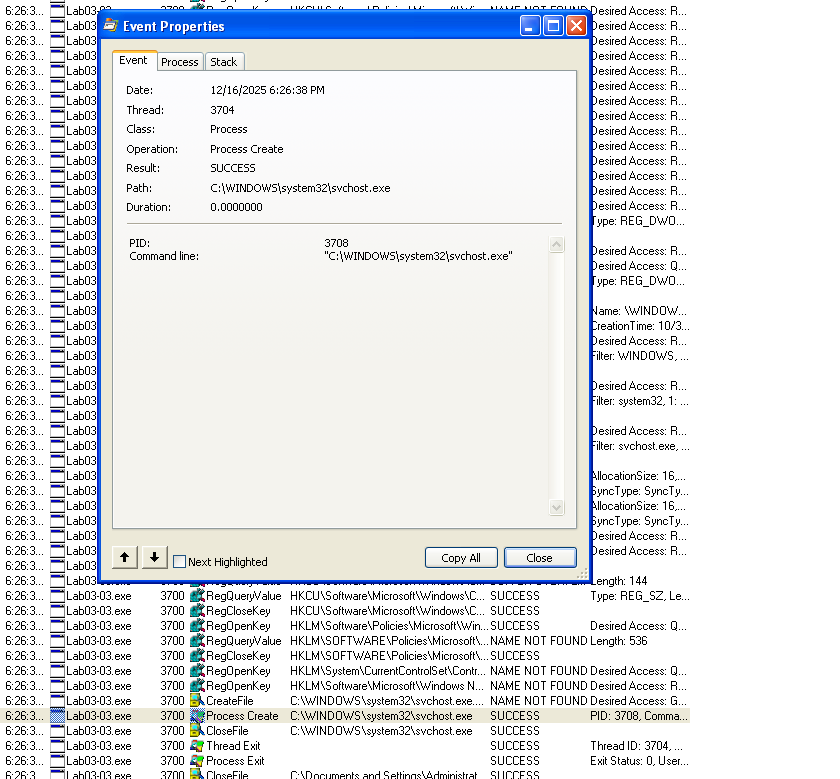 Using Process Monitor and filtering on Lab03-03.exe, we see that the malware creates a new process at: C:\WINDOWS\system32\svchost.exe
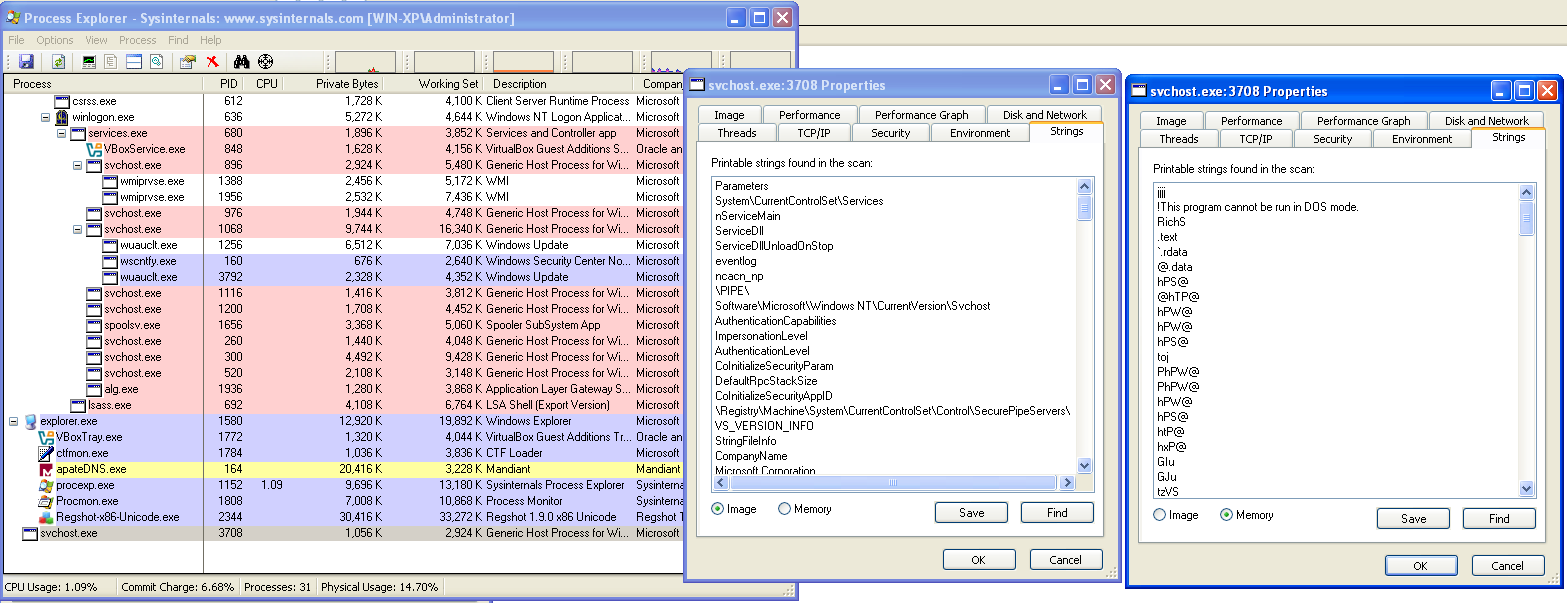
In Process Explorer, several svchost instances are normally present, but one of them appears “orphaned”, it has no parent process, which is abnormal for svchost. Its code signature verifies correctly, but comparing its in-memory image to the file on disk shows that they do not match, confirming that the process has been **hollowed out and replaced with the malware’s code.
What are the malware’s host-based indicators?
Process Monitor also shows that the malware creates a new file in its execution directory. Navigating there reveals: practicalmalwareanalysis.log
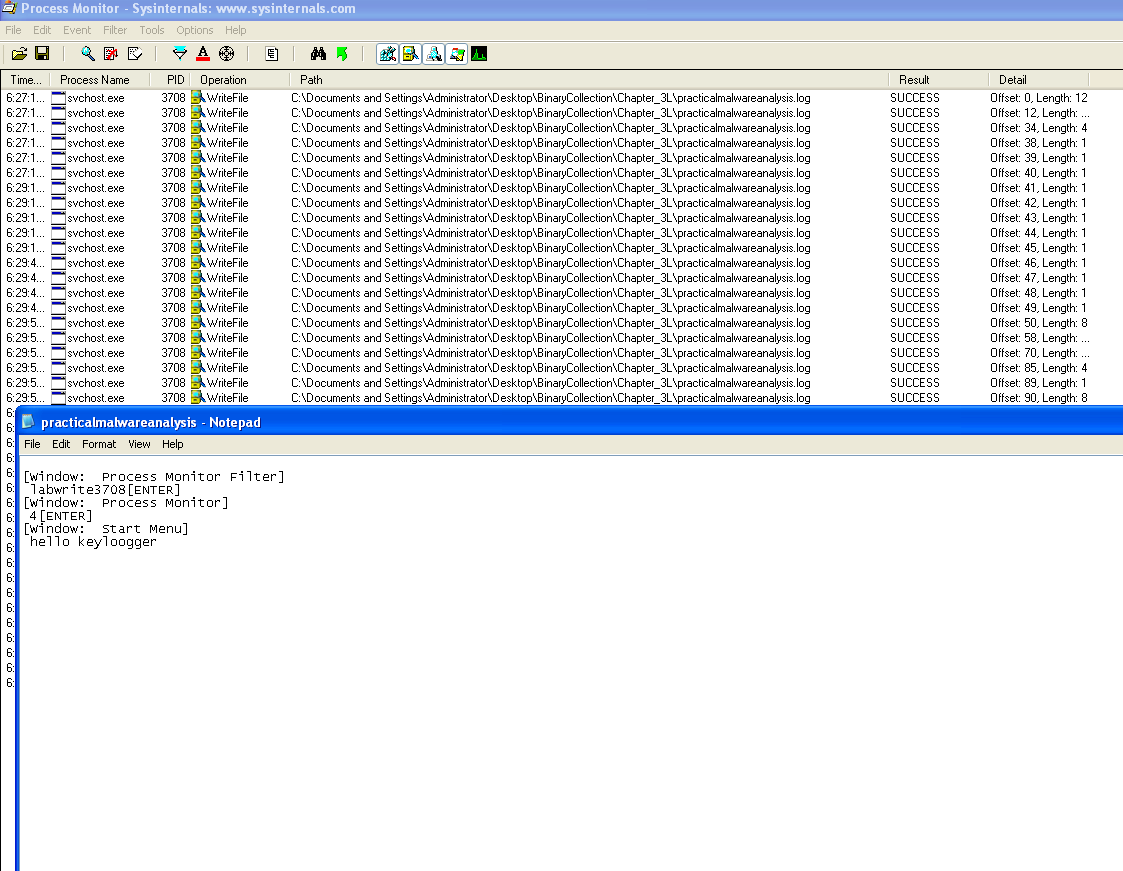 Opening this file shows it contains every keystroke typed while the malware was running, making it an explicit indicator of compromise.
What is the purpose of this program?
The evidence confirms that the malware uses process hollowing to replace a legitimate svchost.exe process and then functions as a keylogger, capturing and logging all user keystrokes to a file, although no external network communication has been observerved.
Lab03-04
What happens when you run this file?
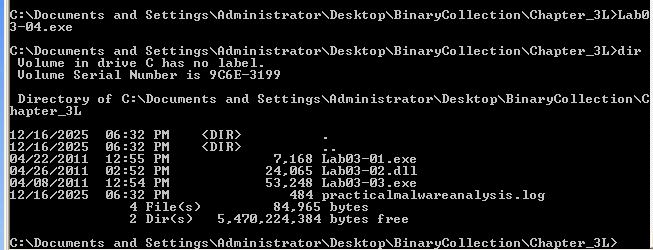 The binary deletes itself, as evident by the procmon cmd process that the malware created to run the command
"C:\WINDOWS\system32\cmd.exe" /c del C:\DOCUME~1\Admin\Desktop\PRACTI~1\BINARY~1\CH9F95~1\Lab03-04.exe >> NULOther than that, the malware did nothing, suggesting that certain conditions must be first met for it to run, maybe a certain parent process name, command-line arguments, presence of another file… Further analysis is required