lab11
Lab 11-1
What does the malware drop to disk? How does the malware achieve persistence?
To identify the initial footprint, I monitored the malware’s execution using Procmon and compared system states with Regshot. While the execution was relatively quiet, generating only 55 events, the WriteFile operations were highly significant.
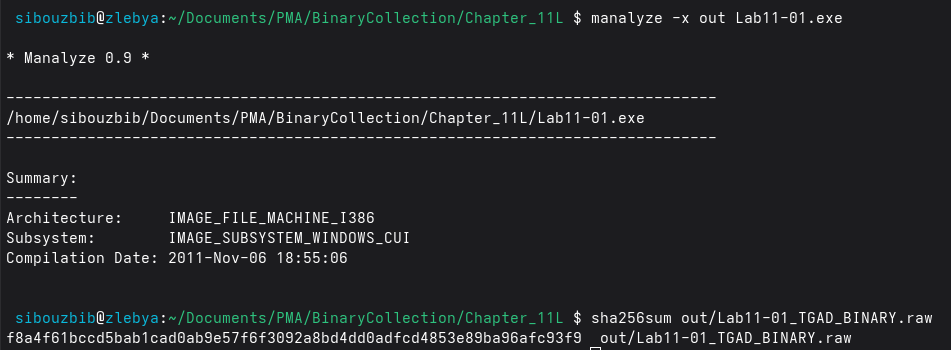
The malware wrote twice to a single file at “C:\Documents and Settings\sibou\Desktop\BinaryCollection\Chapter_11L\msgina32.dll”. The first write was 4096 bytes and the second 2560 bytes, totaling 6656 bytes, with the SHA-256 Hash f8a4f61bccd5bab1cad0ab9e57f6f3092a8bd4dd0adfcd4853e89ba96afc93f9.
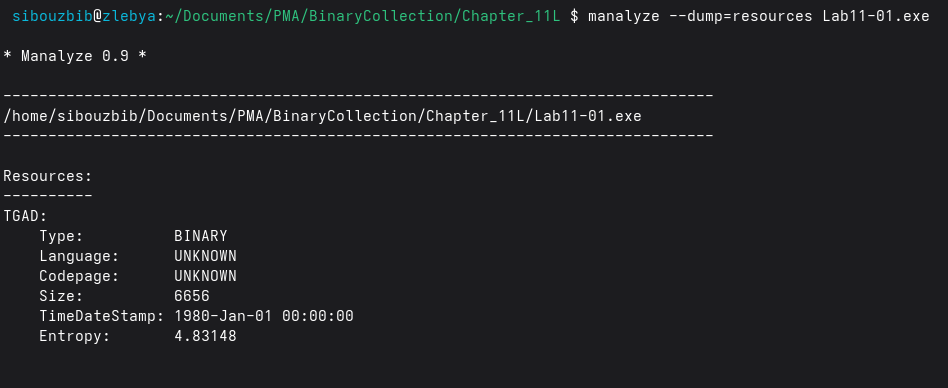
Now if we go back and statically analyse the exe file, we find out that its resources section only contains one entry; “TGAD” with the size 6656. Exactly the same size written to the disk. So since it was probably dumped as is, without decompression whatsoever, we can just dump this TGAD and analyse it later on.
Another event worth mentioning is setting the reg value of HKLM\SOFTWARE\Microsoft\Windows NT\CurrentVersion\Winlogon\GinaDLL with the value of the full path of this newly dropped dll. By hijacking the GinaDLL value, the malware ensures that Winlogon.exe loads the malicious DLL during the boot process, allowing it to run with SYSTEM privileges before any user even authenticates. Regshot confirmed this was the only significant registry change aside from standard Windows noise.
How does the malware steal user credentials?
At this stage, reverse engineering is required. We begin by analyzing the executable component.
The first portion of the main function is responsible for extracting a DLL embedded in the executable’s resource section. The malware first retrieves its own module handle by calling GetModuleHandleA with a ModuleName parameter of 0. This handle is then passed to sub_401080, which locates the embedded resource using FindResource, specifying “TGAD” as the resource name and “binary” as its type.
Once the resource is found, the malware uses _fopen and _fwrite to dump it to disk as the observed DLL file. After successfully writing the file, it prints “DR\n” to the console.
Returning to main, the executable performs string manipulation to construct the full path of the dropped DLL. It then calls sub_401000, which is responsible for creating a new registry value to establish persistence. Once this is done, the executable prints “DI\n” to the console and terminates: its role is complete.
With the executable fully analyzed, we move on to the DLL. As expected, nearly all exported functions follow the Wlx naming convention, consistent with a GINA replacement DLL. Most of these functions are short and appear to exist solely to satisfy the required interface, so instead of analyzing each individually, I focused on identifying their common behavior.
Every exported function invokes sub_10001000, passing the name of the exported function as an argument. This strongly suggests that the malware forwards calls to the original GINA implementation to avoid destabilizing the system. Inside this function, GetProcAddress is called using a global variable named hLibModule as the module handle.
Initially, hLibModule appears uninitialized (all zeros). Cross-referencing reveals that it is populated at runtime within DllMain:
push    esi
mov     esi, [esp+20Ch+hinstDLL]
push    esi             ; hLibModule
call    ds:DisableThreadLibraryCalls
lea     eax, [esp+20Ch+Buffer]
push    104h            ; uSize
push    eax             ; lpBuffer
mov     hModule, esi
call    ds:GetSystemDirectoryW
lea     ecx, [esp+20Ch+Buffer]
push    offset String2  ; "\\MSGina"
push    ecx             ; lpString1
call    ds:lstrcatW
lea     edx, [esp+20Ch+Buffer]
push    edx             ; lpLibFileName
call    ds:LoadLibraryW
xor     ecx, ecx
mov     hLibModule, eax
This code dynamically loads the legitimate MSGina.dll and stores its handle in hLibModule. As a result, whenever one of the malware’s exported functions is invoked, it can execute its own code and then forward the call to the corresponding legitimate GINA export.
For most exports, the malware simply forwards the call and returns the result without any modification. However, one function behaves differently: WlxLoggedOutSAS.
Unlike the other exports, WlxLoggedOutSAS does not immediately jump to the original function. Instead, it saves a pointer to the original function, allocates space for the stack arguments, and invokes it using a call instruction rather than a jmp. This design allows the malware to inspect both the user’s input and the authentication result returned by GINA, making it responsible for stack cleanup.
After the API call returns, the malware checks whether authentication was successful. If so, it parses data stored in the ESI register. Earlier in the code, ESI was assigned a pointer to the pNprNotifyInfo parameter, which corresponds to the PWLX_MPR_NOTIFY_INFO structure.
Rather than manually matching structure offsets, I imported the ntapi type library into IDA and applied the PWLX_MPR_NOTIFY_INFO type directly to the relevant registers.
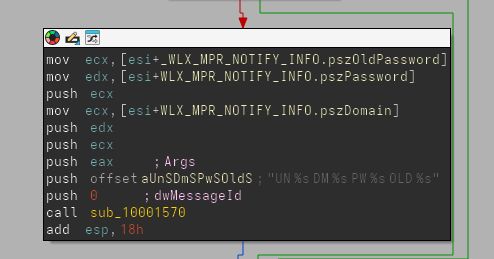
As shown, the structure provides access to:
- The username
- The old password
- The new (current) password
- The domain name used for authentication
For example:
mov eax, [esi+WLX_MPR_NOTIFY_INFO.pszUserName]Here, IDA correctly identifies eax as pointing to the username field. With these values extracted, the malware calls sub_10001570.
What does the malware do with stolen credentials? How can you use this malware to get user credentials from your test environment?
The function sub_10001570 is straightforward. It opens (or creates) a file named msutil32.sys in append mode (“a”), retrieves the current system date and time, and writes the captured credentials to the file.
To confirm this behavior, I rebooted the virtual machine. On startup, I was presented with an unusual login prompt, visually identical to the Windows XP credential dialog, but one that had not appeared previously.
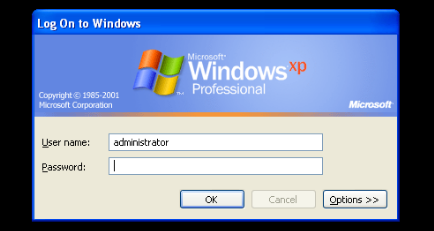
After logging in, I searched for the output file. Because the malware does not specify a full path when opening the file, it is created in the DLL’s working directory. Since GINA runs from System32, the file was located there.
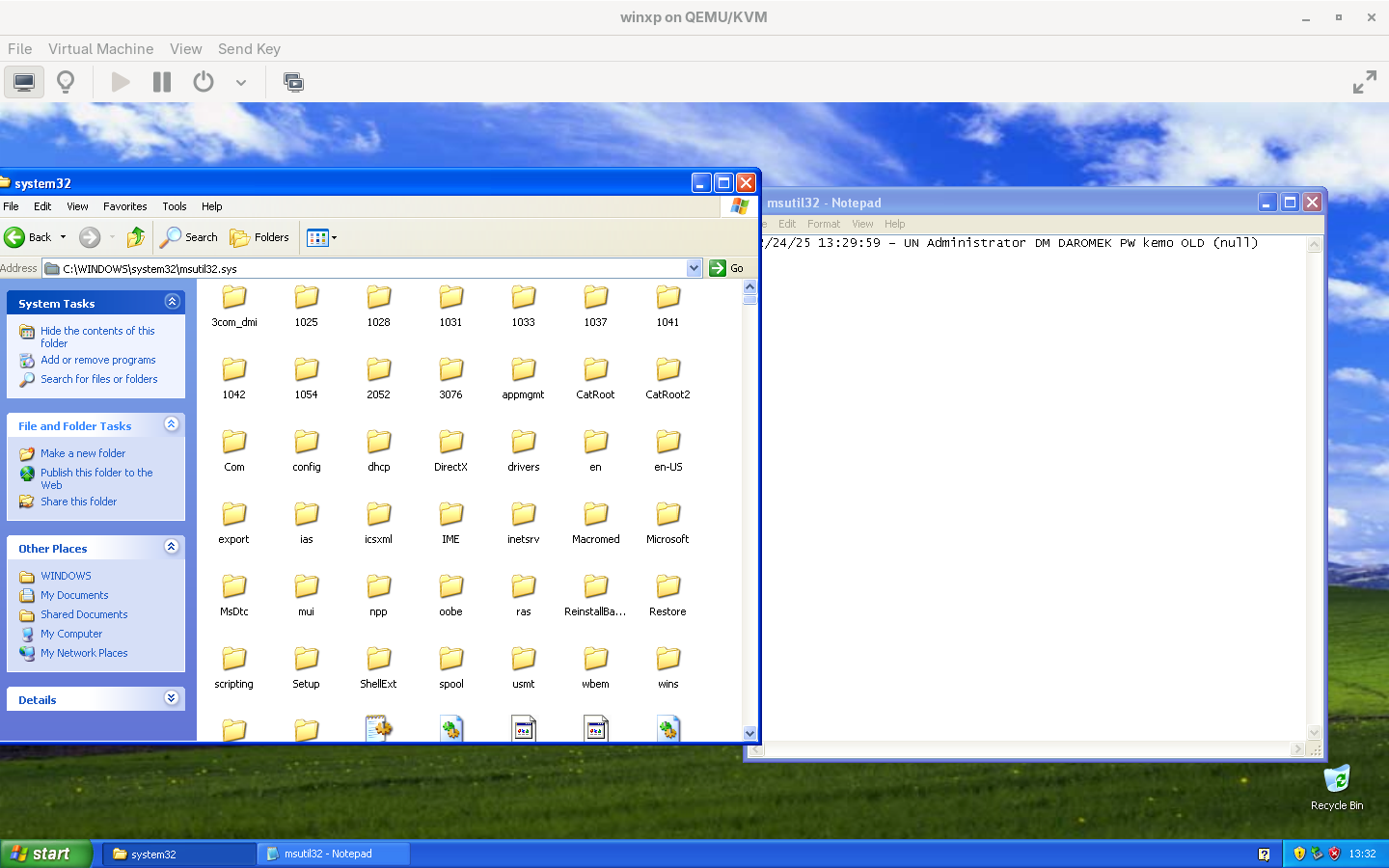
Opening msutil32.sys with a standard text editor confirmed that my credentials had been logged successfully.
In summary, this malware replaces the legitimate GINA DLL with a malicious proxy. While forwarding most authentication-related calls to the original MSGina.dll, it intercepts the WlxLoggedOutSAS function to capture user credentials during a successful login. These credentials are then silently written to a local file in the System32 directory, allowing the attacker to harvest usernames, passwords, and domains without disrupting normal system behavior.
Lab 11-2
What are the exports for this DLL malware?
This malware exposes only a single export: an installer function. However, the imported functions referenced by the DLL suggest directory traversal and file‑writing capabilities. APIs such as GetCurrentProcessId and CopyFile indicate self‑installation behavior and potential persistence mechanisms. Additionally, the presence of several registry‑related functions suggests attempts at persistence and system configuration tampering.
Although no direct cryptographic or network‑related imports are observed, the presence of LoadLibrary implies runtime dynamic linking. This is further corroborated by embedded strings such as wsock32.dll and send, which appear in the string dump and indicate potential networking capabilities loaded at runtime.
What happens after you attempt to install this malware using rundll32.exe? How is this malware installed for persistence?
When attempting to install the DLL using its exported installer function, a registry modification is observed. Specifically, the following value is set:
HKLM\SOFTWARE\Microsoft\Windows NT\CurrentVersion\Windows\AppInit_DLLs = "spoolvxx32.dll"Notably, the original DLL does not carry this name. By monitoring file system activity with Procmon during execution of rundll32.exe, only a single file‑write event is detected. A DLL is written to the System32 directory, and its file size matches that of the original sample. This confirms that the malware copies itself into System32 while renaming itself to spoolvxx32.dll.
The AppInit_DLLs registry value is a well-known persistence mechanism in Windows because it instructs the operating system to automatically load the specified DLL into every process that links against User32.dll, which includes the vast majority of graphical user interface (GUI) applications. By injecting itself this way, the malware ensures it survives system reboots and remains active without needing to run as a standalone executable or rely on startup folders, making it stealthier and harder to detect through basic process monitoring.
Although no additional malicious activity is immediately observed, this persistence mechanism is not characteristic of legitimate software. As a result, further analysis is required to fully understand the malware’s behavior.
Where must Lab11-02.ini reside in order for the malware to install properly?
Opening the DLL in IDA reveals that the installer function does not initially appear to perform any checks that would cause execution to fail due to missing dependencies. The function sets the registry key:
SOFTWARE\Microsoft\Windows NT\CurrentVersion\Windows\AppInit_DLLsto reference spoolvxx32.dll. It then invokes a function that calls GetSystemDirectory, which consistently returns C:\Windows\System32 on Windows XP systems.
The destination path is subsequently constructed as C:\Windows\System32\spoolvxx32.dll.
At this point, CopyFile is invoked, with the source path stored in a global variable named ExistingFileName. Initially, IDA misinterprets this variable as a single byte due to the presence of a null byte followed by zeroed memory, indicating runtime initialization. To simplify analysis, the variable was redefined as a 260‑character string.
Since DllMain is always executed when the DLL is loaded, its analysis becomes critical for understanding why the installer initially appeared to fail and how ExistingFileName is populated.
Within DllMain, the function pushes the global buffer along with the module handle and calls GetModuleFileName, storing the full DLL path in ExistingFileName. This behavior was confirmed by attaching rundll32.exe to a debugger and configuring it to call the installer export “C:\Windows\SysWOW64\rundll32.exe” C:\Users\sibouzbib\Desktop\Lab11-02.dll installer
Because the DLL is not loaded at process startup, a breakpoint must be set on DLL load. Once hit, the DLL’s memory becomes accessible. Breaking immediately after GetModuleFileName confirms that the global buffer contains the full path of the original DLL. This path is later used by the installer function to copy the DLL into System32 for persistence.
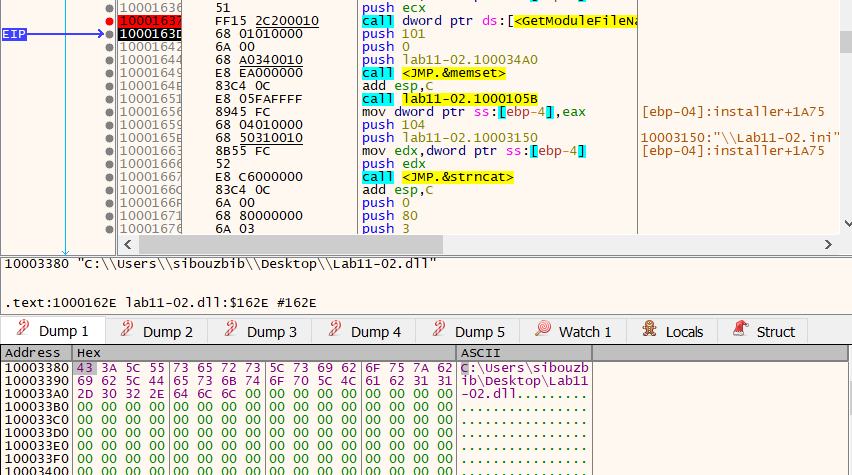
Later, the malware calls GetSystemDirectory again and constructs the path C:\Windows\System32\Lab11-02.ini
It then attempts to open this file using CreateFile. If the file does not exist, execution terminates immediately, explaining why the installer previously exited without completing installation.
What user-space rootkit technique does this malware employ?
To further understand the malware, we begin by examining what it does with the INI file. After reading the file’s contents into a buffer, a function is called to transform that data. At this stage, the purpose of this transformation is not immediately clear. It could be a configuration parser, an obfuscation routine, or some form of decoding. To clarify this behavior, a practical approach is to load the DLL into a debugger and inspect the buffer before and after the function call.
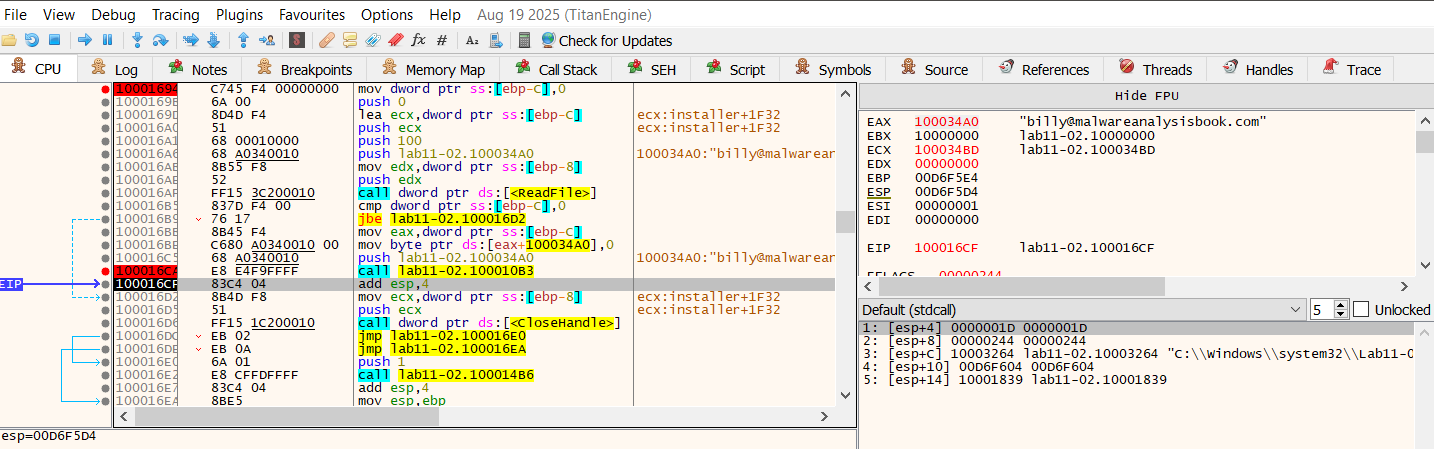
As expected, this turns out to be a simple decryption routine, which produces the string: billy@malwareanalysisbook.com
This value is stored in a global buffer, and then the function sub_100014B6 is called. This function retrieves the name of the executable that loaded the DLL, converts it to uppercase, and performs several comparisons against known process names.
If the hosting process name does not match THEBAT.EXE, OUTLOOK.EXE, or MSIMN.EXE, the function returns without taking further action. If there is a match, execution continues, indicating that the malware is selectively activating based on the hosting process.
If there’s a match, this part is executed:
call    sub_100013BD
push    offset email ; int
push    offset sub_1000113D ; int
push    offset aSend    ; "send"
push    offset ModuleName ; "wsock32.dll"
call    sub_100012A3
add     esp, 10h
call    sub_10001499
When the process name matches one of the targeted mail clients, the malware first calls sub_100013BD. This function retrieves the current process ID and passes it to sub_100012FE. Inside this function, the malware dynamically resolves the address of OpenThread from kernel32.dll, rather than linking to it statically.
Using CreateToolhelp32Snapshot, the malware enumerates all threads in the system. For each thread, it checks whether:
- The thread belongs to the current process, and
- The thread ID differs from the currently executing thread
When both conditions are satisfied, the thread is opened and suspended via SuspendThread.
At this point, it is not yet clear what will be modified, but suspending peer threads strongly suggests that code or data shared by multiple threads is about to be altered, and the malware is attempting to avoid race conditions or crashes during that modification.
After thread suspension, execution proceeds to sub_100012A3. This function receives four parameters:
- A module name (wsock32.dll)
- A function name (send)
- The address of another internal function
- A pointer to a writable buffer
The function attempts to obtain a module handle for wsock32.dll, loading it if necessary, and then resolves the address of the exported function send() using GetProcAddress.
At this stage, the malware has dynamically obtained a pointer to a widely used network API function, which strongly indicates that network traffic is a target of interest.
Once the address is resolved, it is passed along with the additional parameters to sub_10001203, where more complex memory manipulation occurs.
Inside sub_10001203, the malware first computes a value derived from the difference between two addresses: the resolved send() address and the address of the internal function passed earlier. A constant value of 5 is subtracted from this result. At this point, the exact meaning of this calculation is unclear, but the repeated use of the value 5 strongly suggests it relates to instruction length.
Next, the malware calls VirtualProtect to change the memory protection of the first five bytes of send() to PAGE_EXECUTE_READWRITE. This confirms that executable code is about to be modified.
The malware then allocates a small heap buffer and copies the original first five bytes of send() into it. This is followed by writing a byte value of 0xE9 into the buffer, which corresponds to the opcode for a relative jump instruction on x86 systems. Immediately after, a calculated offset is written, forming a valid jump instruction.
At this point, the allocated buffer contains executable code that begins with the original instructions from send() and then transfers execution elsewhere. Although the destination is not yet obvious, this buffer clearly serves as a continuation point for the original function.
After preparing the buffer, the malware overwrites the first five bytes of send() itself. These bytes are replaced with the same 0xE9 jump opcode and the previously calculated offset.
Because x86 relative jumps compute their destination from the address immediately following the jump instruction, the earlier subtraction of 5 now becomes meaningful: it ensures that execution lands exactly at the intended target.
Once the overwrite is complete, the original memory protection is restored.
At runtime, any call to send() will now be redirected to the internal function passed earlier. The original bytes of send() are no longer at the entry point, but they have not been lost; they exist in the allocated buffer prepared earlier.
The internal function reached through this redirection (sub_1000113D) uses the same calling convention and parameters as send(). Because execution reaches it via a jump rather than a call, the stack layout remains unchanged, allowing it to safely access the original arguments.
This function examines the outgoing buffer and checks whether it contains the substring “RCPT TO:”. This indicates that the function is interpreting the data at a protocol level, rather than treating it as opaque network traffic.
When this condition is met, the function constructs a new SMTP command using the previously decrypted mail address. It then invokes the executable buffer created earlier, which executes the original instructions of send() and resumes execution inside the real function.
After this additional transmission, the function restores the original parameters and invokes the same executable buffer again, allowing the original data to be sent normally.
At this point can we conclude that the malware implements a user‑space inline hooking technique using a trampoline. This allows it to intercept and manipulate network traffic in selected processes without disrupting normal functionality.
This behavior is consistent with a user‑mode rootkit mechanism, where standard API behavior is transparently altered to observe or modify application activity while remaining concealed from the user and the application itself.
Once loaded into a compatible process, such as targeted email clients like Outlook or The Bat, the malware’s code executes during DLL initialization, checking the host process name and, if it matches, dynamically hooking the send function from wsock32.dll using an inline hooking technique with a trampoline. This alteration redirects network calls to the malware’s custom function, allowing it to intercept and duplicate outgoing emails before resuming normal execution. As a result, every time a new GUI process starts and loads User32.dll, the malicious DLL is injected anew, ensuring the hook is reapplied and the credential-stealing or data-exfiltration behavior persists across sessions without user awareness.
How can you dynamically capture this malware’s activity with Wireshark?
To observe the malware’s behavior in practice, I used my Fedora host to set up an SMTP sink on port 2525 (avoiding port 25 to bypass privilege restrictions) using the smtp-sink utility. I then launched Outlook Express inside the virtual machine and configured a local mail account, with the QEMU‑bridged interface acting as the SMTP server on port 2525.
With Wireshark running on the host, I filtered for traffic matching tcp.port == 2525 on the virbr0 interface. When sending a test email, the capture revealed that the message was transmitted twice.
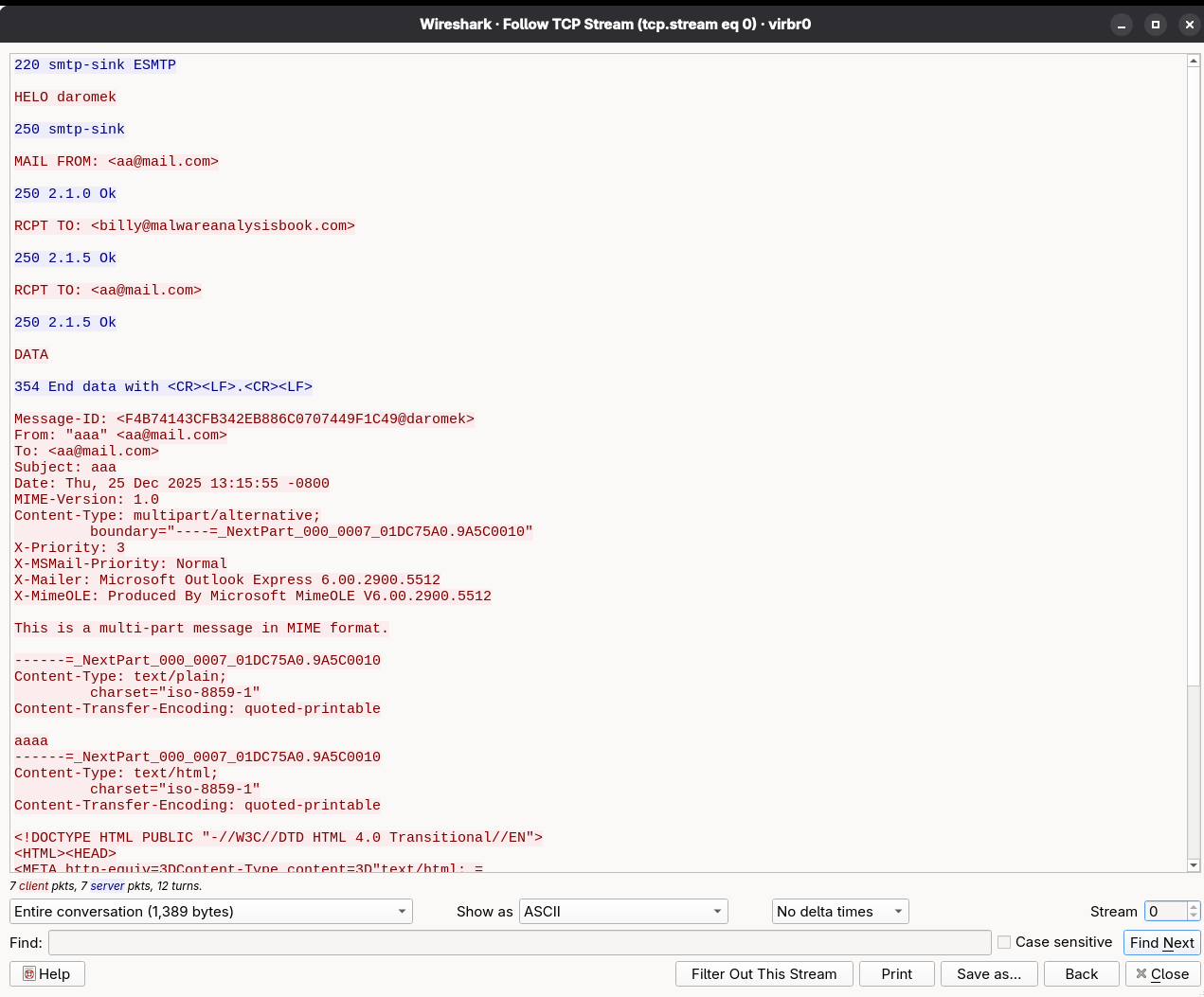
Analysis of the SMTP traffic shows that the email is first sent to an attacker‑controlled address and then forwarded to the intended recipient. This behavior confirms that the malware hooks into the mail‑sending process, effectively implementing a mail‑sniffing and exfiltration mechanism at the DLL level.
Lab 11-3
What interesting analysis leads can you discover using basic static analysis?
A first pass over the imports of Lab11-03.dll immediately highlights user-interaction surveillance behavior. The DLL imports GetAsyncKeyState, a classic API for polling keyboard state, along with GetForegroundWindow and GetWindowTextA, which allow the program to determine which window currently has focus and extract its title. Together, these APIs strongly suggest that the DLL records not only keystrokes, but also the application context in which the keys are typed.
This is reinforced by file-handling imports that provide all the primitives required to maintain a persistent log file. The presence of CreateThread indicates that the logging routine is likely executed asynchronously in the background so it does not block the main program flow.
The lack of obvious networking imports suggests local logging only; however, because functions such as LoadLibraryA and GetProcAddress are present, additional runtime behavior could still be resolved dynamically and requires further analysis.
The DLL’s strings further reinforce these behavioral hints. It contains references to system-looking filenames such as kernel64x.dll and the suspicious path C:\WINDOWS\System32\kernel64x.dll, which mimics legitimate Windows naming conventions. This indicates an attempt at camouflage so the dropped file blends into the system directory.
Another notable observation is the exported function zzz69806582, which is clearly obfuscated and warrants deeper inspection.
Turning to Lab11-03.exe, the imports show a different role. APIs such as CopyFileA, CreateFileMappingA, MapViewOfFile, and UnmapViewOfFile indicate that the executable manipulates files at a low level, which is typical of droppers or installers.
The strings inside the EXE provide strong clues about installation and persistence. It references Lab11-03.dll, C:\WINDOWS\System32\inet_epar32.dll, and a command string net start cisvc. The use of C:\WINDOWS\System32\%s implies formatted construction of system paths. The inclusion of net start cisvc is particularly revealing.
CiSvc stands for Content Indexing Service (Windows Indexing Service), a legacy Windows service used primarily on older systems (e.g., Windows 2000/XP) to build an index of file contents for fast searching.
Technically, CiSvc scans files, extracts text and metadata, and stores the information in a catalog. It supports multiple file formats through filter handlers and persistent handlers, which explains its interaction with registry areas.
From a malware perspective, CiSvc is interesting because it loads DLLs and runs as a trusted system service. Malware can abuse it by forcing it to start, placing a malicious DLL where it expects a handler, or hiding execution inside a legitimate service so nothing looks suspicious in Task Manager.
What happens when you run this malware?
When executed, the most important observable behavior is that the malware activates and abuses the Windows Indexing Service (CiSvc) to establish persistence and prepare the environment for its payload.
From the Regshot output, the largest structural change is the creation of multiple registry keys under:
HKLM\SYSTEM\CurrentControlSet\Enum\Root\LEGACY_CISVC
HKLM\SYSTEM\CurrentControlSet\Services\CiSvc\Enum
and the same paths under ControlSet001. These entries are created when a service is installed or started. Values such as “Service”: “CiSvc”, “DeviceDesc”: “Indexing Service”, and “ActiveService”: “CiSvc” indicate that the malware explicitly starts or reinstates the Indexing Service. This directly matches the earlier static string net start cisvc found in the EXE, confirming that the program launches the service at runtime. This is not normal behavior for a simple application and shows that the malware manipulates system services for execution and persistence.
The most notable Procmon event is the creation of inet_epar32.dll. Its size exactly matches Lab11-03.dll, indicating the DLL is simply copied into System32 under a misleading name for persistence and concealment.
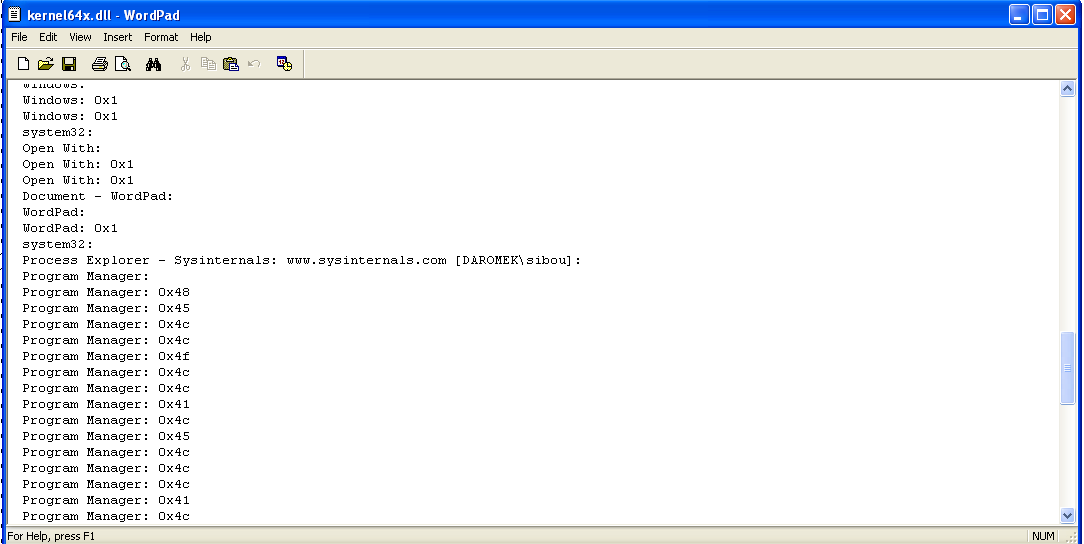
From static analysis, we also infer that kernel64x.dll is created in System32. Since none of the Lab processes write it directly, the activity appears to be performed by cisvc.exe. Filtering file-write operations for that process confirms that kernel64x.dll is written multiple times.
Viewing this file confirms the keylogging suspicion. The log captures user activity on the system, including window titles and keystrokes. It records which applications are in the foreground (e.g., Process Monitor, Regshot, Notepad, Explorer) and logs key events as hex values. The repeated entries show focus changes and keyboard input being collected. In short, the malware logs what windows you use and what keys you type, implementing basic activity and keystroke monitoring.
How does Lab11-03.exe persistently install Lab11-03.dll? Which Windows system file does the malware infect?
First, the dropper copies the DLL into System32 using a misleading name:
push    offset NewFileName      ; "C:\\WINDOWS\\System32\\inet_epar32.dll"
push    offset ExistingFileName ; "Lab11-03.dll"
call    ds:CopyFileA
It then builds the string C:\WINDOWS\System32\cisvc.exe and passes it to sub_401070. This function opens the system file and uses APIs such as CreateFileMappingA to map it into memory instead of writing directly.
Using this mapping, the code parses the PE headers and passes the section table and number of sections to another routine. A key snippet is:
push    offset aText    ; ".text"
mov     edx, [ebp+lp]
push    edx            ; String1
call    __strcmpi
This searches for the .text section of cisvc.exe and returns its address, preparing the file for code injection.
After mapping the file and locating the .text section, the routine does four main things:
- Verifies there is enough unused space in .text for the patch.
- Calculates where the patch will be written inside the file.
- Fixes a placeholder constant inside the patch stub.
- Copies the patch stub into the file and updates the PE entry point.
First, the function ensures that the PE has a valid entry point and that the .text section is large enough to hold the injected stub.
mov     edx, [ebp+var_24]
cmp     dword ptr [edx+28h], 0      ; AddressOfEntryPoint == 0?
jnz     short loc_4011AA
Offset +0x28 from the NT headers is OptionalHeader.AddressOfEntryPoint. If it is zero, the function aborts because there is no valid place to return to after the patch runs.
Next, it checks the raw size of .text:
mov     eax, [ebp+var_14]
cmp     dword ptr [eax+10h], 13Ah   ; SizeOfRawData <= 0x13A?
ja      short loc_4011BE
Offset +0x10 in an IMAGE_SECTION_HEADER is SizeOfRawData. The code requires at least 0x13A bytes available.
Then it verifies there is slack space between the virtual size and raw size:
mov     ecx, [ebp+var_14]
mov     edx, [ebp+var_14]
mov     eax, [ecx+10h]             ; SizeOfRawData
sub     eax, [edx+8]               ; - VirtualSize
mov     [ebp+var_1C], eax
cmp     [ebp+var_1C], 13Ah
jnb     short loc_4011DE
Here, [+8] is VirtualSize. The subtraction computes unused bytes at the end of .text. If less than 0x13A, the patch cannot fit.
So at this point, the code has confirmed there is a code cave large enough to hold the injected stub. Once the space is validated, the exact file offset for injection is calculated.
mov     ecx, [ebp+var_14]
mov     edx, [ecx+14h]             ; PointerToRawData
mov     eax, [ebp+var_14]
add     edx, [eax+8]               ; + VirtualSize
mov     [ebp+var_28], edx
Offset +0x14 is PointerToRawData. Adding VirtualSize gives: injectOffset = PointerToRawData + VirtualSize
This is the position inside the file where the stub will be written, immediately after the real .text code, inside unused space.
The injected stub lives in dword_409030. Before writing it into the file, the code scans it for a special constant that needs to be fixed up.
cmp     [ebp+var_20], 13Ah
jnb     short loc_40127C
This loop runs for 0x13A bytes. Inside the loop, it looks for the pattern 0x12345678:
mov     al, byte ptr dword_409030[edx]
cmp     eax, 78h        ; 'x'
jnz     short loc_401277

mov     dl, byte ptr (dword_409030+1)[ecx]
cmp     edx, 56h        ; 'V'
jnz     short loc_401277

mov     cl, byte ptr (dword_409030+2)[eax]
cmp     ecx, 34h        ; '4'
jnz     short loc_401277

mov     al, byte ptr (dword_409030+3)[edx]
cmp     eax, 12h
jnz     short loc_401277
Those bytes represent the placeholder. This value is meant to be replaced with a correct relative displacement for a jump instruction inside the stub. When the placeholder is found, the code computes a relative offset so the stub can jump back to the program’s original entry point.
mov     ecx, [ebp+var_24]
mov     edx, [ecx+28h]         ; AddressOfEntryPoint

mov     eax, [ebp+var_14]
add     edx, [eax+14h]         ; + PointerToRawData

mov     ecx, [ebp+var_24]
sub     edx, [ecx+2Ch]         ; - ImageBase
This converts the original entry point from RVA into a file-relative position. Next, it adjusts for where the instruction lives inside the injected stub:
mov     eax, [ebp+var_20]
mov     ecx, [ebp+var_28]
lea     eax, [ecx+eax+4]
sub     edx, eax
mov     [ebp+var_30], edx
That implements the x86 relative jump formula: rel = target - (current + 4)
Finally, the placeholder is overwritten:
mov     ecx, [ebp+var_20]
mov     edx, [ebp+var_30]
mov     dword_409030[ecx], edx
So the stub now contains a valid trampoline back to the original code. With the stub fixed, the code copies it into the mapped file at the injection offset.
mov     edi, [ebp+lpBaseAddress]
add     edi, [ebp+var_28]

mov     ecx, 4Eh
mov     esi, offset dword_409030
rep movsd
movsw
This is equivalent to:
memcpy(base + injectOffset, stub, 0x13A);So the patch code is now physically written into the .text section of the file. Finally, the PE header is modified so execution begins at the injected stub.
mov     eax, [ebp+var_14]
mov     ecx, [ebp+var_28]
sub     ecx, [eax+14h]

mov     edx, [ebp+var_24]
add     ecx, [edx+2Ch]

mov     eax, [ebp+var_24]
mov     [eax+28h], ecx
This computes: newEntry = injectOffset - PointerToRawData + ImageBase, and writes it to: OptionalHeader.AddressOfEntryPoint
From now on, when the program starts, Windows jumps into the injected stub instead of the original code.
Because the file was memory-mapped, no explicit write is needed. When cleanup happens:
call    CloseHandle
call    CloseHandle
call    UnmapViewOfFile
the modified pages are flushed and the patched executable is saved on disk.
At a high level, the injected block performs dynamic API resolution without normal Windows imports, a technique used to hide behavior:
- sub_40903E hashes strings by rotating a value and adding each byte.
- sub_40905F walks the PE export table and resolves functions by comparing hashes instead of names.
- sub_4090BC retrieves module base addresses from the PEB using fs:[30h], avoiding GetModuleHandle.
- sub_4090DD combines these routines to resolve multiple APIs dynamically and store them as function pointers.
Instead of importing functions normally, the malware reconstructs them at runtime. This hides API usage from static analysis and signature-based detection.
After the resolver completes, the executable dynamically resolves the exported function zzz69806582 from inet_epar32.dll using hashing and PE parsing rather than normal imports. The EXE then jumps into inet_epar32.dll!zzz69806582, making the DLL the real payload. The EXE therefore acts primarily as a loader, while the DLL contains the malicious functionality.
What does Lab11-03.dll do? Where does the malware store the data it collects?
The exported function zzz69806582 is the main entry point. It begins by creating a new thread with CreateThread, whose start address points to the DLL’s logging routine.
This thread creates the file C:\WINDOWS\System32\kernel64x.dll and repeatedly calls an internal routine,sub_10001030, that captures both keystrokes and the active window context. The routine queries the foreground window, retrieves its title, polls the keyboard state, formats the data, and appends it to the log file.
In short:
- Purpose: User activity and keystroke logging.
- Collected data: Window titles + keyboard input.
- Storage location:
C:\WINDOWS\System32\kernel64x.dll (used as a disguised log file).
This makes Lab11-03 a basic but stealthy keylogger with service-based persistence and loader-style installation.