network-security-and-traffic-encryption
7.1. vulnerability assessment
In the initial development phase of our Distributed Anomaly Detection System, we focused primarily on agent logic and mobility. However, a critical security audit of the network traffic revealed a significant vulnerability: JADE (Java Agent Development Framework) communicates in Clear Text by default.
Although our simulation environment (GNS3) represents a “trusted” Local Area Network (LAN), relying on the perimeter firewall is insufficient in modern cybersecurity standards (Zero Trust Architecture). An attacker who gains access to a single switch port or compromises a router could perform a Man-in-the-Middle (MitM) attack.
7.1.1 Evidence of Vulnerability
To verify this, we deployed Wireshark on the central switch interface to capture traffic between the CentralAgent and AL-1.
Observation: As illustrated in Figure 7.1, the JADE Inter-Platform Message Transport Protocol (IMTP) transmits Java serialized objects and ACL Messages without any encryption.
- Metric Leakage: The CPU and Network usage stats are visible.
- Command Leakage: Crucially, the “Scout Reports” containing process lists and the “Kill Orders” containing process names are readable.
- Mobility Risk: The serialized bytecode of the Mobile Agent itself is visible, allowing an attacker to potentially inject malicious bytecode during transit.
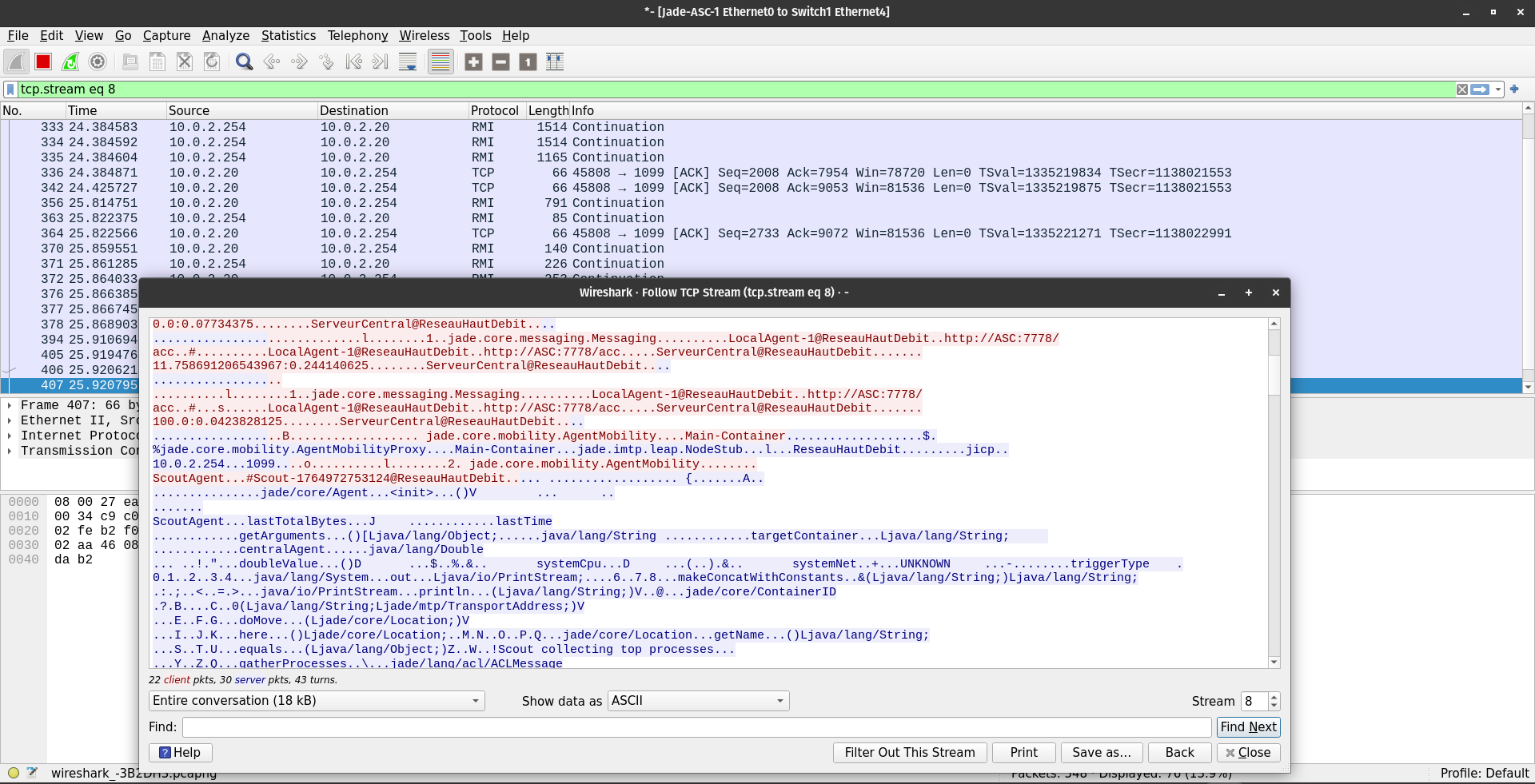
Figure 7.1: Wireshark capture of plaintext ACL messages.
7.2. native JADE security (SSL/TLS)
Our first approach was to utilize the native security features provided by the JADE framework, specifically the Secure Socket Layer (SSL) support for the RMI (Remote Method Invocation) registry.
7.2.1 Configuration Attempt
We followed the official JADE Administrator’s Guide to enable the IMTP over SSL.
- Keystore Generation:
keytool -genkey -alias jade -keyalg RSA -keystore jadeStore -storepass 123456 - Platform Configuration (main.properties): We created a properties file to enforce SSL on the main container.
jade_core_messaging_MessageManager_poolsize=10 jade_core_messaging_MessageManager_delivery_service=jade.core.messaging.TopicBasedMsgDelivery imtp=jade.imtp.leap.JICP.JICPIMTPManager connection=jade.imtp.leap.JICP.BifectionalConnection - Launch Command:
java -cp libs/jade.jar:libs/commons-codec.jar jade.Boot -gui -conf main.properties
7.2.2 Failure Analysis
Outcome: Failed. Despite multiple configuration attempts, the platform failed to initialize.
- Deprecation: The SSL implementation in JADE 4.6 relies on older Java security libraries that have been deprecated in OpenJDK 11/17 (which are standard on Ubuntu 22.04).
- Documentation Gap: The documentation for “S-JADE” (Secure JADE) has not been actively maintained since 2013, leading to “Class Not Found” errors regarding jade.security packages that are no longer included in the standard distribution.
- Complexity: Debugging the RMI SSL handshake failures proved extremely difficult due to cryptic Java stack traces.
7.3. application-layer encryption
Following the failure of the transport layer security, we attempted to implement encryption directly within the Agent code (LocalAgent.java).
7.3.1 Implementation logic
We modified the sendMetrics() method to encrypt the payload string (CPU/RAM data) using AES-256 before wrapping it in the ACL Message.
Code Modification:
// LocalAgent.java
SecretKeySpec secretKey = new SecretKeySpec(myKey, "AES");
Cipher cipher = Cipher.getInstance("AES");
cipher.init(Cipher.ENCRYPT_MODE, secretKey);
String encryptedContent = Base64.getEncoder().encodeToString(cipher.doFinal(plainContent.getBytes()));
msg.setContent(encryptedContent);
7.3.2 Failure Analysis
Outcome: Functionally Working but Insecure.
- Header Leakage: While the content (metrics) was hidden, the ACL Message Headers (Sender, Receiver, Ontology, Performative) remained in plaintext. An attacker could still map the network topology.
- Replay Attacks: This method did not protect against replay attacks. An attacker could capture an encrypted “High CPU” message and replay it 1000 times to flood the Central Server, triggering false alarms.
- Overhead: The Mobile Agent mechanism became problematic. Since the Mobile Agent is executable code, encrypting the agent class itself would require rewriting the JADE ClassLoader, which is infeasible.
7.4. reverse proxy tunneling
We attempted to tunnel the traffic through standard web proxies, assuming JADE used simple HTTP-like sockets.
7.4.1 Configuration Attempt
We installed Stunnel on both the Client and Server to wrap the traffic in TLS. Stunnel Configuration (stunnel.conf):
[jade-imtp]
accept = 1099
connect = 127.0.0.1:1099
cert = /etc/stunnel/stunnel.pem
7.4.2 Failure Analysis
Outcome: Failed. The architecture of JADE’s communication protocol proved incompatible with standard point-to-point proxies like Stunnel or Nginx due to its reliance on Java RMI (Remote Method Invocation).
- Dynamic Port Allocation: Unlike a web server that listens on a single static port (e.g., 443), JADE uses a dual-port architecture. The main RMI Registry listens on a known port (default 1099) for initial lookups, but the actual data transmission between Agent Containers occurs on ephemeral ports (randomly assigned by the OS, typically in the 30000-60000 range). Stunnel cannot predict which port the JADE container will choose next, making it impossible to statically map the tunnel.
- Protocol Mismatch: Stunnel expects a persistent 1-to-1 stream. JADE’s “Split-Container” execution mode often opens multiple concurrent, bidirectional socket connections for different agents. Stunnel would successfully encrypt the initial handshake on port 1099, but when the agents attempted to open a secondary direct socket for high-speed message passing, the connection would bypass the tunnel entirely (failing security) or be blocked by the firewall (failing connectivity).
7.5. SSH reverse tunneling
We utilized the existing SSH access to create encrypted tunnels between the nodes, leveraging the -L (Local Forward) and -R (Remote Forward) capabilities of OpenSSH.
7.5.1 Configuration Attempt
On the Client Node (AL-1), we established a tunnel to the Central Server (ASC).
# Forward local port 7778 to remote 7778
ssh -L 7778:localhost:7778 -R 1099:localhost:1099 user@10.0.2.254 -N -f
7.5.2 Failure Analysis
Outcome: Abandoned due to Performance and Instability.
- CPU Overhead: Encapsulating Java serialization traffic inside SSH caused a massive CPU spike on the sshd process, often exceeding the resource usage of the JADE agents themselves. This is because SSH encrypts data in the user space (context switching) rather than the kernel space, which is inefficient for high-throughput messaging.
- The “TCP-over-TCP Meltdown”: We encountered a classic networking phenomenon known as TCP Meltdown. JADE uses TCP for reliable delivery. SSH also uses TCP. When we encapsulate JADE’s TCP packets inside the SSH TCP tunnel:
- If a single packet is dropped on the physical network, the inner TCP (JADE) detects a loss and waits.
- Simultaneously, the outer TCP (SSH) detects the loss and retransmits.
- This creates a feedback loop of retransmissions and “Head-of-Line Blocking,” causing erratic latency spikes (Jitter).
- Result: The JADE Platform uses strict keep-alive heartbeats. The latency spikes caused by the tunnel were interpreted by the Main Container as a “Node Failure,” causing it to constantly disconnect and reconnect the Local Agents, rendering the system unstable.
7.6. wireguard VPN (final approach)
After evaluating the failures of Application (Java), Transport (SSL), and Session (SSH) layer attempts, we concluded that Network Layer encryption was the only viable solution. We selected WireGuard, a modern, kernel-space VPN protocol.
7.6.1 Why WireGuard?
- Transparency: JADE agents interact with the network interface (wg0) exactly as they would with eth0. No code changes were required in Java.
- UDP Transport: Unlike SSH, WireGuard uses UDP, avoiding the TCP-over-TCP meltdown problem.
- Kernel Performance: WireGuard runs inside the Linux kernel, offering lower latency and CPU usage than userspace alternatives like OpenVPN.
7.6.2 Implementation Steps
Step 1: Installation (All Nodes)
sudo apt update
sudo apt install wireguard -y
Step 2: Key Generation (All Nodes)
# Generate Private and Public keys
wg genkey | tee privatekey | wg pubkey > publickey
Step 3: Central Server Configuration (ASC) File: /etc/wireguard/wg0.conf
[Interface]
Address = 10.100.0.1/24
SaveConfig = true
ListenPort = 51820
PrivateKey = <ASC_PRIVATE_KEY>

[Peer] # Peer AL-1
PublicKey = <AL1_PUBLIC_KEY>
AllowedIPs = 10.100.0.2/32
Step 4: Client Configuration (AL-1) File: /etc/wireguard/wg0.conf
[Interface]
Address = 10.100.0.2/24
PrivateKey = <AL1_PRIVATE_KEY>

[Peer] # Server ASC
PublicKey = <ASC_PUBLIC_KEY>
Endpoint = 192.168.122.254:51820 # Physical IP
AllowedIPs = 10.100.0.0/24
PersistentKeepalive = 25
Step 5: Activation
sudo wg-quick up wg0Step 6: Verification We verify the secure tunnel status and connectivity.
# Check tunnel status
sudo wg show

# Ping the virtual IP of the server
ping 10.100.0.1
Step 7: JADE Interface Binding (Critical) By default, JADE binds to the first available interface. To enforce encryption, we must explicitly bind the agents to the WireGuard Virtual IP (10.100.0.x).
# On Central Server (ASC)
java -cp libs/jade.jar:libs/commons-codec.jar jade.Boot -gui -host 10.100.0.1 -name MyPlatform

# On Client (AL-1)
java -cp libs/jade.jar:libs/commons-codec.jar jade.Boot -container -host 10.100.0.1 -agents AL1:LocalAgent
7.6.3 Results and Validation
Once the VPN was established and JADE was re-bound to the wg0 interface, we performed a final security audit using Wireshark.
Validation Observations:
- Protocol: Wireshark now identifies 100% of the traffic as WireGuard protocol (UDP Port 51820).
- Payload Obfuscation: The “Data” field of every packet is encrypted noise. Neither the JVM headers, the ACL Message content, nor the Mobile Agent bytecode are visible.
- Mobility Success: The ScoutAgent successfully migrated from 10.100.0.1 to 10.100.0.2, gathered data, and returned, all while completely invisible to the packet sniffer on the physical switch.
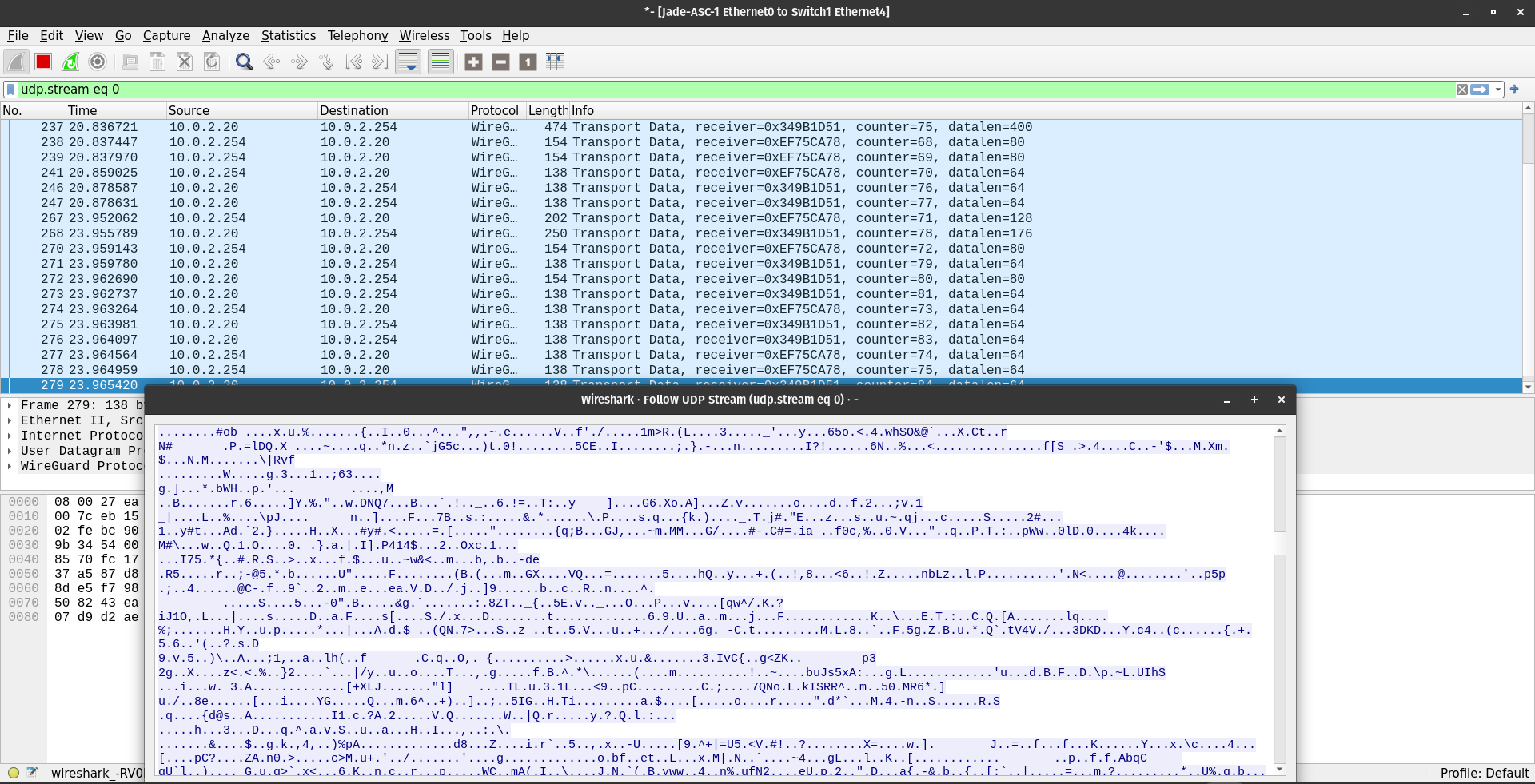
Figure 7.2: capture showing encrypted WireGuard traffic.
7.6.4 Summary
The decision to adopt WireGuard over application-level fixes provided three distinct architectural advantages that exceed even a theoretical success with native JADE SSL:
- Total Stack Obfuscation: Native JADE SSL only encrypts the RMI payload. An attacker could still see the TCP headers and traffic patterns (e.g., detecting a burst of traffic every 5 seconds). WireGuard encrypts the entire IP packet, masking even the traffic volume to a degree (padding).
- Code Transparency & Agent Agnosticism: Application-layer encryption (Iteration 2) required modifying LocalAgent.java to encrypt strings. This implies that every future agent developer must manually implement encryption libraries. With WireGuard, encryption is transparent. The Java code sends clear text to 10.100.0.1, and the Kernel handles the cryptography. This drastically reduces development time and bugs.
- Resilience to “TCP Meltdown”: Unlike SSH Tunnels (TCP-over-TCP), WireGuard utilizes UDP. If a packet is dropped, WireGuard does not attempt a retransmission storm that conflicts with JADE’s own TCP reliability mechanisms. This resulted in a stable heartbeat signal even under high network load simulation (iperf3 tests), solving the instability issues encountered in Iteration 4.