network-architecture-and-simulation
3.1. Simulation environment (GNS3)
The experimental validation of our multi-agent architecture was conducted on the GNS3 (Graphical Network Simulator-3) platform. This environment allowed us to emulate real network hardware (Cisco IOS) in conjunction with virtual machines (VirtualBox), providing a test framework faithful to a production deployment.
The topology consists of the following elements:
- 1 Edge Router (Gateway): A Cisco router acting as the default gateway and NAT firewall.
- 1 Ethernet Switch: Ensures Layer 2 connectivity for the internal LAN.
- 4 Ubuntu Server Virtual Machines: Hosting our system agents (1 Central Server Agent and 3 Local/Client Agents).
3.2. Addressing plan and logical topology
The network is segmented into two distinct zones to isolate monitoring traffic from the external network while allowing Internet access for updates and remote administration.
| Equipment | Role | Interface | IP Address | Zone |
|---|---|---|---|---|
| Cisco Router | Gateway / NAT | Eth0/0 | DHCP (ex: 192.168.122.23) | WAN / Outside |
| Cisco Router | Gateway LAN | Eth1/0 | 10.0.2.1/24 | LAN / Inside |
| Server VM (ASC) | Central Agent | enp0s3 | 10.0.2.254/24 | LAN |
| Client VM 1 | Local Agent | enp0s3 | 10.0.2.20/24 | LAN |
| Client VM 2 | Local Agent | enp0s3 | 10.0.2.50/24 | LAN |
| Client VM 3 | Local Agent | enp0s3 | 10.0.2.60/24 | LAN |
3.3. Cisco router configuration
3.3.1. Interface configuration
The external interface (Ethernet0/0) obtains its address dynamically via the GNS3 NAT node, simulating a standard ISP connection. The internal interface (FastEthernet1/0) acts as the default gateway for the 10.0.2.0/24 subnet.
! WAN Interface Configuration (To GNS3 NAT/Internet)
interface FastEthernet0/0
 ip address dhcp
 ip nat outside
 no shutdown
!
! LAN Interface Configuration (To Switch)
interface FastEthernet1/0
 ip address 10.0.2.1 255.255.255.0
 ip nat inside
 no shutdown
3.3.2. Rationale for double NAT
A technical peculiarity of this simulation lies in the use of NAT on the Cisco router, even though the GNS3 “Cloud NAT” node already performs translation.
Problem: The GNS3 NAT node bridges to the host network and lacks routes to 10.0.2.0/24.
Solution: NAT overload (PAT) on the Cisco router.
- The Cisco router replaces the source address 10.0.2.x with its WAN address (e.g., 192.168.122.23).
- The external network (and GNS3 NAT) only sees the address 192.168.122.23 and knows how to reply to it.
- The Cisco router maintains a translation table to forward responses back to the correct VMs.
! Definition of traffic allowed to be NATed
access-list 1 permit 10.0.2.0 0.0.0.255

! Activation of NAT Overload (Outbound to Internet)
ip nat inside source list 1 interface FastEthernet0/0 overload
3.3.3. Remote accessibility: port forwarding (static NAT)
To administer the Ubuntu servers located in the private LAN from the host machine (or externally), we configured static “Port Forwarding”. This redirects specific ports on the router’s WAN interface to port 22 (SSH) of each internal VM.
Applied Cisco Configuration:
! Redirection for Central Server Agent (Port 2222 -> 10.0.2.254:22)
ip nat inside source static tcp 10.0.2.254 22 interface Ethernet0/0 2222

! Redirection for Client Agent 1 (Port 2220 -> 10.0.2.20:22)
ip nat inside source static tcp 10.0.2.20 22 interface Ethernet0/0 2220

! Redirection for Client Agent 2 (Port 2250 -> 10.0.2.50:22)
ip nat inside source static tcp 10.0.2.50 22 interface Ethernet0/0 2250

! Redirection for Client Agent 3 (Port 2260 -> 10.0.2.60:22)
ip nat inside source static tcp 10.0.2.60 22 interface Ethernet0/0 2260
This configuration allows us to access the machines via simplified SSH commands, targeting the router’s single IP but using distinct ports:
- Access ASC: ssh -X -p 2222 sibo@192.168.122.23 (The -X option enables X11 forwarding for JADE graphs).
- Access Agents: ssh -p 2220 sibo@192.168.122.23, etc.
3.3.4. Configuration validation
Before proceeding with the deployment of JADE agents, it is imperative to validate network connectivity and address translation rules.
Topology Visualization:
The figure below presents the final state of the network simulated in GNS3, integrating the edge router, the switch, and the four interconnected virtual machines.
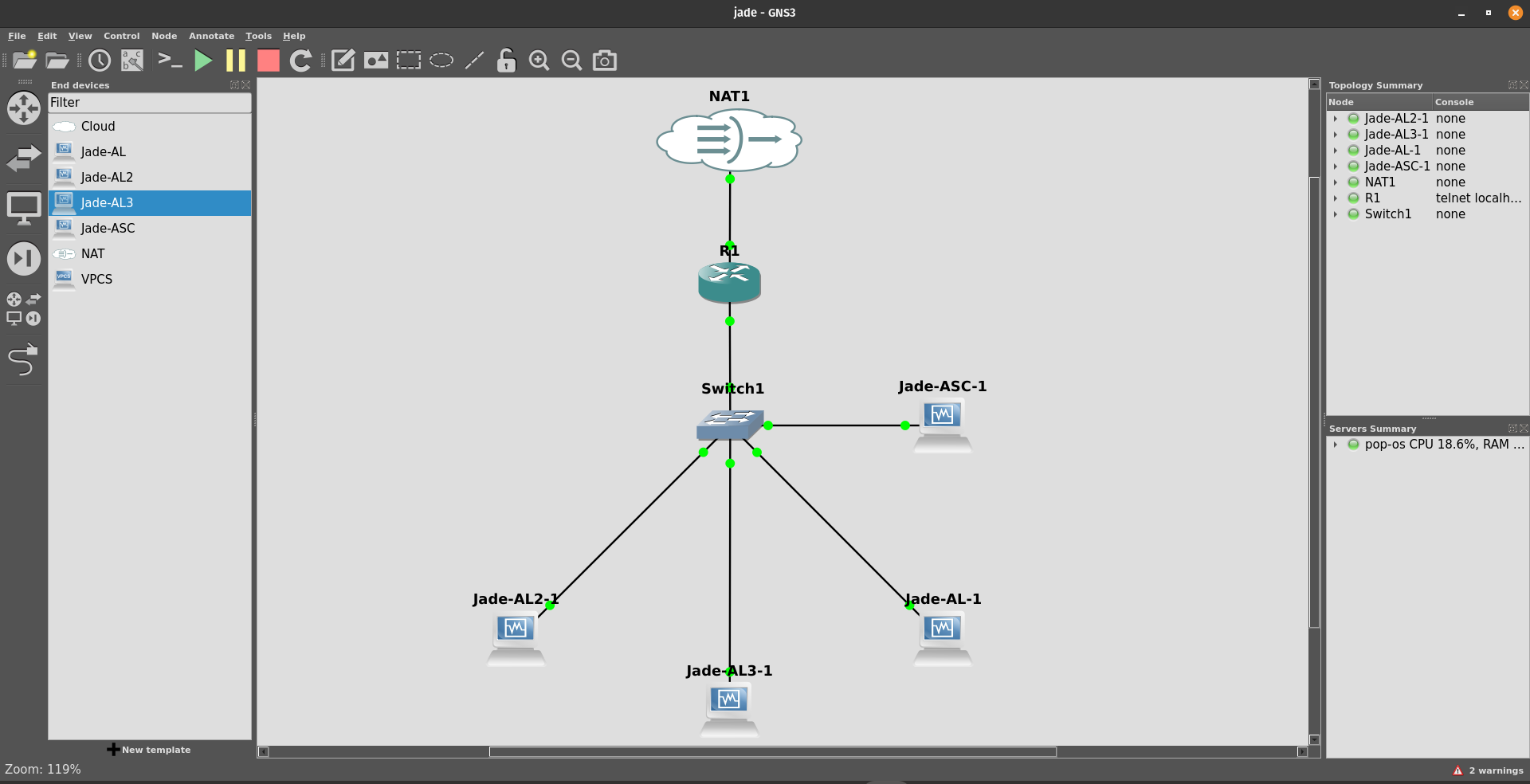
Figure 3.1: final topology in GNS3.
Internet Connectivity Test (NAT Outbound):
First, we verified connectivity to the external network (Internet) to confirm the proper functioning of NAT on the Cisco router. The test was performed via a ping command from a client node to an external address.
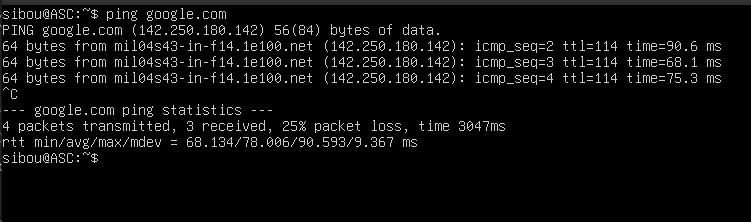
Figure 3.2: connectivity test (Ping) validating Internet access from an agent.
SSH Accessibility Test (NAT Inbound):
Next, we validated the remote accessibility of the agents via the previously configured Port Forwarding rules. The following capture illustrates a successful SSH connection to the Central Server Agent (ASC) by targeting port 2222 of the router.
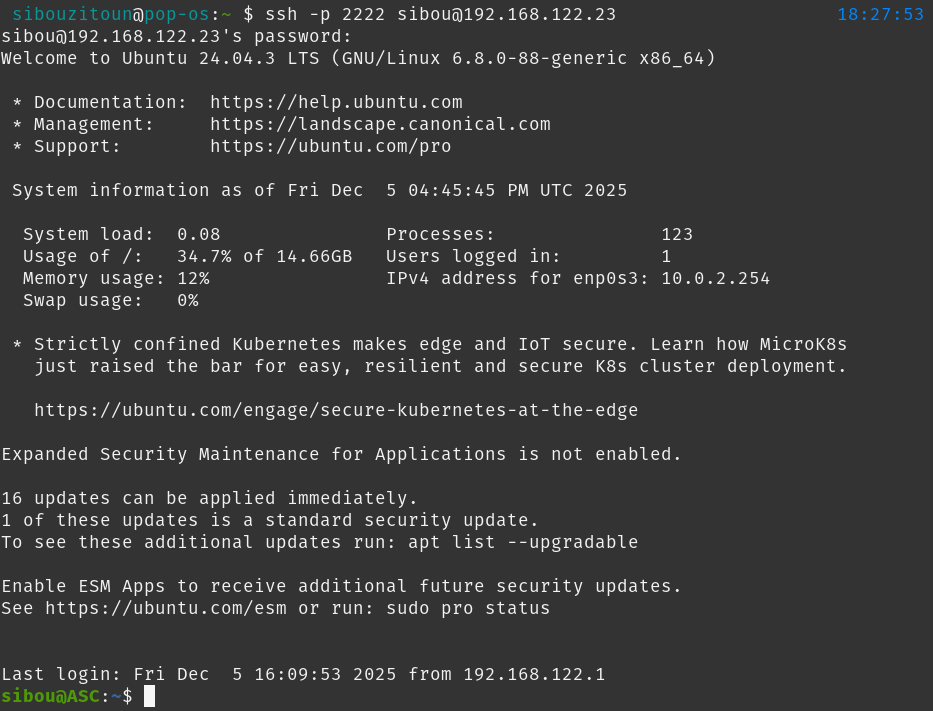
Figure 3.3: successful remote SSH connection to the ASC.
3.4. Hostname configuration and navigation
To simplify the administration and management of the agent network, we opted for meaningful hostnames instead of relying solely on IP addresses. This improves clarity when deploying agents, reading logs, and executing SSH commands.
We updated the hostname of each machine and configured the /etc/hosts file on all nodes to allow local name resolution.
Configuration applied:
- ASC: Agent Serveur Central (10.0.2.254)
- AL-1: Agent Local 1 (10.0.2.20)
- AL-2: Agent Local 2 (10.0.2.50)
- AL-3: Agent Local 3 (10.0.2.60)
Implementation commands:
On each Ubuntu VM, we executed the following commands:
# 1. Set the hostname (Example for ASC)
sudo hostnamectl set-hostname ASC

# 2. Update /etc/hosts for local resolution
echo "10.0.2.254 ASC" | sudo tee -a /etc/hosts
echo "10.0.2.20  AL-1" | sudo tee -a /etc/hosts
echo "10.0.2.50  AL-2" | sudo tee -a /etc/hosts
echo "10.0.2.60  AL-3" | sudo tee -a /etc/hosts
This configuration ensures that JADE agents can be deployed using simplified container names (e.g., -host ASC) and facilitates network diagnostics (e.g., ping AL-1 from the central server).